

Assyst - Tests and Exams
Assyst - Tests and Exams is made and published by Denis Butko. AppBrain is an independent app data site and isn't affiliated with Denis Butko. The app name, icon, screenshots and description belong to Denis Butko and are shown as published on the App Store.
AppBrain's verdict
Top 10- Rating on App Store
- 4.40
- 20 ratings
- Last updated
- October 27, 2026
- Size
- 110.7 MB
It doesn't have enough ratings yet to judge what users think. Its best ranking is #4 in Top Paid, Education in India.
User feedback
Ratings and reviews on the App StoreComments on Assyst - Tests and Exams for iOS
We don't have enough comments to show example comments. Please check back later.
Store listing
By Denis Butko, from the App Store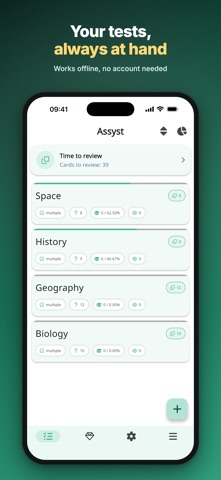


Description by Denis Butko Written by the developer, not by AppBrain. Click to read.
Over a million installs. In development since 2018, the app is translated into dozens of languages and works with files from the Assist desktop program.
How to add a test
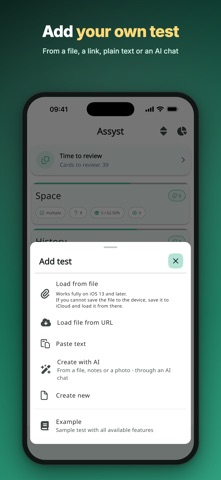
- Open a qst, qsz or qsze file from your device, by a link or straight from a messenger or email
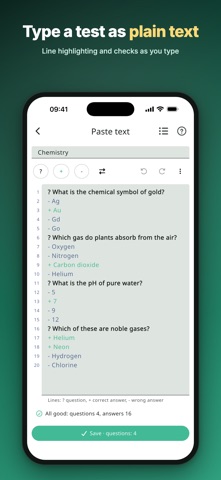
- Paste or type a test as text: a question starts with ?, a correct answer with +, a wrong one with -. The text editor checks it as you type and suggests fixes, shows the structure and a preview, and saves your draft automatically
- For lecture notes, a PDF, a Word document or a photo of a page there is a ready prompt: send it to an AI chat with your material and paste the answer into the text editor
- Build a test from scratch in the editor or start from an example
Three modes
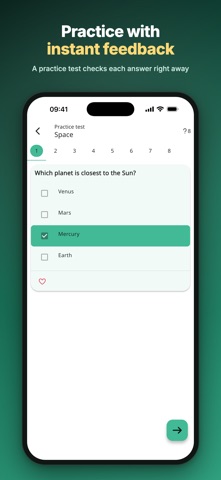
- Practice test: each answer is checked right away, followed by a hint if the question has one
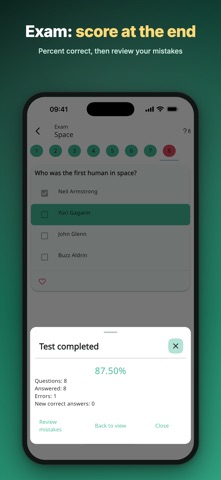
- Exam: you see the result only at the end
- Flashcards: the question is on the front, the answer on the back. Recall it, flip the card and mark "I know" or "Don't know" with a swipe or a button; the last mark can be undone. The "Study unknown" deck collects the cards you haven't learned yet, and the "Time to review" banner above the test list reminds you to come back to what you studied
Before you start, pick the questions: all, random, a range, only unanswered, favorites or by category. Shuffle questions and answers and set a time limit. Each filter shows how many questions match it, and the button shows how many go into the session. If none are left, the app tells you which filter to reset. You can also start one session on several tests at once.
After a session
- The number of errors and new correct answers
- Review mistakes: retake only the questions you didn't answer correctly
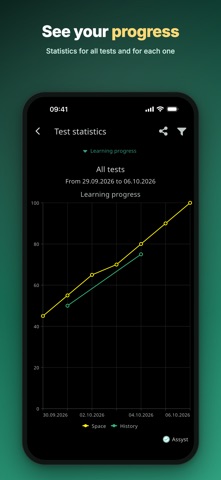
- Charts: learning progress, attempts per day and by test, passed and failed attempts
- Learning progress for each test in the list: the number and percentage of correct answers, with sorting by progress
View, create and share
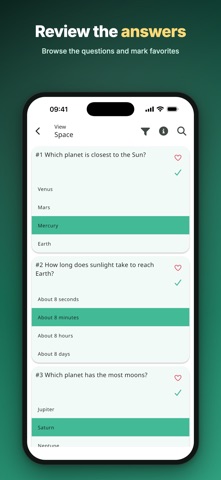
- View a test with all answers or only the correct ones, with search, filters and favorite questions
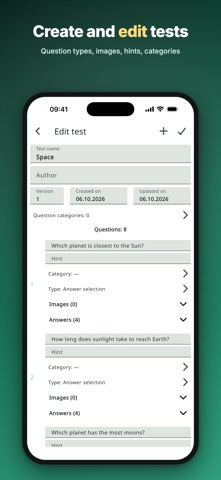
- Six question types: answer selection with one or more correct answers, answer ordering, entering the correct answer as text or a number, and fill in the blanks by typing or choosing
- Question categories, hints, test author and version, several images per question and one per answer
- Export to qst, qsz and qsze or a ZIP archive, share via messengers and email
Who it's for
- School students and college applicants - final school exams, university entrance exams and olympiads
- University and college students - midterms, finals and tests on lectures and textbooks
- Teachers, tutors, parents and training centers - a test maker for class tests, quizzes and trivia
- Companies and HR - employee training, testing and certification, candidate assessment, occupational health and safety exams
- Doctors, lawyers, accountants and other professionals - accreditation, certification and licensing exams
- Driving schools and learner drivers - their own tests for the driving theory exam
- Language learners - words and terms on flashcards
Make it yours: light, dark or system theme, font size and the size of the "Answer / Next" button, automatic move to the next question, keeping the screen on during testing and more.
The core features don't require in-app purchases. PRO removes ads, lifts the editor limits and unlocks "Review mistakes".
Safety and technology
Found in the app by AppBrain- Price
- $0.99
- App size
- 110.7 MB
- Content rating
- Everyone
Technologies used by Assyst - Tests and Exams
Releases
Updates seen on the App Store- Version
- 4.4.5
- Launched
- November 2021
No changelog data
Alternatives
Similar apps and more from Denis ButkoAlternatives to Assyst - Tests and Exams








Also available on Google Play

Rankings
App Store top charts- Highest rank
- #4
- Chart
- Top Paid
- Education
- Country
- India
About the app and developer
About Assyst - Tests and Exams
Assyst - Tests and Exams is an education app developed by Denis Butko.
User Ratings
Assyst - Tests and Exams is rated 4.40 out of 5 stars. The rating is based on 20 ratings.
App Information
Assyst - Tests and Exams costs $0.99. The app size is 110.66 MB. The latest version available is 4.4.5. The last update was on October 27, 2026.
Technical Requirements
The app has a content rating of Everyone. The app has been available on the App Store since November 2021.
Developer information for Denis Butko
Address: