

AstroVitals
AstroVitals is made and published by MAXIMILIAN BOTEV. AppBrain is an independent app data site and isn't affiliated with MAXIMILIAN BOTEV. The app name, icon, screenshots and description belong to MAXIMILIAN BOTEV and are shown as published on the App Store.
AppBrain's verdict
New- Rating on App Store
- 3.67
- 3 ratings
- Last updated
- August 23, 2026
AstroVitals came out 80 days ago. It doesn't have enough ratings yet to judge what users think.
Rankings
App Store top chartsApp Store Rankings for AstroVitals
Competitors
Similar apps and more from MAXIMILIAN BOTEVAlternatives to AstroVitals


Releases
Updates seen on the App Store- Version
- 1.1.0
- Launched
- August 2026
No changelog data
User feedback
Ratings and reviews on the App StoreComments on AstroVitals for iOS
We don't have enough comments to show example comments. Please check back later.
Technology
Found in the app by AppBrain- Price
- Free
- App size
- 8.79 MB
- Content rating
- Everyone
Technologies used by AstroVitals
About the app and developer
About AstroVitals
AstroVitals is an utilities app developed by MAXIMILIAN BOTEV.
User Ratings
AstroVitals is rated 3.67 out of 5 stars. The rating is based on 3 ratings.
App Information
AstroVitals is freely available from the App Store. The app size is 8.79 MB. The latest version available is 1.1.0. The last update was on August 23, 2026.
Technical Requirements
The app has a content rating of Everyone. The app has been available on the App Store since August 2026.
Developer information for MAXIMILIAN BOTEV
Address:
Store listing
By MAXIMILIAN BOTEV, from the App Store

Description by MAXIMILIAN BOTEV Written by the developer, not by AppBrain. Click to read.
iPhone, iPad and Apple Watch — so you can check on the session from the couch,
the tent, or your wrist at 3 AM.
AstroVitals connects to N.I.N.A. (Nighttime Imaging 'N' Astronomy) over your
local network through the Advanced API plugin, and turns the numbers into a
dark, glanceable night-vision dashboard.
GUIDING AT A GLANCE
• Flowing RA/Dec guide graph, just like your guiding software
• Live total RMS plus session best, worst and stability score
• Peak-error and pixel-scale readouts, adjustable time window
FOCUS & IMAGE QUALITY
• Watch autofocus V-curves build point by point, live
• Best-focus position and HFR marked when the run completes
• HFR and star-count trends across every sub of the session
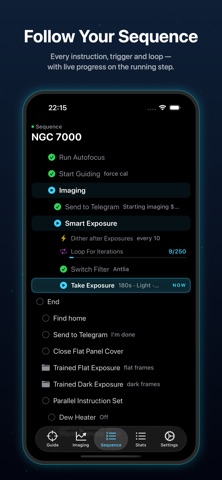
YOUR WHOLE SEQUENCE
• The full Advanced Sequencer tree — instructions, triggers, loop conditions
• The running step highlighted with live progress (87/250 exposures…)
• Values shown inline: exposure length, filter, wait-until times and more
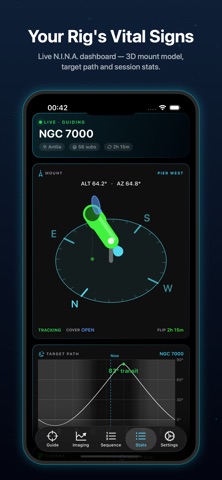
THE STATS DASHBOARD
• A live 3D model of your mount showing exactly where it points, with
meridian-flip warning colors and flat-panel cover state
• Target altitude path with transit time and astronomical darkness
• Camera cooling, ambient temperature, power draw and input voltage
• Rearrangeable tiles — drag them into your preferred layout
ON YOUR WRIST
• The full dashboard as a native Apple Watch app
• Watch-face complications: meridian-flip countdown and subs done
• iPhone home-screen and lock-screen widgets with a live flip timer
SIMPLE SETUP
• Auto-discovers your NINA machine on the local network
• Demo mode simulates a full session — try every screen without a telescope
SMART ALERTS & CONFIRMED CONTROL
• Optional alerts for worsening or recovering image quality, lost guiding and
meridian-flip progress while AstroVitals is active
• Start, pause and stop the running sequence when Allow Control is enabled
• A configurable panic plan can stop activity, park or home the mount, close a
detected flat-panel cover and disable selected power outputs
• Siri opens the review-and-slide confirmation screen; it never sends a command
by itself
Requires N.I.N.A. with the free Advanced API plugin (v2) on the same network.
AstroVitals starts in Read-only mode. Control requires explicit opt-in and
confirmation, and remains on the user's local network.
No accounts, no analytics, no data leaves your network.