

Atelier Photo Editor
Atelier Photo Editor is made and published by GYOU GI. AppBrain is an independent app data site and isn't affiliated with GYOU GI. The app name, icon, screenshots and description belong to GYOU GI and are shown as published on the App Store.
AppBrain's verdict
- Last updated
- October 30, 2026
- Size
- 17.4 MB
User feedback
Ratings and reviews on the App StoreComments on Atelier Photo Editor for iOS
We don't have enough comments to show example comments. Please check back later.
Store listing
By GYOU GI, from the App Store



Description by GYOU GI Written by the developer, not by AppBrain. Click to read.
AI-ASSISTED COMPOSITION
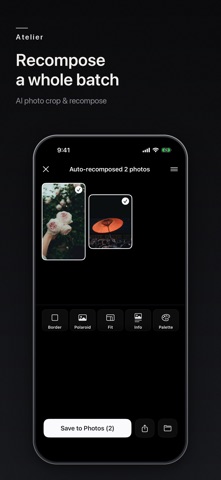
Powered by Apple's on-device Vision, Atelier reads the subject, horizon, and negative space to suggest the best crop. "AI Auto-Compose" picks the ratio and straightens the horizon in one tap. Guides for rule of thirds, golden ratio, diagonal, and golden triangle let you fine-tune by hand.
CROP & RECOMPOSE
• Free crop and a full set of ratios (1:1, 4:5, 16:9, 9:16, 2.35:1, …) plus custom
• Horizon straightening and subject-aware snapping
• Batch auto-compose for many photos at once
COLOR
• One-tap film-style filters
• Import your own .cube LUTs as custom filters
• Manual exposure, contrast, highlights, shadows, saturation, temperature, and more
• Press and hold the canvas to compare before/after
BEAUTY
• Natural skin retouch: smooth, brighten, relight
• Slim face, enlarge eyes; lipstick, blush, eyeshadow
• Faces are detected on device and only skin is affected — all offline
FRAMES
• Border (with corner radius), Polaroid, Fit, Info, and Palette frames
• Any color via a color wheel; adjustable shadow and band height
• Date stamp, caption text, or import your own logo
• Multiple type styles: standard, serif, rounded, handwriting, and more
EXPORT
• Choose format (Original / HEIC / JPEG / PNG), size, and quality
• HDR · 10-bit export for supported photos
• Multi-ratio batch export (e.g. 1:1, 4:5, 9:16 at once for social)
• Optional removal of location (GPS) metadata
PRICING
Free to download, with a 7-day full trial on first launch. After that the core stays free (cropping, all filters, basic adjustments, basic beauty, single export, AI Auto-Compose & Auto-Color, all guides, HDR). Atelier Pro (a one-time purchase — pay once, unlocked forever) unlocks custom ratios & sizes, advanced color (saturation, effects), advanced beauty (reshape & makeup), advanced frames (Polaroid, Fit, Info, Palette, custom color, logo), .cube LUT import, GPS removal, and batch export — Pro effects are previewable, and the purchase removes the watermark and lets you export.
PRIVACY
Fully offline. Zero data collection, no ads, no tracking. Your photos stay on your device.
For iPhone and iPad (iOS 18 and later). iPhone is portrait; on iPad in landscape the controls move to a side panel so the photo fills the height.
IN-APP PURCHASE (Atelier Pro)
A one-time, non-consumable purchase that unlocks the Pro features permanently. Payment is charged to your Apple ID at confirmation of purchase. It does not auto-renew and there are no recurring charges. The purchase is tied to your Apple ID and can be restored on your devices via "Restore Purchases". Prices are shown in the app and may vary by region.
• Terms of Use (EULA): https://atelier-legal.glspace.co.jp/terms.html
• Privacy Policy: https://atelier-legal.glspace.co.jp/privacy.html
Safety and technology
Found in the app by AppBrain- Price
- Free
- App size
- 17.4 MB
- Content rating
- Everyone
Technologies used by Atelier Photo Editor
Releases
Updates seen on the App Store- Version
- 1.5.1
- Launched
- June 2026
No changelog data
Alternatives
Similar apps and more from GYOU GIMore from GYOU GI


Rankings
App Store top chartsApp Store Rankings for Atelier Photo Editor
About the app and developer
About Atelier Photo Editor
Atelier Photo Editor is a photo & video app developed by GYOU GI.
What is the rating of Atelier Photo Editor?
Atelier Photo Editor has no ratings yet.
Is Atelier Photo Editor free?
Atelier Photo Editor is free. The app size is 17.43 MB. The latest version available is 1.5.1. The last update was on October 30, 2026.
What are the requirements for Atelier Photo Editor?
The app has a content rating of Everyone. The app has been available on the App Store since June 2026.
Developer information for GYOU GI
Address:
Frequently asked questions about Atelier Photo Editor
Is Atelier Photo Editor free?
Yes. Atelier Photo Editor is free on the App Store.
Is Atelier Photo Editor still available?
Yes. Atelier Photo Editor is on the App Store, and the last update we saw was on October 30, 2026.
How large is Atelier Photo Editor?
Atelier Photo Editor is 17.43 MB.
Is Atelier Photo Editor suitable for children?
App Store rates the content of Atelier Photo Editor as suitable for everyone.
Who made Atelier Photo Editor?
Atelier Photo Editor was developed by GYOU GI. It is listed in the photo & video category on the App Store.