

Atlas 3D is made and published by Atlas Dedektör. AppBrain is an independent app data site and isn't affiliated with Atlas Dedektör. The app name, icon, screenshots and description belong to Atlas Dedektör and are shown as published on the App Store.
AppBrain's verdict
- Last updated
- July 1, 2026
Rankings
App Store top chartsApp Store Rankings for Atlas 3D
Competitors
Similar apps and more from Atlas DedektörAlso available on Google Play

Releases
Updates seen on the App Store- Version
- 1.14.0
- Launched
- August 2024
No changelog data
User feedback
Ratings and reviews on the App StoreComments on Atlas 3D for iOS
We don't have enough comments to show example comments. Please check back later.
Technology
Found in the app by AppBrain- Price
- Free
- App size
- 66.1 MB
- Content rating
- Everyone
Technologies used by Atlas 3D
About the app and developer
About Atlas 3D
Atlas 3D is an utilities app developed by Atlas Dedektör.
User Ratings
The app has no ratings yet.
App Information
Atlas 3D is freely available from the App Store. The app size is 66.06 MB. The latest version available is 1.14.0. The last update was on July 1, 2026.
Technical Requirements
The app has a content rating of Everyone. The app has been available on the App Store since August 2024.
Developer information for Atlas Dedektör
Address:
Frequently asked questions about Atlas 3D
Is Atlas 3D free?
Yes. Atlas 3D is free on the App Store.
Is Atlas 3D still available?
Yes. Atlas 3D is on the App Store, and the last update we saw was on July 1, 2026.
How large is Atlas 3D?
Atlas 3D is 66.06 MB.
Is Atlas 3D suitable for children?
App Store rates the content of Atlas 3D as suitable for everyone.
Who made Atlas 3D?
Atlas 3D was developed by Atlas Dedektör. It is listed in the utilities category on the App Store.
Store listing
By Atlas Dedektör, from the App Store


Description by Atlas Dedektör Written by the developer, not by AppBrain. Click to read.
- With Real-Time Scanning mode, navigate your device in the desired area and view the results in real time.
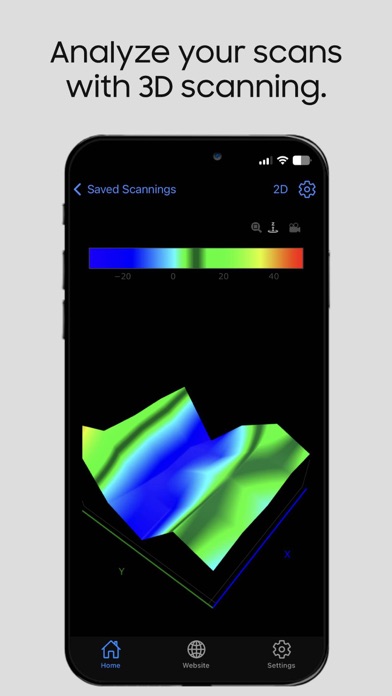
- With Underground Scanning mode, scan the area you specify automatically or manually, with the desired width and height, and view the results in 3D.
- With Pointer mode, navigate your device in the desired area, view the results with indicators and audio alerts.
- Find your direction with the compass included in our app without needing other applications.
- Use your Field Scanning devices with default frequencies or with your own frequencies.
- View, analyze and share the records of Underground Scans that you have saved in Saved Scans and view/save a shared record that others shared with you.
- Quickly learn how to use the app with the User Manual within the app.
- Update your device software within the app.
- Use the application with Turkish or English support (more language options are coming soon).