

Attendance (For Students)
Attendance (For Students) is made and published by Neel Makhecha. AppBrain is an independent app data site and isn't affiliated with Neel Makhecha. The app name, icon, screenshots and description belong to Neel Makhecha and are shown as published on the App Store.
AppBrain's verdict
Established- Best rank
- #79
- Top Free, India
- Rating on App Store
- 4.60
- 30 ratings
- Last updated
- January 30, 2020
It doesn't have enough ratings yet to judge what users think. Its best ranking is #79 in Top Free, Education in India.
Rankings
App Store top charts- Highest rank
- #79
- Chart
- Top Free
- Education
- Country
- India
App Store Rankings for Attendance (For Students)
Top rankings
| Rank | Country | Category | List |
|---|---|---|---|
| 79 | India | Education | Top Free |
Ranking history in India
Competitors
Similar apps and more from Neel MakhechaAlternatives to Attendance (For Students)





More from Neel Makhecha


Releases
Updates seen on the App Store- Version
- 3.1.10
- Launched
- August 2018
No changelog data
User feedback
Ratings and reviews on the App StoreComments on Attendance (For Students) for iOS
We don't have enough comments to show example comments. Please check back later.
Technology
Found in the app by AppBrain- Price
- Free
- App size
- 26.3 MB
- Content rating
- Everyone
Technologies used by Attendance (For Students)
About the app and developer
About Attendance (For Students)
Attendance (For Students) is an education app developed by Neel Makhecha.
What is the rating of Attendance (For Students)?
Attendance (For Students) is rated 4.60 out of 5 stars, based on 30 ratings.
Is Attendance (For Students) free?
Attendance (For Students) is free. The app size is 26.25 MB. The latest version available is 3.1.10. The last update was on January 30, 2020.
What are the requirements for Attendance (For Students)?
The app has a content rating of Everyone. The app has been available on the App Store since August 2018.
Developer information for Neel Makhecha
Address:
Frequently asked questions about Attendance (For Students)
Is Attendance (For Students) free?
Yes. Attendance (For Students) is free on the App Store.
Is Attendance (For Students) still available?
Yes. Attendance (For Students) is on the App Store, and the last update we saw was on January 30, 2020.
How large is Attendance (For Students)?
Attendance (For Students) is 26.25 MB.
Is Attendance (For Students) suitable for children?
App Store rates the content of Attendance (For Students) as suitable for everyone.
How do people rate Attendance (For Students)?
Attendance (For Students) scores 4.60 out of 5 stars, from 30 ratings on the App Store.
Who made Attendance (For Students)?
Attendance (For Students) was developed by Neel Makhecha. It is listed in the education category on the App Store.
What are the best alternatives to Attendance (For Students)?
People looking at Attendance (For Students) also look at these education apps: Proverbs & Sayings Master, Chemistry Periodic Table 2026, Crypto Pie - Learn Crypto, Chord, Periodic Table Chemistry 2026.
Store listing
By Neel Makhecha, from the App Store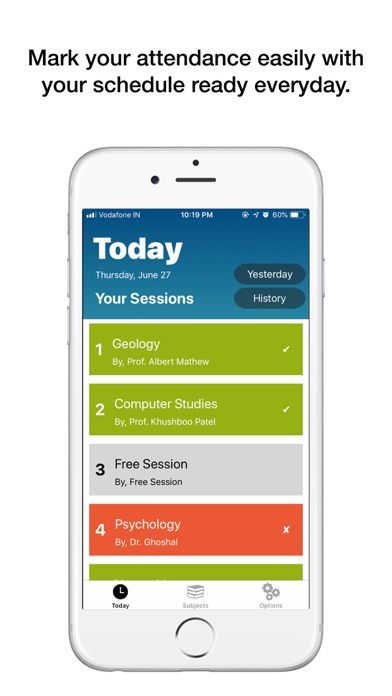





Description by Neel Makhecha Written by the developer, not by AppBrain. Click to read.
Features at a Glance:
- Organise your weekly schedule (time-table).
- Easily mark your attendance with "Today" tab where sessions are shown according to your schedule.
- Specify custom attendance limits for each subject.
- View overall attendance record and subject-wise attendance record in percentage and in more details like no. of sessions attended and no. of sessions conducted.
- Get smart suggestions on how many upcoming sessions to attend to keep up with your attendance limits for each subject.
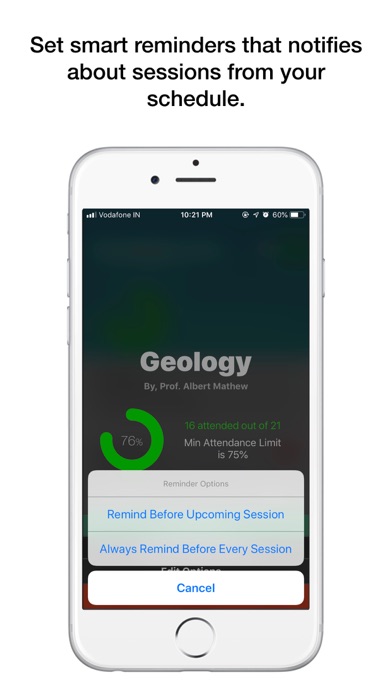
- Get automatic reminders on sessions for specific subject according to your schedule and more.
- Get weekly attendance report with graphs representing multiple days for each subject.
- Visit history date-wise to view which sessions you attended or missed in a specific day.
Features, elaborated:
1. Setup your schedule (time-table) once, and you'll see your sessions according to that everyday on the "Today" tab to mark your attendance easily. Just swipe right to mark the session as "Present", left as "Absent" or partially swipe left and select "Class Canceled", if that's the choice. Else, just tap on a session and then select any of the three options.
2. Get notification everyday which reminds you to register your attendance record. You can even set a custom time for when you want to receive it.
3. Get overall attendance records and subject-wise attendance records as you mark your attendance daily. You'll see each & every detail, such as, percentage of your attendance, total sessions attended, total sessions conducted, etc.
4. Get smart suggestions to attend upcoming sessions. For example, if the attendance in a subject is low, then it will show the suggestion on how many sessions you need to attend to reach the minimum limit, or if it's high then it will show that for how many sessions it will be okay if you miss.
5. If you often miss sessions of a particular subject, you can set reminders for particular subject. Attendance will look up in your schedule and will remind you a day before.
6. Attendance will notify you to view your weekly attendance report every weekends. Just tap on the notification and you'll see various graphs representing attendance record for each day of your last week. Graphs for overall attendance and subject-wise attendance records are shown.
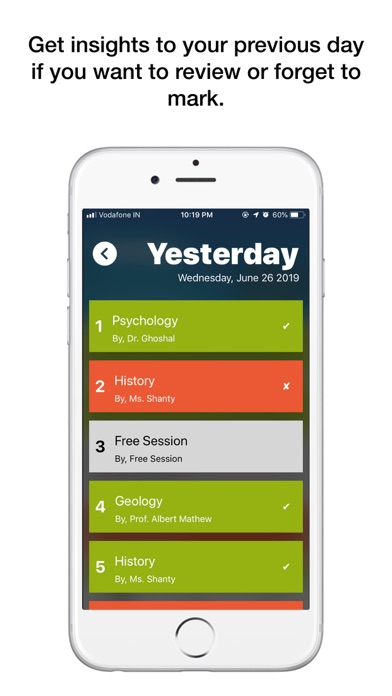
7. If you miss to mark attendance for some day, you can do it the next day by selecting "Yesterday" from the "Today" tab. This gives you a quick access to yesterday's schedule without looking up manually.
8. Your attendance is saved date-wise, hence tapping on "History" and then entering the date will show the schedule of that particular day along with what you've marked. You can even edit your attendance right from there, if needed.
9. If your academic year started months ago and right now you're at the middle of the academic year, you can initialise attendance record for each subject with number of attended sessions and total number of conducted sessions if you already have those data. This will help you manage your attendance record not from "zero" but from the value you provide.
10. Attendance comes with two gorgeous UI design options:
- The default mode, which has a beautiful, bright and colourful design.
- The Dark Mode, which has an elegant colour combinations of deep blacks and dark colours to match.