

Audio Converter - Edit Any MP3
Audio Converter - Edit Any MP3 is made and published by flamingo quokka. AppBrain is an independent app data site and isn't affiliated with flamingo quokka. The app name, icon, screenshots and description belong to flamingo quokka and are shown as published on the App Store.
AppBrain's verdict
- Rating on App Store
- 5.00
- 1 ratings
- Last updated
- October 14, 2025
It doesn't have enough ratings yet to judge what users think.
Rankings
App Store top chartsApp Store Rankings for Audio Converter - Edit Any MP3
Competitors
Similar apps and more from flamingo quokkaAlternatives to Audio Converter - Edit Any MP3




More from flamingo quokka




Releases
Updates seen on the App Store- Version
- 1.1
- Launched
- October 2025
No changelog data
User feedback
Ratings and reviews on the App StoreComments on Audio Converter - Edit Any MP3 for iOS
We don't have enough comments to show example comments. Please check back later.
Technology
Found in the app by AppBrain- Price
- Free
- App size
- 92.4 MB
- Content rating
- Everyone
Technologies used by Audio Converter - Edit Any MP3
About the app and developer
About Audio Converter - Edit Any MP3
Audio Converter - Edit Any MP3 is an utilities app developed by flamingo quokka.
What is the rating of Audio Converter - Edit Any MP3?
Audio Converter - Edit Any MP3 is rated 5.00 out of 5 stars, based on one rating ratings.
Is Audio Converter - Edit Any MP3 free?
Audio Converter - Edit Any MP3 is free. The app size is 92.38 MB. The latest version available is 1.1. The last update was on October 14, 2025.
What are the requirements for Audio Converter - Edit Any MP3?
The app has a content rating of Everyone. The app has been available on the App Store since October 2025.
Developer information for flamingo quokka
Address:
Store listing
By flamingo quokka, from the App Store


Description by flamingo quokka Written by the developer, not by AppBrain. Click to read.
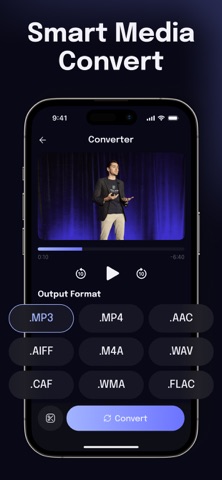
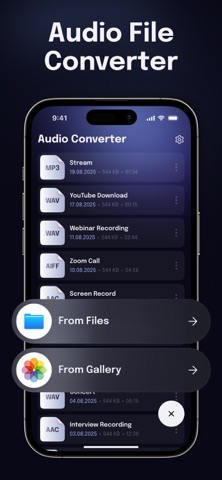
With a clean interface and lightning-fast performance, you don’t need to be a professional to work with audio. Just select your file, choose the desired format, and get high-quality results in seconds.
Why choose Audio Converter?
- Convert audio into all popular formats (MP3, WAV, AAC, FLAC, and more)
- Extract high-quality sound from video files
- Compress audio to save valuable storage space
- Keep the best possible sound quality during conversion
- Batch conversion support for multiple files
- Intuitive design - no complicated settings
Who is it for?
Musicians who need fast format changes, students preparing recordings, podcasters, video creators, or anyone who simply wants their music and audio files in the right format.
Turn your device into a professional audio conversion studio tool with Audio Converter.
Privacy Policy: https://docs.google.com/document/d/1_dTg8S2PFPTChDscPzrDrQlFDoBLURbJr7LhVQVxO90/edit?usp=sharing
Terms of Use: https://docs.google.com/document/d/1QnvC9VtK-9GJnHikia9EwqLkM2eT6p0EjAwJ-PTu-Ic/edit?usp=sharing