

Audio Copilot: AI Note Taker
Audio Copilot: AI Note Taker is made and published by TRISIMIO SL. AppBrain is an independent app data site and isn't affiliated with TRISIMIO SL. The app name, icon, screenshots and description belong to TRISIMIO SL and are shown as published on the App Store.
AppBrain's verdict
- Last updated
- October 9, 2026
Rankings
App Store top chartsApp Store Rankings for Audio Copilot: AI Note Taker
Competitors
Similar apps and more from TRISIMIO SLMore from TRISIMIO SL


Releases
Updates seen on the App Store- Version
- 2.1.1
- Launched
- April 2026
No changelog data
User feedback
Ratings and reviews on the App StoreComments on Audio Copilot: AI Note Taker for iOS
We don't have enough comments to show example comments. Please check back later.
Technology
Found in the app by AppBrain- Price
- Free
- App size
- 47.1 MB
- Content rating
- Everyone
Technologies used by Audio Copilot: AI Note Taker
About the app and developer
About Audio Copilot: AI Note Taker
Audio Copilot: AI Note Taker is an utilities app developed by TRISIMIO SL.
User Ratings
The app has no ratings yet.
App Information
Audio Copilot: AI Note Taker is freely available from the App Store. The app size is 47.11 MB. The latest version available is 2.1.1. The last update was on October 9, 2026.
Technical Requirements
The app has a content rating of Everyone. The app has been available on the App Store since April 2026.
Developer information for TRISIMIO SL
Address:
Store listing
By TRISIMIO SL, from the App Store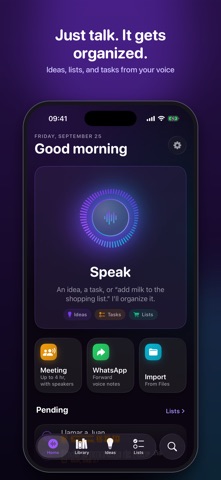


Description by TRISIMIO SL Written by the developer, not by AppBrain. Click to read.
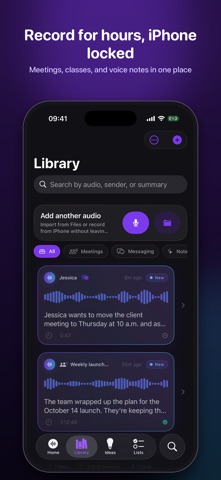
RECORD FOR HOURS WITH YOUR IPHONE LOCKED
- Meetings, classes, and interviews up to 4 hours long and with the screen locked.
- Start from Control Center, the Action Button, a widget, or Siri.
- Follow the recording in the Dynamic Island and on the Lock Screen; pause or mark key moments.
- Recording recovery: if a call comes in or the app closes, your audio is kept and recovered.
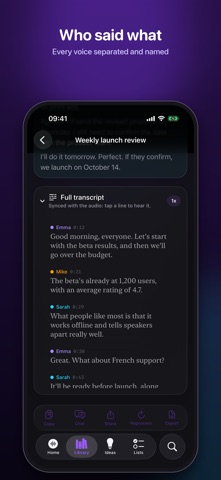
WHO SAID WHAT
- Tells each person apart, and you can put a name to every voice.
- Full transcript synced to the audio: tap a sentence to hear it.
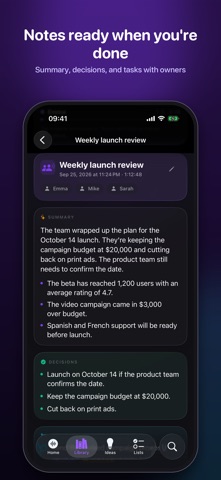
NOTES READY WHEN YOU'RE DONE
- Summary, key points, decisions, action items with owners and due dates, open questions, and agenda.
- A follow-up message ready to send to your team.
- Export as Markdown, TXT, or SRT subtitles.
SPEAK AND STAY ORGANIZED
- Talk through an idea however it comes out: it's saved with a title and key points.
- Come back to the same topic another day and it's merged with what you already said.
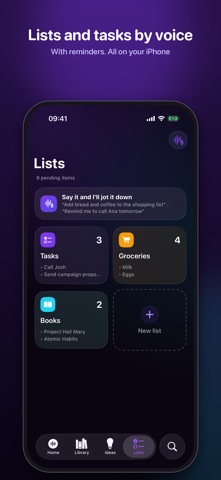
- Say “add bread and coffee to my shopping list” and it's added to your list.
- Say “remind me to call Josh tomorrow at 10” and you'll get the task with its reminder.
WHATSAPP VOICE MESSAGES TO TEXT
- Share a voice message from WhatsApp, Telegram, or any app.
- Read the transcript, the summary, what's being asked of you, and a reply ready to copy.
- Import MP3, M4A, WAV, OGG, Opus, and other formats.
EVERYTHING WITHIN REACH
- Interactive widgets to start speaking with one tap and check off your lists.
- Search across your audio, meetings, ideas, and lists.
- Siri and Shortcuts: say “Talk to Audio Copilot” or “What's pending in Audio Copilot.”
PRIVACY
Audio Copilot works on device. Your audio, transcripts, ideas, and lists are stored and processed on your iPhone, with no accounts and no servers. You can lock the app with Face ID.
PRO ACCESS AND TRIAL
Audio Copilot requires a Pro subscription or a lifetime purchase to record, transcribe, and create ideas, lists, and tasks. There is no ongoing free plan. The annual plan includes a 7-day free trial for eligible users; then you are charged the price shown at purchase confirmation and the subscription renews automatically until canceled. You can also choose the weekly plan without a trial or a one-time lifetime purchase. Prices and terms are shown before purchase. Manage or cancel your subscription in your Apple account settings. Existing purchases and saved data are retained.
Live transcription requires iOS 26. Advanced summaries use Apple Intelligence when available.
Terms of Use: https://audiocopilot.trimonkey.es/terms
Privacy Policy: https://audiocopilot.trimonkey.es/privacy
Optional usage analytics and crash diagnostics are off by default and can be changed in Settings. If enabled, technical data is sent to Firebase; audio, transcripts and summaries are not included in usage analytics.