Audio Editor: Cut & Converter
Audio Editor: Cut & Converter is made and published by DF Vietnam Company Limited. AppBrain is an independent app data site and isn't affiliated with DF Vietnam Company Limited. The app name, icon, screenshots and description belong to DF Vietnam Company Limited and are shown as published on the App Store.
AppBrain's verdict
- Last updated
- September 14, 2026
Rankings
App Store top chartsApp Store Rankings for Audio Editor: Cut & Converter
Competitors
Similar apps and more from DF Vietnam Company LimitedAlternatives to Audio Editor: Cut & Converter
More from DF Vietnam Company Limited
Releases
Updates seen on the App Store- Version
- 1.0.1
- Launched
- September 2026
No changelog data
User feedback
Ratings and reviews on the App StoreComments on Audio Editor: Cut & Converter for iOS
We don't have enough comments to show example comments. Please check back later.
Technology
Found in the app by AppBrain- Price
- Free
- App size
- 63.5 MB
- Content rating
- Medium
Technologies used by Audio Editor: Cut & Converter
About the app and developer
About Audio Editor: Cut & Converter
Audio Editor: Cut & Converter is a music app developed by DF Vietnam Company Limited.
User Ratings
The app has no ratings yet.
App Information
Audio Editor: Cut & Converter is freely available from the App Store. The app size is 63.54 MB. The latest version available is 1.0.1. The last update was on September 14, 2026.
Technical Requirements
The app has a content rating of Medium Maturity. The app has been available on the App Store since September 2026.
Developer information for DF Vietnam Company Limited
Address:
Store listing
By DF Vietnam Company Limited, from the App StoreDescription by DF Vietnam Company Limited Written by the developer, not by AppBrain. Click to read.
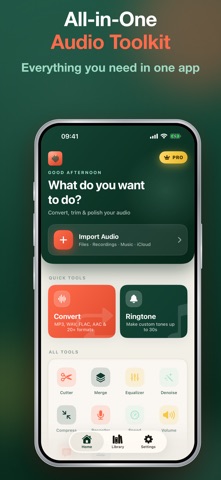
Audio Editor is the all-in-one toolkit for anyone who works with sound. Turn a song into the perfect ringtone, convert a recording to MP3, merge clips into one track, clean up background noise, or turn speech into text — all in one fast, beautifully simple app built for iOS 18.
WHAT YOU CAN DO
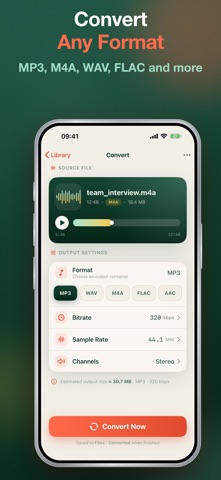
• Convert any format — MP3, M4A, WAV, FLAC, OGG, AAC, AIFF, CAF, WMA, and M4R. Switch in a tap.
• Cut & trim — Drag on the waveform to grab exactly the part you want. Frame-accurate, zero guesswork.
• Merge — Combine multiple files into one seamless track.
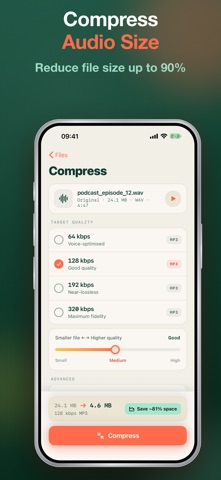
• Compress — Shrink file size for easy sharing without wrecking quality.
• Equalizer — Shape your sound with ready-made presets or build your own.
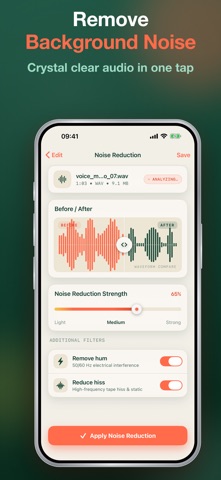
• Denoise — Remove hiss, hum, and background noise from any recording.
• Speed & volume — Slow down, speed up, or boost the level of any clip.
• Record — Capture high-quality audio anytime, then edit it instantly.
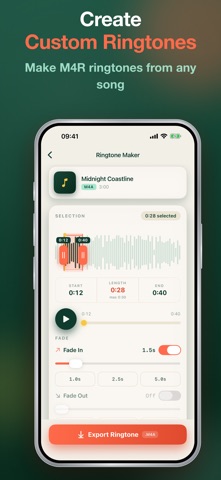
• Ringtone maker — Turn any song into a custom ringtone for your iPhone.
• Transcribe — Convert voice and audio into accurate text you can copy and share.
WHY YOU'LL LOVE IT
• 100% native, built for iOS 18 — fast, smooth, and gorgeous in light and dark mode.
• No watermarks, ever — your audio stays clean.
• Works offline — your files never have to leave your device.
• Share Extension — send audio from any app and start editing in one tap.
HOW IT WORKS
1. Import or record your audio.
2. Pick a tool — cut, convert, merge, EQ, denoise, and more.
3. Export and share in your favorite format.
Perfect for podcasters, musicians, students, content creators, and anyone who needs to clean up a voice memo or build the perfect ringtone.
Download Audio Editor today and take full control of your sound.
AUDIO EDITOR PREMIUM (auto-renewing subscription)
• Unlocks unlimited access to every tool in Audio Editor — conversion, cutting, merging, compression, EQ, denoise, ringtone maker, and transcription.
• Monthly and Yearly plans available; the Yearly plan includes a 7-day free trial.
• Payment is charged to your Apple ID account at confirmation of purchase.
• Subscription automatically renews unless auto-renew is turned off at least 24 hours before the end of the current period.
• Your account will be charged for renewal within 24 hours prior to the end of the current period, at the price of the selected plan.
• Manage your subscription or turn off auto-renewal anytime in Settings > [your name] > Subscriptions on your device after purchase.
• Any unused portion of a free trial period is forfeited when you purchase a subscription.
Terms of Use (EULA): https://www.apple.com/legal/internet-services/itunes/dev/stdeula/
Privacy Policy: https://dfvietnam.top/privacy