

audio editor & mp3 cutter app
audio editor & mp3 cutter app is made and published by Sounak Sarkar. AppBrain is an independent app data site and isn't affiliated with Sounak Sarkar. The app name, icon, screenshots and description belong to Sounak Sarkar and are shown as published on the App Store.
AppBrain's verdict
Established- Rating on App Store
- 3.73
- 22 ratings
- Last updated
- August 24, 2023
- Size
- 15.5 MB
It doesn't have enough ratings yet to judge what users think.
User feedback
Ratings and reviews on the App StoreComments on audio editor & mp3 cutter app for iOS
We don't have enough comments to show example comments. Please check back later.
Store listing
By Sounak Sarkar, from the App Store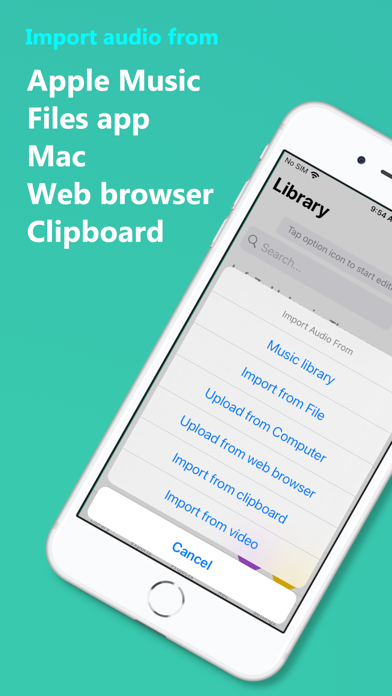


Description by Sounak Sarkar Written by the developer, not by AppBrain. Click to read.
[Features]
Import: Import audios from iTunes, Apple Music, Files, Web browser, Clipboard etc.
Organize: keep recordings, exported audios and imported audios in different folders for easy access.
Recording: Record audios and import them in your project.
Ringtone: make ringtone in single click and set on your device.
[Editing]
Sound mixing: Supports multitrack audio editing and sound mixing. Drag to arrange audio clips from different sources in timeline.
Silence: Select audio segment and make it silent
Cutting: cut audio segment and use.
Splitting: Split audio in two or more parts.
Merging: Join multiple clips into one single clip.
Copy: copy and paste selected track.
Draft: automatically saves your current editing as project for future use.
[Effects]
Reverb: room, hall, chamber and many more preset to choose from.
Balance: Supports R-CH and L-CH balancing
Fade: Fade in and out individual tracks up to 4 seconds.
Volume : adjust volume of each and every track separately in your composition.
Pitch shifting: Increase or decrease pitch independant of playback speed.
Playback Speed: from 0.25x to 4x variable speed supported.
Distortion: Apply distortion effect with predefined presets.
Delay: delay audio up to 2 seconds with up to 100% feedback.
Equalizer: supports 10 band equalizer with 10+ filters to choose from. Bass Boost, increase treble and many more cool effect with custom equalizer settings.
[DSP Tools]
Noise Cancellation: Remove low frequency and high frequency noise from audio
Improve Vocals: Enhance vocals.
Extract Vocals: Extract vocals from audio and remove music.
Extract Music: Extract music removing all vocals from audio.
Reverse Track: Play track from back to front.
Remove Silence: Remove all zero amplitude samples.
Bass Boost: Amplify low frequency components.
Make Stereo: Make mono audio to stereo.
[Export]
Supports stereo and mono channel export.
export as m4a, mp3, wav, caf
[Contact us]
racersoft@gmail.com
If you have any feedback please share with us.
Safety and technology
Found in the app by AppBrain- Price
- Free
- App size
- 15.5 MB
- Content rating
- Everyone
Technologies used by audio editor & mp3 cutter app
Releases
Updates seen on the App Store- Version
- 0.9
- Launched
- June 2021
No changelog data
Alternatives
Similar apps and more from Sounak SarkarAlternatives to audio editor & mp3 cutter app








More from Sounak Sarkar


Rankings
App Store top chartsApp Store Rankings for audio editor & mp3 cutter app
About the app and developer
About audio editor & mp3 cutter app
audio editor & mp3 cutter app is an utilities app developed by Sounak Sarkar.
User Ratings
audio editor & mp3 cutter app is rated 3.73 out of 5 stars. The rating is based on 22 ratings.
App Information
audio editor & mp3 cutter app is freely available from the App Store. The app size is 15.50 MB. The latest version available is 0.9. The last update was on August 24, 2023.
Technical Requirements
The app has a content rating of Everyone. The app has been available on the App Store since June 2021.
Developer information for Sounak Sarkar
Address:
Frequently asked questions about audio editor & mp3 cutter app
Is audio editor & mp3 cutter app free?
Yes. audio editor & mp3 cutter app is free on the App Store.
Is audio editor & mp3 cutter app still available?
Yes. audio editor & mp3 cutter app is on the App Store, and the last update we saw was on August 24, 2023.
How large is audio editor & mp3 cutter app?
audio editor & mp3 cutter app is 15.50 MB.
Is audio editor & mp3 cutter app suitable for children?
App Store rates the content of audio editor & mp3 cutter app as suitable for everyone.
How do people rate audio editor & mp3 cutter app?
audio editor & mp3 cutter app scores 3.73 out of 5 stars, from 22 ratings on the App Store.
Who made audio editor & mp3 cutter app?
audio editor & mp3 cutter app was developed by Sounak Sarkar. It is listed in the utilities category on the App Store.
What are the best alternatives to audio editor & mp3 cutter app?
People looking at audio editor & mp3 cutter app also look at these utilities apps: Audio Cutter Converter Merger, Multitrack Editor: Audio Lab, Wave Audio Editor, M4A Converter, M4A to MP3, Speed Dial - T9 and Smart Call.