




AppBrain's verdict
- Last updated
- August 24, 2026
- Size
- 5.49 MB
User feedback
Ratings and reviews on the App StoreComments on Audio SA for iOS
We don't have enough comments to show example comments. Please check back later.
Store listing
By Yasuyoshi Ota, from the App StoreDescription by Yasuyoshi Ota Written by the developer, not by AppBrain. Click to read.
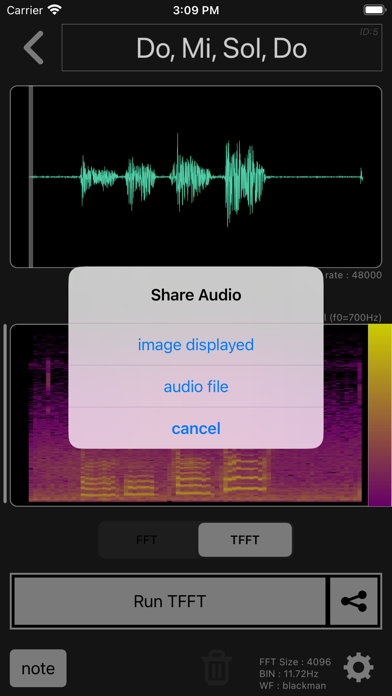
The created TFFT image can be exported as a high resolution image. (Image size example iPhoneSE3: 4096×4096, iPhoneX: 6144×6144)
If you just want to try creating a voiceprint, you don't need to worry about the settings. Just record your voice and run the TFFT to see the voiceprint.
"Audio SA" can also be used for FFT-related learning. You can also check changes in important characteristics such as FFT frequency resolution and dynamic range while switching the FFT size and window function.
As an additional function, we have implemented a simple waveform generator, so please try it when learning. The simple waveform generator can generate sine waves, square waves, Gaussian white noise, and their combinations.
When using TFFT images for machine learning, etc., it will be necessary to give sufficient consideration to the settings.
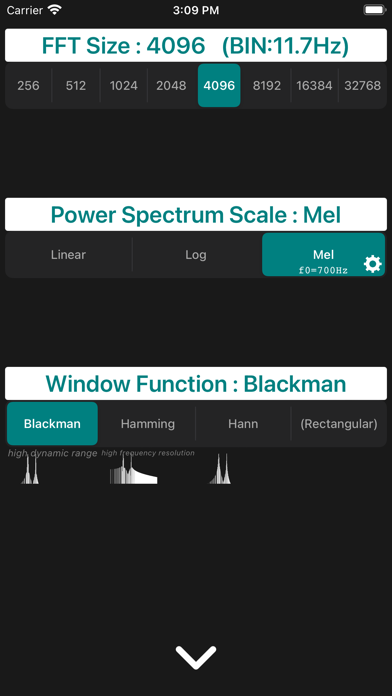
"Audio SA" allows you to set the audio waveform analysis range, FFT size, power spectrum scale, window function, and drawing color.
The analysis range of the audio waveform is set by scaling and moving the audio waveform. The displayed range becomes the analysis range.
Tap the play button to play only the analysis range, which is convenient for checking.
FFT size can be selected from 256,512,1024,2048,4096,8192,16384,32768.
(However, you can select from 256, 512, 1024, 2048, and 4096 during recording and playback.)
The power spectrum scale can be selected from Linear scale, Log scale, and Mel scale.
For Mel scale, you can set the break frequency. The mel scale is close to a linear scale up to the break frequency and close to a log scale after the break frequency. 700Hz, which is the most commonly used frequency, is set as the default value.
The window function can be selected from Blackman, Hamming, Hann, Rectangular.
It is recommended to choose Blackman when wide dynamic range is required and Hamming when high frequency resolution is required.
Roughly speaking, Hann is a trait between Blackman and Hamming.
For Rectangular, no special window function is multiplied during FFT transform. The audio data cut out from the audio waveform for the FFT size is used as it is.
In addition, the lower limit of the dynamic range when drawing TFFT images can also be set. It's easy to set up, just swipe up and down on the FFT image. The part displayed as the FFT image is drawn as it is in the TFFT image.
"Audio SA" consumes tickets to record audio. Tickets can be earned by watching ads.
However, if you purchase "Remove Ads" as an in-app purchase, you will be able to record without a ticket.
[details]
https://app.brain-workout.org/spectrumanalyzer-e/
Safety and technology
Found in the app by AppBrain- Price
- Free
- App size
- 5.49 MB
- Content rating
- Everyone
Technologies used by Audio SA
Releases
Updates seen on the App Store- Version
- 1.0.7
- Launched
- January 2023
No changelog data
Alternatives
Similar apps and more from Yasuyoshi OtaAlternatives to Audio SA




More from Yasuyoshi Ota


Rankings
App Store top chartsApp Store Rankings for Audio SA
About the app and developer
About Audio SA
Audio SA is an utilities app developed by Yasuyoshi Ota.
User Ratings
The app has no ratings yet.
App Information
Audio SA is freely available from the App Store. The app size is 5.49 MB. The latest version available is 1.0.7. The last update was on August 24, 2026.
Technical Requirements
The app has a content rating of Everyone. The app has been available on the App Store since January 2023.
Audio SA is made and published by Yasuyoshi Ota. AppBrain is an independent app data site and isn't affiliated with Yasuyoshi Ota. The app name, icon, screenshots and description belong to Yasuyoshi Ota and are shown as published on the App Store.
Developer information for Yasuyoshi Ota
Address: