

Audio2AI
Audio2AI is made and published by Rodrigo Sauceda. AppBrain is an independent app data site and isn't affiliated with Rodrigo Sauceda. The app name, icon, screenshots and description belong to Rodrigo Sauceda and are shown as published on the App Store.
AppBrain's verdict
- Last updated
- October 29, 2026
Rankings
App Store top chartsApp Store Rankings for Audio2AI
Competitors
Similar apps and more from Rodrigo SaucedaAlternatives to Audio2AI


Releases
Updates seen on the App Store- Version
- 2.8.1
- Launched
- December 2025
No changelog data
User feedback
Ratings and reviews on the App StoreComments on Audio2AI for iOS
We don't have enough comments to show example comments. Please check back later.
Technology
Found in the app by AppBrain- Price
- Free
- App size
- 5.79 MB
- Content rating
- Everyone
Technologies used by Audio2AI
About the app and developer
About Audio2AI
Audio2AI is a productivity app developed by Rodrigo Sauceda.
What is the rating of Audio2AI?
Audio2AI has no ratings yet.
Is Audio2AI free?
Audio2AI is free. The app size is 5.79 MB. The latest version available is 2.8.1. The last update was on October 29, 2026.
What are the requirements for Audio2AI?
The app has a content rating of Everyone. The app has been available on the App Store since December 2025.
Developer information for Rodrigo Sauceda
Address:
Store listing
By Rodrigo Sauceda, from the App Store



Description by Rodrigo Sauceda Written by the developer, not by AppBrain. Click to read.
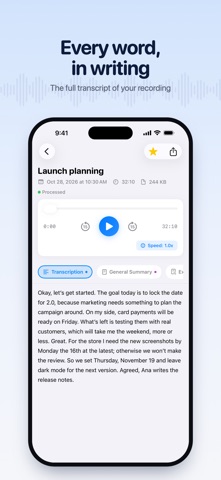
Record a meeting, a class or an interview. When it ends you have the transcript and a summary; one more tap gets you the minutes, a to-do list or a translation.
WHAT YOU GET FROM EVERY RECORDING
• Transcript: everything that was said, as text.
• Summary: the essentials, in one paragraph.
• Executive summary: decisions, risks and next step.
• Minutes: attendees, topics and agreements.
• To-do list: tasks with an owner and a date.
• Key points: the key ideas, as a list.
• Translation: the recording, in your language.
• Email: the summary, ready to send.
The transcript and summary are created automatically. Ask for the rest when you need it, and it's saved with the audio. Copy it, share it, email it or export it to PDF.
RECORD
• Record with one tap, up to one hour per recording. If you hit the limit, what you recorded is saved.
• Import audio you already have, like voice memos or recorded meetings.
• Keep recording in the background, even if you switch apps or lock your iPhone (Premium).
• Audio2AI detects the language of the audio on its own.
ORGANIZE AND LISTEN
• Groups to sort your recordings by project, class or client.
• Favorites, to keep the important ones close.
• A player that keeps playing while you move around the app.
• Works offline: record and listen without internet; it syncs when you're back online.
• Sign in with Apple, your Google account or your email.
• Available in English, Spanish, Portuguese, French and German.
PLANS
• Free: record, import, listen to and organize your audio.
• Premium: unlimited transcription, every AI result and background recording. You can try it free for 3 days.
Premium is a monthly or yearly subscription. Payment is charged to your Apple Account when you confirm the purchase, and it renews automatically unless you cancel at least 24 hours before the end of the current period. You can manage or cancel it in Settings → your name → Subscriptions.
YOUR PRIVACY
We don't sell your information. Your audio is used only to transcribe it and create what you ask for. You can delete any recording, or your whole account, from Settings.
Terms of Use: https://audio2ai.com/terms
Privacy Policy: https://audio2ai.com/privacy
Questions or ideas? Email us at hola@audio2ai.com