

audiOS Terminal Keyboard
audiOS Terminal Keyboard is made and published by Luis Gutierrez. AppBrain is an independent app data site and isn't affiliated with Luis Gutierrez. The app name, icon, screenshots and description belong to Luis Gutierrez and are shown as published on the App Store.
AppBrain's verdict
- Rating on App Store
- 5.00
- 3 ratings
- Last updated
- August 29, 2026
It doesn't have enough ratings yet to judge what users think.
Rankings
App Store top chartsApp Store Rankings for audiOS Terminal Keyboard
Competitors
Similar apps and more from Luis GutierrezAlternatives to audiOS Terminal Keyboard


Releases
Updates seen on the App Store- Version
- 1.4
- Launched
- March 2026
No changelog data
User feedback
Ratings and reviews on the App StoreComments on audiOS Terminal Keyboard for iOS
We don't have enough comments to show example comments. Please check back later.
Technology
Found in the app by AppBrain- Price
- Free
- App size
- 28.2 MB
- Content rating
- Everyone
Technologies used by audiOS Terminal Keyboard
About the app and developer
About audiOS Terminal Keyboard
audiOS Terminal Keyboard is an utilities app developed by Luis Gutierrez.
What is the rating of audiOS Terminal Keyboard?
audiOS Terminal Keyboard is rated 5.00 out of 5 stars, based on 3 ratings.
Is audiOS Terminal Keyboard free?
audiOS Terminal Keyboard is free. The app size is 28.16 MB. The latest version available is 1.4. The last update was on August 29, 2026.
What are the requirements for audiOS Terminal Keyboard?
The app has a content rating of Everyone. The app has been available on the App Store since March 2026.
Developer information for Luis Gutierrez
Address:
Frequently asked questions about audiOS Terminal Keyboard
Is audiOS Terminal Keyboard free?
Yes. audiOS Terminal Keyboard is free on the App Store.
Is audiOS Terminal Keyboard still available?
Yes. audiOS Terminal Keyboard is on the App Store, and the last update we saw was on August 29, 2026.
How large is audiOS Terminal Keyboard?
audiOS Terminal Keyboard is 28.16 MB.
Is audiOS Terminal Keyboard suitable for children?
App Store rates the content of audiOS Terminal Keyboard as suitable for everyone.
How do people rate audiOS Terminal Keyboard?
audiOS Terminal Keyboard scores 5.00 out of 5 stars, from 3 ratings on the App Store.
Who made audiOS Terminal Keyboard?
audiOS Terminal Keyboard was developed by Luis Gutierrez. It is listed in the utilities category on the App Store.
What are the best alternatives to audiOS Terminal Keyboard?
People looking at audiOS Terminal Keyboard also look at these utilities apps: Talk Into Notes, SafeKey — Password Manager, FlowMount, AILandlord, Copy as....
Store listing
By Luis Gutierrez, from the App Store
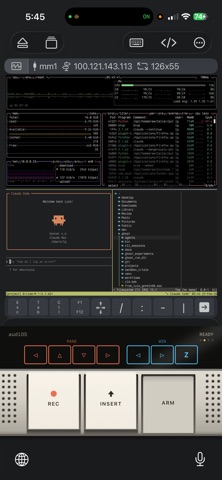
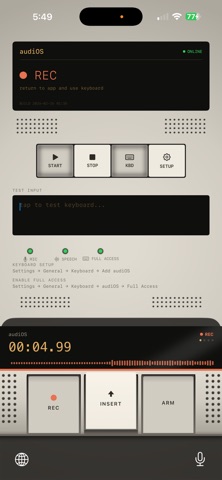
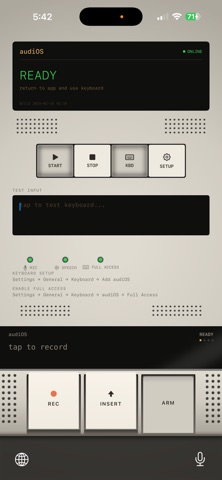
Description by Luis Gutierrez Written by the developer, not by AppBrain. Click to read.
audiOS sits in your keyboard tray and transcribes speech in near-real-time using Groq's Whisper API. Speak naturally.
WORKS EVERYWHERE
• iMessage, WhatsApp, Slack, Notes, Mail, social media — anywhere the iOS keyboard works
• ARM/DISARM safety switch — armed mode submits text with a newline, disarmed mode inserts only. No accidental sends.
• Built-in TMUX / Claude Code shortcut pages for terminal power users
HOW IT WORKS
1. Open the audiOS app and tap START to activate the background audio service
2. Switch to any app and select the audiOS keyboard
3. Tap REC to record — speak naturally
4. Watch your transcript appear in real-time on the keyboard display
5. Tap INSERT to paste text
POWER FEATURES:
• LIFT - Cut the text before your cursor into a stack, INSERT to paste it anywhere else
• ARM - **Claude Code only** ARM-up: INSERT adds a newline, ARM-down: INSERT submits the prompt
• AUTO - **Claude Code only** Automatically press INSERT every 1 second
LIVE ACTIVITY
Recording status appears on your Lock Screen and Dynamic Island so you always know when the mic is hot.
FINE-TUNE YOUR EXPERIENCE
• Groq timeout slider — choose how long to wait for cloud transcription (5–60 seconds) before falling back to on-device dictation
• Idle shutdown control — keep the audio service alive from 5 minutes to 4 hours depending on your workflow
HARDWARE AESTHETIC
Inspired by legendary field recorders. Convex mechanical buttons with haptic feedback and tape-deck sound effects. An OLED-style display. It's a real device.
14-DAY FREE TRIAL
Try audiOS free for 14 days. $4.99 one-time purchase after trial.
Audio is sent to Groq's Whisper API via our proxy server for transcription. No audio is stored on our servers. See our privacy policy for details.
Requires iOS 17.0+. Keyboard extension requires Full Access enabled in Settings.
Terms of Use: https://www.apple.com/legal/internet-services/itunes/dev/stdeula/