




AppBrain's verdict
- Last updated
- November 7, 2026
- Size
- 77.9 MB
User feedback
Ratings and reviews on the App StoreComments on Audoc: Read Aloud PDF & Docs for iOS
We don't have enough comments to show example comments. Please check back later.
Store listing
By Picassosoft, from the App StoreDescription by Picassosoft Written by the developer, not by AppBrain. Click to read.
FOLLOW ALONG AS IT READS
Audoc highlights the sentence you are hearing and, with Apple voices, each word as well. Look up at any moment and you know exactly where you are.
TABLES AND CHARTS THAT MAKE SENSE OUT LOUD
Plain text-to-speech turns a table into a stream of numbers. Audoc tells you the size of the table and reads every row with its column names. Charts, diagrams, and pictures are described where they appear in the document.
BRING IN ANYTHING
• PDF, Word, PowerPoint, Excel, OpenDocument, EPUB, HTML, Markdown, RTF, CSV, and text
• Korean Hangul documents: HWP and HWPX
• Older Office files (DOC, PPT, XLS), WPS, Pages, Keynote, and Numbers
• DRM-free Kindle books (MOBI, AZW3) and FB2
• Email (EML, MSG), saved web pages (MHTML, web archive), XPS, and multi-page TIFF scans
• Subtitles (SRT, VTT), Jupyter notebooks, AsciiDoc, reStructuredText, Org, and LaTeX
• Older text files in Korean, Japanese, and Chinese encodings
• Paste a web link: Audoc keeps the article and skips menus and ads
• Scan paper pages with the document camera, or open a photo of a page: on-device text recognition reads it
• Share a page, file, or text to Audoc from Safari, Mail, or Files
• Paste any text
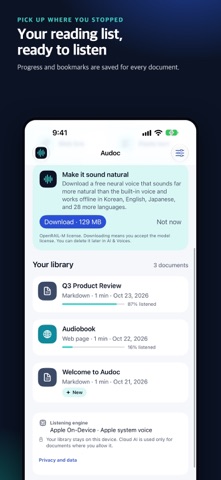
PICK UP WHERE YOU STOPPED
• Your place is saved for every document
• Bookmark the parts you want to hear again
• Continue listening from the library or the Home Screen widget
• Sleep timer, from 5 minutes to the end of the current part
• Playback speed from 0.75× to 2×, with Lock Screen and Control Center controls
• Export a document as an audio file to play anywhere
MADE FOR EVERY SCREEN
On iPhone Duo and iPad, your library and the player sit side by side, with the listening script next to the text being read. Fold iPhone Duo and Audoc keeps playing from the same place. Dark Mode is supported throughout.
NATURAL VOICES THAT WORK OFFLINE
Use Apple’s voices, or download a free multilingual neural voice (Korean, English, Japanese, and 28 more languages) inside the app.
TRANSLATE AND LISTEN
Translate the listening script into Korean, English, Japanese, Chinese, Spanish, French, German, Portuguese, Hindi, or Arabic with Apple Intelligence or a downloadable Gemma model on your device, then listen in the new language.
PRIVATE BY DEFAULT
Documents are processed on your iPhone or iPad. No account, no ads, no tracking. Nothing is uploaded unless you add your own Gemini or OpenAI key and allow cloud processing for a specific document.
GOOD TO KNOW
• AI descriptions and translations can contain mistakes; check important details against the original.
• Voice and AI downloads are optional and large. Speed and quality depend on your device’s memory, storage, and the document.
• Apple Intelligence translation needs a device and region where Apple Intelligence is available.
• Imports are limited to 256 MB. Legacy DOC, PPT, and XLS files may have less structure than DOCX, PPTX, and XLSX. Numbers files are read as text values without their cell positions.
• Password-protected and DRM-protected files can't be opened. HWP 3.0 files from before 2002 need to be saved again in a recent version of Hangul.
• Pages that require signing in cannot be opened from a link.
• Requires iOS or iPadOS 18 or later.
본 제품은 한글과컴퓨터의 한/글 문서 파일(.hwp) 공개 문서를 참고하여 개발하였습니다.
Safety and technology
Found in the app by AppBrain- Price
- $2.99
- App size
- 77.9 MB
- Content rating
- Everyone
Technologies used by Audoc: Read Aloud PDF & Docs
Releases
Updates seen on the App Store- Version
- 1.2.1
- Launched
- September 2026
No changelog data
Rankings
App Store top charts- Highest rank
- #33
- Chart
- Top Paid
- Productivity
- Country
- South Korea
App Store Rankings for Audoc: Read Aloud PDF & Docs
Top rankings
| Rank | Country | Category | List |
|---|---|---|---|
| 33 | South Korea | Productivity | Top Paid |
Ranking history in South Korea
About the app and developer
About Audoc: Read Aloud PDF & Docs
Audoc: Read Aloud PDF & Docs is a productivity app developed by Picassosoft.
User Ratings
The app has no ratings yet.
App Information
Audoc: Read Aloud PDF & Docs costs $2.99. The app size is 77.93 MB. The latest version available is 1.2.1. The last update was on November 7, 2026.
Technical Requirements
The app has a content rating of Everyone. The app has been available on the App Store since September 2026.
Audoc: Read Aloud PDF & Docs is made and published by Picassosoft. AppBrain is an independent app data site and isn't affiliated with Picassosoft. The app name, icon, screenshots and description belong to Picassosoft and are shown as published on the App Store.
Developer information for Picassosoft
Address:
Share Audoc: Read Aloud PDF & Docs
Subscribe now to get full and unlimited access to AppBrain Intelligence. You'll have access to:
- App Intelligence dashboard (performance timeline, competitor comparison, country rankings, insight cards)
- Detailed ranking data per app
- Full timeline per developer
- Device market shares data per country
- Unlimited keyword tracking
- AI assistant access via MCP (Claude, Cursor or any MCP client)
AppBrain is an app data site, we track rankings, ratings, installs for all apps and games on Google Play and the App Store. AppBrain doesn't host app files or APKs, all install links go directly to the official store. All trademarks are owned by their respective owners.
More apps
App statistics