

Aupath: Task & Event Calendar
Aupath: Task & Event Calendar is made and published by KAZUMI KURA. AppBrain is an independent app data site and isn't affiliated with KAZUMI KURA. The app name, icon, screenshots and description belong to KAZUMI KURA and are shown as published on the App Store.
AppBrain's verdict
- Last updated
- June 20, 2026
- Size
- 10.4 MB
User feedback
Ratings and reviews on the App StoreComments on Aupath: Task & Event Calendar for iOS
We don't have enough comments to show example comments. Please check back later.
Store listing
By KAZUMI KURA, from the App Store


Description by KAZUMI KURA Written by the developer, not by AppBrain. Click to read.
"Which project was due, and when?" Aupath brings your tasks, events, and calendar together on a single screen—turning the scattered mess in your head into a clear, at-a-glance overview. No more bouncing between a calendar app and a to-do app.
■ Who it's for
・Freelancers, designers, illustrators, and video creators running several projects at once
・Anyone managing projects with multiple deadlines
・People who want work and personal plans in one place
・Anyone tired of juggling a separate calendar app and to-do app
■ Key features
Multiple deadlines for a single task — Give one project several milestones like "rough draft," "revisions," and "final delivery." Manage the whole workflow in one place and see your progress at a glance.
Create recurring work in one tap with templates — Save projects and events you create over and over as templates, then recall an entire setup—deadlines, tags, and notifications included—to all but eliminate repetitive entry. Duplicate and reorder them to reuse your own way of working exactly as it is.
Calendar × tasks on one screen — See task deadlines and events together on the calendar, and switch between today, this week, and this month to grasp your project status intuitively.
Month, week, and day views — Switch between three views in a single tap. Perfect for zooming out to plan, or zooming in on the details of a single day.
A fast, scannable list view — See every plan, event, and task in a list, neatly separated by tabs. Work and personal life, all in one place.
Home Screen widgets — Choose from widgets in multiple sizes and check today's plans and upcoming deadlines right from your Home Screen, without even opening the app.
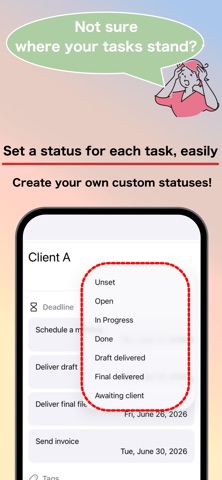
Customizable statuses — Freely add, edit, and reorder project statuses like "To do," "In progress," and "Done" to match the way you actually work.
Organize and filter with tags — Tag projects and categories, then filter down to just the plans you need in seconds.
Holidays worldwide — Holidays appear automatically based on your device's region settings, so overseas projects and long-term plans are easy to map out.
11 languages — Available in Japanese, English, Chinese (Simplified & Traditional), Korean, Spanish, French, German, Portuguese, Arabic, and Hindi. Switch anytime inside the app, independently of your device settings.
Dark mode — Switches automatically with your device settings, or set it manually in the app. Easy on the eyes for late-night work.
Simple, beautiful design — An interface stripped of needless decoration and focused on delivering information clearly. Because you'll use it every day, we obsessed over readability and ease of use.
■ Ways to use it
・Tag projects and filter by them
・Get reminders as task deadlines approach
・Spin up recurring projects from templates
・Plan your workload week by week
・Schedule around personal commitments so nothing collides
■ From the developer
"Running several projects in parallel." "One project with multiple deadlines." I always felt existing calendar and to-do apps didn't truly answer this creator-specific way of working. Aupath was born from those real-world frustrations. I'd be glad if it could ride alongside your creative work for a long time to come.
Questions or requests? Please don't hesitate to reach out to our support team.
Safety and technology
Found in the app by AppBrain- Price
- Free
- App size
- 10.4 MB
- Content rating
- Everyone
Technologies used by Aupath: Task & Event Calendar
Releases
Updates seen on the App Store- Version
- 1.2.1
- Launched
- April 2026
No changelog data
Alternatives
Similar apps and more from KAZUMI KURAMore from KAZUMI KURA

Rankings
App Store top chartsApp Store Rankings for Aupath: Task & Event Calendar
About the app and developer
About Aupath: Task & Event Calendar
Aupath: Task & Event Calendar is a productivity app developed by KAZUMI KURA.
User Ratings
The app has no ratings yet.
App Information
Aupath: Task & Event Calendar is freely available from the App Store. The app size is 10.37 MB. The latest version available is 1.2.1. The last update was on June 20, 2026.
Technical Requirements
The app has a content rating of Everyone. The app has been available on the App Store since April 2026.
Developer information for KAZUMI KURA
Address: