

Authenticatorⓒ App
Authenticatorⓒ App is made and published by MTWOM LIMITED. AppBrain is an independent app data site and isn't affiliated with MTWOM LIMITED. The app name, icon, screenshots and description belong to MTWOM LIMITED and are shown as published on the App Store.
AppBrain's verdict
- Rating on App Store
- 4.44
- 9 ratings
- Last updated
- September 30, 2026
It doesn't have enough ratings yet to judge what users think.
Rankings
App Store top chartsApp Store Rankings for Authenticatorⓒ App
Competitors
Similar apps and more from MTWOM LIMITEDMore from MTWOM LIMITED


Releases
Updates seen on the App Store- Version
- 1.2.9
- Launched
- February 2026
No changelog data
User feedback
Ratings and reviews on the App StoreComments on Authenticatorⓒ App for iOS
We don't have enough comments to show example comments. Please check back later.
Technology
Found in the app by AppBrain- Price
- Free
- App size
- 48.4 MB
- Content rating
- Everyone
Technologies used by Authenticatorⓒ App
About the app and developer
About Authenticatorⓒ App
Authenticatorⓒ App is a productivity app developed by MTWOM LIMITED.
User Ratings
Authenticatorⓒ App is rated 4.44 out of 5 stars. The rating is based on 9 ratings.
App Information
Authenticatorⓒ App is freely available from the App Store. The app size is 48.43 MB. The latest version available is 1.2.9. The last update was on September 30, 2026.
Technical Requirements
The app has a content rating of Everyone. The app has been available on the App Store since February 2026.
Developer information for MTWOM LIMITED
Address:
Store listing
By MTWOM LIMITED, from the App Store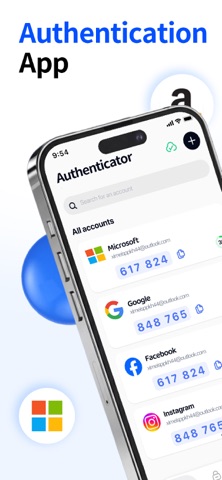



Description by MTWOM LIMITED Written by the developer, not by AppBrain. Click to read.
Safeguard your online accounts with Authenticator, a user-friendly and robust two-factor authentication (2FA) solution. Generate time-based verification codes, manage all your accounts in one place, and keep your sensitive credentials secure—with zero ads to distract you.
Key Features:
- Face ID Smart Lock: Unlock the app instantly via Face ID for seamless access; customize auto-lock timers (immediate, 1 minute, or 5 minutes) to match your security preferences.
- Quick Account Search: Locate any account in an instant, even when managing a large number of entries.
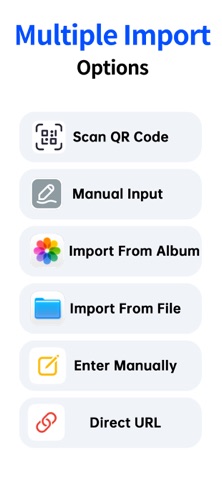
- Flexible Account Management: Add accounts by scanning QR codes, copying secret keys, or manual input; edit or remove entries at any time; keep all your authentication tokens neatly organized in a single hub.
- One-Time Passwords (OTP): 6-digit verification codes auto-refresh every 30 seconds; one-tap code copying for quick logins; fully offline operation—generate codes even without an internet connection.
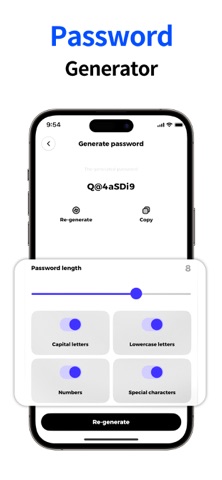
- Basic Password Manager: Securely store passwords alongside your 2FA accounts; create strong, customizable passwords; use the share menu for basic autofill to speed up login workflows.
- 100% Ad-Free: Enjoy a clean, clutter-free interface designed exclusively for security and ease of use.
Authenticator simplifies multi-account management with speed, safety, and simplicity. Protect your digital identity and streamline your login process today!
Need assistance or have questions?
We’re dedicated to delivering the best authentication experience possible. For inquiries, bug reports, or feature suggestions, reach out to our support team at support@scvjn.cn.
Subscription Information
• Payment will be charged to your iTunes account at confirmation of purchase.
• Subscriptions automatically renew unless turned off at least 24 hours before the end of the current period.
• You can manage or turn off auto-renewal in Settings → Apple ID → Subscriptions.
• A free trial is available. After the trial ends, the subscription renews automatically unless canceled in advance.
Privacy Policy: http://authenticator.mmtwom.com/#/privacy
User Agreement: http://authenticator.mmtwom.com/#/agreement