

Authenticator - 2FA&Passwords
Authenticator - 2FA&Passwords is made and published by 莉 张. AppBrain is an independent app data site and isn't affiliated with 莉 张. The app name, icon, screenshots and description belong to 莉 张 and are shown as published on the App Store.
AppBrain's verdict
- Last updated
- August 23, 2026
Rankings
App Store top chartsApp Store Rankings for Authenticator - 2FA&Passwords
Competitors
Similar apps and more from 莉 张Alternatives to Authenticator - 2FA&Passwords

More from 莉 张


Releases
Updates seen on the App Store- Version
- 1.0
- Launched
- August 2026
No changelog data
User feedback
Ratings and reviews on the App StoreComments on Authenticator - 2FA&Passwords for iOS
We don't have enough comments to show example comments. Please check back later.
Technology
Found in the app by AppBrain- Price
- Free
- App size
- 19.3 MB
- Content rating
- High
Technologies used by Authenticator - 2FA&Passwords
About the app and developer
About Authenticator - 2FA&Passwords
Authenticator - 2FA&Passwords is an utilities app developed by 莉 张.
User Ratings
The app has no ratings yet.
App Information
Authenticator - 2FA&Passwords is freely available from the App Store. The app size is 19.34 MB. The latest version available is 1.0. The last update was on August 23, 2026.
Technical Requirements
The app has a content rating of High Maturity. The app has been available on the App Store since August 2026.
Developer information for 莉 张
Address:
Store listing
By 莉 张, from the App Store
Description by 莉 张 Written by the developer, not by AppBrain. Click to read.
Core Features
Two-Factor Authentication Codes: Add 2FA accounts by scanning a QR code or manually entering a secret key. The app automatically generates dynamic verification codes and supports standard TOTP and HOTP protocols for websites, email services, and other online platforms.
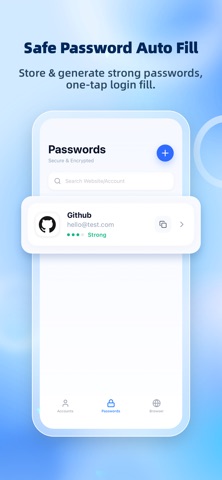
Secure Password Management: Store website addresses, usernames, passwords, and notes in one place, reducing the security risks of reusing the same password. All password data is encrypted and stored in a secure local vault.
Strong Password Generator: Quickly generate strong random passwords. Customize password length and choose whether to include numbers, symbols, and other character types, helping you use a unique password for every website.
iOS AutoFill: Use iOS AutoFill in Safari and other compatible apps. Select saved credentials from the system credential interface and fill them after biometric authentication.
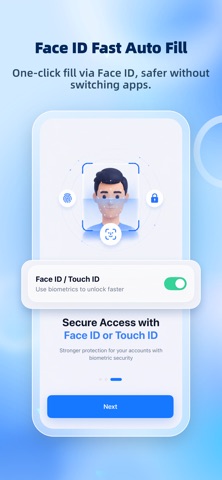
Face ID Protection: Unlock the app and authorize AutoFill using Face ID. You can also access your vault with an independent app lock password, preventing unauthorized access to your verification codes and passwords.
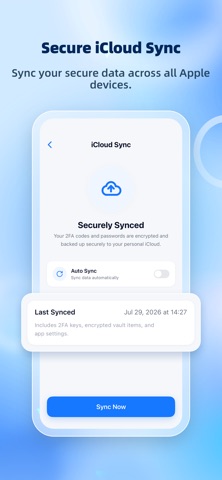
Encrypted iCloud Sync: Sync your encrypted vault data to your personal iCloud account and keep authentication accounts and passwords consistent across your own Apple devices.
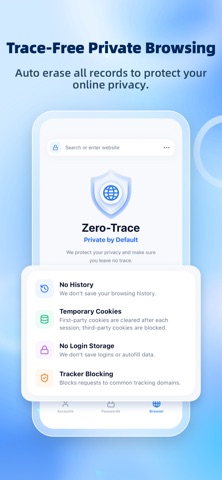
Private Browser: Browse the web in a separate private environment without retaining long-term login sessions or browsing data. When a browsing session is closed, the app clears its associated cache, cookies, and temporary data.
User Experience and Benefits
Quick Account Setup: Scan a 2FA QR code provided by a website to complete setup and start viewing verification codes. Secret keys can also be entered manually.
Encrypted Sensitive Data: 2FA secret keys, website passwords, notes, and other sensitive information are stored in an encrypted vault. Sensitive screens are automatically hidden when the app moves to the background.
Fewer Copy-and-Paste Steps: Use the iOS AutoFill extension to select passwords or dynamic verification codes directly on supported login pages, reducing the need to switch between apps.
Password History: Keep a limited history of recent passwords when making changes, helping you verify previous updates without accumulating sensitive information indefinitely.
The free version includes access to basic features. Automatic cloud backup, advanced AutoFill features, and expanded storage for accounts and passwords require a Premium subscription.
Privacy Policy:
https://www.hnmichuang.com/privacy_policy/com.michuang.authenticator.ios/policy_other_en.html
User Agreement:
https://www.hnmichuang.com/privacy_policy/com.michuang.authenticator.ios/protocol_other_en.html
Terms of Use (EULA):
https://www.apple.com/legal/internet-services/itunes/dev/stdeula/