

Authenticator App • 2FA & OTP
Authenticator App • 2FA & OTP is made and published by RAPID DIJITAL HIZMETLER LIMITED SIRKETI. AppBrain is an independent app data site and isn't affiliated with RAPID DIJITAL HIZMETLER LIMITED SIRKETI. The app name, icon, screenshots and description belong to RAPID DIJITAL HIZMETLER LIMITED SIRKETI and are shown as published on the App Store.
AppBrain's verdict
- Last updated
- October 19, 2026
- Size
- 26.0 MB
User feedback
Ratings and reviews on the App StoreComments on Authenticator App • 2FA & OTP for iOS
We don't have enough comments to show example comments. Please check back later.
Store listing
By RAPID DIJITAL HIZMETLER LIMITED SIRKETI, from the App Store


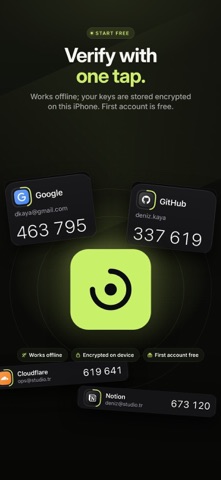
Description by RAPID DIJITAL HIZMETLER LIMITED SIRKETI Written by the developer, not by AppBrain. Click to read.
QUICK SETUP
• Scan the QR code on the website with your camera; the account appears in your list instantly.
• Read QR codes from photos, screenshots or files.
• Type or paste the setup key; spaces and dashes are no problem.
• Preview the code before saving to avoid mistakes.
MOVE FROM OTHER APPS
• Scan Google Authenticator transfer QR codes and bring all your accounts over at once.
• Import exports from 2FAS, Aegis, Raivo and andOTP.
• Accounts are listed before they're added, so you choose which ones to bring. Duplicates are skipped.
EVERYDAY USE
• Tap a code to copy it. Copied codes are cleared from the clipboard when they expire.
• See the time left on the countdown ring; the next code is ready in the final seconds.
• Pin the accounts you use most, tag them (Work, Personal, Crypto…) and search.
• Recognize accounts at a glance with brand logos.
• TOTP and HOTP · SHA-1, SHA-256, SHA-512 · 6–8 digits · 30–60 seconds.
SECURITY AND PRIVACY
• Lock with Face ID, Touch ID or an app passcode.
• Auto-lock: immediately when you leave the app or after a time you choose.
• Cooldown after failed attempts.
• Codes are hidden in screen recordings, screen mirroring and the app switcher.
• Data is stored encrypted on your device; no ads, no account required.
BACKUP AND TRANSFER
• Encrypted iCloud backup: automatic with every change.
• Password-protected .authbackup file: save it to Files and keep it wherever you like.
• Restore your backup on a new iPhone with one tap.
• Device-to-device transfer: move your accounts to another iPhone with a QR code.
AUTOFILL
• Verification codes appear above the keyboard in Safari and apps.
• The account matching the website is suggested; Face ID verification before filling.
SECURE NOTES
• Keep recovery codes linked to their account and mark the ones you've used.
• Encrypted notes for Wi-Fi passwords, bank cards, logins and license keys.
TOOLS
• Password generator: random, words or PIN, with a strength meter.
• QR generator: Wi-Fi, links, contacts, email and text.
• Security check: shows weak spots in your accounts and notes.
BUILT FOR iOS
• Home Screen and Lock Screen widgets, StandBy.
• Live Activity: the copied code's time left in the Dynamic Island.
• Control Center controls and Shortcuts (Siri).
• Dark, light or system theme; Reduce Motion and Dynamic Type support.
AUTHENTICATOR PLUS
You can add 1 account in the free version. With Authenticator Plus:
• Unlimited accounts
• Bulk import
• iCloud backup and backup file export
• Widgets, Live Activity and AutoFill
Subscription details:
• Authenticator Plus is offered as weekly and monthly auto-renewing subscriptions. Prices for your country are shown in the app.
• Payment is charged to your Apple Account when you confirm the purchase.
• The subscription renews automatically unless it is turned off at least 24 hours before the end of the current period; renewal is charged within 24 hours before the period ends.
• You can manage and cancel your subscription after purchase in Settings > Apple Account > Subscriptions.
• If a free trial is offered, any unused portion is forfeited when you purchase a subscription.
Privacy Policy: https://sites.google.com/view/auth-app-privacy-policy
Terms of Use (EULA): https://sites.google.com/view/auth-app-eula
Support: https://sites.google.com/view/auth-application-app
Authenticator is not affiliated with Google, Microsoft, GitHub or any other service named here. All trademarks belong to their respective owners.
Safety and technology
Found in the app by AppBrain- Price
- Free
- App size
- 26.0 MB
- Content rating
- Everyone
Technologies used by Authenticator App • 2FA & OTP
Releases
Updates seen on the App Store- Version
- 1.3
- Launched
- November 2025
No changelog data
Alternatives
Similar apps and more from RAPID DIJITAL HIZMETLER LIMITED SIRKETIMore from RAPID DIJITAL HIZMETLER LIMITED SIRKETI

Rankings
App Store top chartsApp Store Rankings for Authenticator App • 2FA & OTP
About the app and developer
About Authenticator App • 2FA & OTP
Authenticator App • 2FA & OTP is a productivity app developed by RAPID DIJITAL HIZMETLER LIMITED SIRKETI.
User Ratings
The app has no ratings yet.
App Information
Authenticator App • 2FA & OTP is freely available from the App Store. The app size is 26.02 MB. The latest version available is 1.3. The last update was on October 19, 2026.
Technical Requirements
The app has a content rating of Everyone. The app has been available on the App Store since November 2025.
Developer information for RAPID DIJITAL HIZMETLER LIMITED SIRKETI
Frequently asked questions about Authenticator App • 2FA & OTP
Is Authenticator App • 2FA & OTP free?
Yes. Authenticator App • 2FA & OTP is free on the App Store.
Is Authenticator App • 2FA & OTP still available?
Yes. Authenticator App • 2FA & OTP is on the App Store, and the last update we saw was on October 19, 2026.
How large is Authenticator App • 2FA & OTP?
Authenticator App • 2FA & OTP is 26.02 MB.
Is Authenticator App • 2FA & OTP suitable for children?
App Store rates the content of Authenticator App • 2FA & OTP as suitable for everyone.
Who made Authenticator App • 2FA & OTP?
Authenticator App • 2FA & OTP was developed by RAPID DIJITAL HIZMETLER LIMITED SIRKETI. It is listed in the productivity category on the App Store.