

Authenticator App: 2FA Code
Authenticator App: 2FA Code is made and published by VNSolution AI Limited. AppBrain is an independent app data site and isn't affiliated with VNSolution AI Limited. The app name, icon, screenshots and description belong to VNSolution AI Limited and are shown as published on the App Store.
AppBrain's verdict
- Rating on App Store
- 3.00
- 2 ratings
- Last updated
- June 26, 2026
It doesn't have enough ratings yet to judge what users think.
Rankings
App Store top chartsApp Store Rankings for Authenticator App: 2FA Code
Competitors
Similar apps and more from VNSolution AI LimitedMore from VNSolution AI Limited


Also available on Google Play

Releases
Updates seen on the App Store- Version
- 2.3.9
- Launched
- November 2025
No changelog data
User feedback
Ratings and reviews on the App StoreComments on Authenticator App: 2FA Code for iOS
We don't have enough comments to show example comments. Please check back later.
Technology
Found in the app by AppBrain- Price
- Free
- App size
- 131.3 MB
- Content rating
- Everyone
Technologies used by Authenticator App: 2FA Code
About the app and developer
About Authenticator App: 2FA Code
Authenticator App: 2FA Code is a productivity app developed by VNSolution AI Limited.
User Ratings
Authenticator App: 2FA Code is rated 3.00 out of 5 stars. The rating is based on 2 ratings.
App Information
Authenticator App: 2FA Code is freely available from the App Store. The app size is 131.29 MB. The latest version available is 2.3.9. The last update was on June 26, 2026.
Technical Requirements
The app has a content rating of Everyone. The app has been available on the App Store since November 2025.
Developer information for VNSolution AI Limited
Address:
Store listing
By VNSolution AI Limited, from the App Store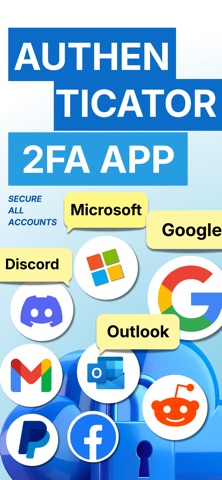
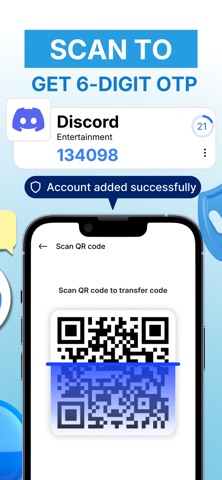
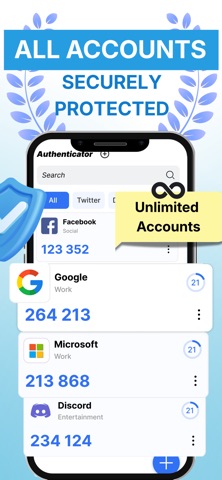


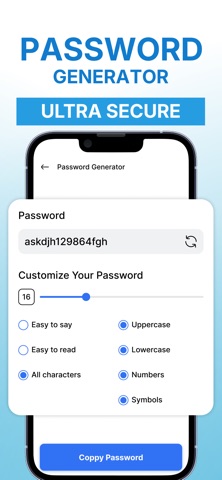
Description by VNSolution AI Limited Written by the developer, not by AppBrain. Click to read.
Designed to be simple and reliable, the app lets you manage authentication codes for multiple services in one place. It can be used to secure email, social networks, work tools, and other accounts that support 2FA. Your data stays under your control with a privacy-focused design.
CORE AUTHENTICATOR FEATURES
- Generate authentication codes using standard TOTP
- Add accounts by scanning QR codes or entering setup details manually
- Transfer authenticator data to a new device using a transfer code
- Support for Dark Mode for comfortable use in low light
SECURE BACKUP & RESTORE
- Protect your accounts with encrypted iCloud backup
- Restore your authentication codes instantly on a new device
- Never lose access to your accounts again
ADVANCED SECURITY TOOLS
- Built-in password manager to store login details safely
- Strong password generator for better account protection
- Secure notes to save sensitive information and backup codes
- Encrypted vault for private data
SECURITY CONTROLS
- App lock with PIN or biometric authentication
- Screenshot protection for sensitive screens
- Simple privacy and security settings
WHEN TO USE AN AUTHENTICATOR APP
- Signing in to services that require two-factor authentication (2FA)
- Managing multiple accounts that use authentication codes
- Moving to a new device and transferring authenticator data
- Keeping backup codes or security information in one secure place
PRIVACY AND DATA PROTECTION
- Data is encrypted and stored locally on your device
- No account registration required
- No tracking or personal data collection
Get started with a reliable authenticator app for two-factor authentication. Generate secure codes, strengthen account security, and manage your data with confidence.
SUBSCRIPTION INFORMATION (Apple-compliant)
Payment will be charged to your Apple ID account at the confirmation of purchase.
Subscriptions automatically renew unless auto-renew is turned off at least 24 hours before the end of the current subscription period. Your account will be charged for renewal within 24 hours prior to the end of the current period, at the price of the selected plan.
You can manage your subscription and turn off auto-renewal at any time by going to your Apple ID account settings in the App Store after purchase.
Links
Privacy Policy:
https://vnsolutionailimited.net/privacy.html
Terms of Use (EULA):
https://vnsolutionailimited.net/terms-of-service.html