

Authenticator TOTP
Authenticator TOTP is made and published by Boris Spiro. AppBrain is an independent app data site and isn't affiliated with Boris Spiro. The app name, icon, screenshots and description belong to Boris Spiro and are shown as published on the App Store.
AppBrain's verdict
- Rating on App Store
- 5.00
- 1 ratings
- Last updated
- October 7, 2026
- Size
- 14.9 MB
It doesn't have enough ratings yet to judge what users think.
User feedback
Ratings and reviews on the App StoreComments on Authenticator TOTP for iOS
We don't have enough comments to show example comments. Please check back later.
Store listing
By Boris Spiro, from the App Store


Description by Boris Spiro Written by the developer, not by AppBrain. Click to read.
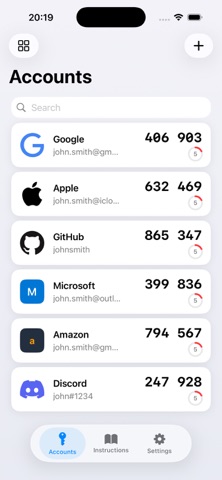
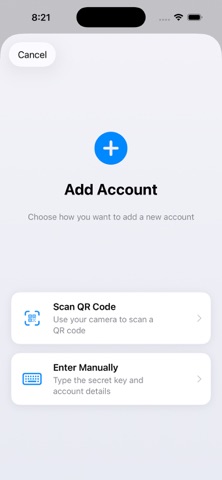
Setting up is effortless. Just scan a QR code and your account is ready in seconds. Whether it's Google, GitHub, Amazon, Discord, or any service that supports 2FA — TOTP Authenticator has you covered.
▸ KEY FEATURES
• Scan QR codes to add accounts instantly
• Generate 2FA codes offline — no network needed
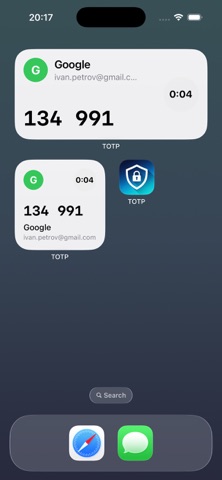
• Lock Screen Widgets for quick access to your codes
• Apple Watch app — view codes right from your wrist
• Password AutoFill integration (iOS 18+) — codes fill automatically
• Biometric Lock with Face ID or Touch ID
• iCloud Sync across all your Apple devices
• Export accounts as QR codes for easy backup or migration
• Support for SHA-1, SHA-256, and SHA-512 algorithms
• Available in 38 languages
▸ SECURITY FIRST
Your secrets never leave your device unprotected. All sensitive data is stored in the iOS Keychain — not in plain text, not in a database. Codes are generated locally on your device, so they work even in airplane mode. Optional biometric lock adds an extra layer of protection.
▸ WIDGETS & AUTOFILL
Add Lock Screen and Home Screen widgets to see your codes at a glance. With iOS 18+ Password AutoFill, your verification codes are suggested automatically when you sign in to apps and websites — no copying and pasting.
▸ PREMIUM
Premium unlocks everything:
• Unlimited accounts
• Apple Watch companion app
• iCloud Sync
• Export accounts as QR codes
• Biometric app lock
Payment will be charged to your Apple ID account at confirmation of purchase. Subscriptions automatically renew unless canceled at least 24 hours before the end of the current period. You can manage or cancel subscriptions in your Apple ID account settings.
Privacy Policy: https://github.com/spiroba/Totp/blob/main/PRIVACY_POLICY.md
Terms of Use: https://github.com/spiroba/Totp/blob/main/TERMS_OF_SERVICE.md
Safety and technology
Found in the app by AppBrain- Price
- Free
- App size
- 14.9 MB
- Content rating
- Everyone
Technologies used by Authenticator TOTP
Releases
Updates seen on the App Store- Version
- 3.3.6
- Launched
- January 2026
No changelog data
Alternatives
Similar apps and more from Boris SpiroAlternatives to Authenticator TOTP


More from Boris Spiro


Rankings
App Store top chartsApp Store Rankings for Authenticator TOTP
About the app and developer
About Authenticator TOTP
Authenticator TOTP is an utilities app developed by Boris Spiro.
User Ratings
Authenticator TOTP is rated 5.00 out of 5 stars. The rating is based on one rating ratings.
App Information
Authenticator TOTP is freely available from the App Store. The app size is 14.92 MB. The latest version available is 3.3.6. The last update was on October 7, 2026.
Technical Requirements
The app has a content rating of Everyone. The app has been available on the App Store since January 2026.
Developer information for Boris Spiro
Address:
Frequently asked questions about Authenticator TOTP
Is Authenticator TOTP free?
Yes. Authenticator TOTP is free on the App Store.
Is Authenticator TOTP still available?
Yes. Authenticator TOTP is on the App Store, and the last update we saw was on October 7, 2026.
How large is Authenticator TOTP?
Authenticator TOTP is 14.92 MB.
Is Authenticator TOTP suitable for children?
App Store rates the content of Authenticator TOTP as suitable for everyone.
How do people rate Authenticator TOTP?
Authenticator TOTP has one rating of 5.00 stars on the App Store.
Who made Authenticator TOTP?
Authenticator TOTP was developed by Boris Spiro. It is listed in the utilities category on the App Store.
What are the best alternatives to Authenticator TOTP?
People looking at Authenticator TOTP also look at these utilities apps: TOTP Authenticator - 2FA, ZETIT Key, Granted: 2FA Authenticator, Authenticator App 2FA & TOTP, Authenticator app ・ 2FA & MFA.