

AuthMe - 2Factor Authenticator
AuthMe - 2Factor Authenticator is made and published by YILDIRIM KULOGLU. AppBrain is an independent app data site and isn't affiliated with YILDIRIM KULOGLU. The app name, icon, screenshots and description belong to YILDIRIM KULOGLU and are shown as published on the App Store.
AppBrain's verdict
- Last updated
- May 11, 2026
- Size
- 56.1 MB
User feedback
Ratings and reviews on the App StoreComments on AuthMe - 2Factor Authenticator for iOS
We don't have enough comments to show example comments. Please check back later.
Store listing
By YILDIRIM KULOGLU, from the App Store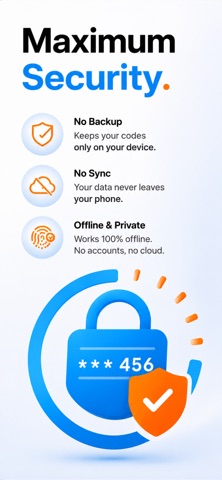


Description by YILDIRIM KULOGLU Written by the developer, not by AppBrain. Click to read.
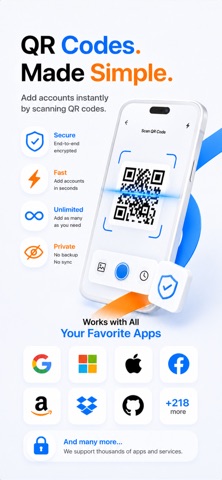
Add an extra layer of security to the services you use every day. AuthMe helps you generate time-based one-time passwords (TOTP) for accounts that support 2FA, MFA or OTP verification. Scan a QR code, save your account, and use AuthMe whenever a login asks for a verification code.
PRIVATE BY DESIGN
AuthMe is built for users who want authentication codes without unnecessary cloud exposure. Your authenticator accounts are stored on your device and the app is designed to work completely offline. Since AuthMe does not rely on cloud backup or online sync, your sensitive 2FA setup data is not sent to our servers.
This local-first approach helps reduce the risk of remote data leaks before they start. Your codes remain available when you have no Wi-Fi, no cellular connection or no internet access.
SAME-DEVICE ACCESS
For security-focused users, AuthMe avoids automatic cloud syncing across devices. However, when you use AuthMe again on the same device, your saved authenticator data is designed to remain available even if the app was previously removed and installed again.
This gives you a balance between convenience and privacy: your accounts stay close to the device you set them up on, without silently copying your authentication secrets to cloud storage.
FAST 2FA SETUP
Getting started is easy:
- Scan a 2FA QR code from a supported service
- Add the account to AuthMe
- Open the app to view your current verification code
- Use the code to sign in securely
AuthMe is useful for accounts that support authenticator apps, including many email, social media, finance, developer, business and productivity services.
KEY FEATURES
- Two-factor authentication code generator
- TOTP and OTP verification code support
- QR code setup for fast account adding
- Manual account setup when needed
- Offline code generation
- Local device-based storage
- No required cloud backup
- No online sync of your 2FA secrets
- Add multiple authenticator accounts
- Clean and simple interface
- Built for privacy-conscious users
WHY USE AUTHME?
Passwords alone are not enough for many online accounts. Two-factor authentication adds another step to your login process, helping protect your accounts even if your password is guessed, leaked or reused elsewhere.
AuthMe keeps this process simple. You do not need an internet connection to generate codes. You do not need to create a separate AuthMe account. Just add your 2FA accounts and access your codes when you need them.
SUBSCRIPTION ACCESS
You can add as many accounts as you need. Access to verification codes for a second account and additional accounts requires an active subscription. Your first account includes limited free access; continued code access after the free access period requires a subscription.
Monthly and yearly subscription options are available. Subscriptions are managed through your App Store account and can be canceled from your App Store subscription settings.
IMPORTANT NOTE
AuthMe is an independent authenticator app and is not affiliated with Google, Microsoft, Meta, X or any other third-party service. AuthMe works with services that support standard authenticator app verification methods.
Protect your logins with offline two-factor authentication. Download AuthMe and keep your verification codes simple, private and close to your device.
Terms of Use:
https://api.twilow.space/authme/terms
Privacy Policy:
https://api.twilow.space/authme/privacy
Safety and technology
Found in the app by AppBrain- Price
- Free
- App size
- 56.1 MB
- Content rating
- Everyone
Technologies used by AuthMe - 2Factor Authenticator
Releases
Updates seen on the App Store- Version
- 1.0
- Launched
- May 2026
No changelog data
Alternatives
Similar apps and more from YILDIRIM KULOGLUMore from YILDIRIM KULOGLU







Rankings
App Store top chartsApp Store Rankings for AuthMe - 2Factor Authenticator
About the app and developer
About AuthMe - 2Factor Authenticator
AuthMe - 2Factor Authenticator is an utilities app developed by YILDIRIM KULOGLU.
User Ratings
The app has no ratings yet.
App Information
AuthMe - 2Factor Authenticator is freely available from the App Store. The app size is 56.10 MB. The latest version available is 1.0. The last update was on May 11, 2026.
Technical Requirements
The app has a content rating of Everyone. The app has been available on the App Store since May 2026.
Developer information for YILDIRIM KULOGLU
Address: