AppBrain
AppBrain
  • Apps
  • Apps being viewed right now Trending apps today Most popular apps All-time most installed apps Top rated apps iPhone and iPad apps
  • Intelligence ▾
    Intelligence overview → Track any Android app or your whole market
    Track & analyze
    Keyword Tracker & OptimizerTrack & improve Play rankings App Performance ReportOne-off PDF for any app StatisticsFree Android & Play market stats
    Promote your app
    Featured Apps App Links
  • Intelligence
  • Pricing
  • Dashboard
  • Sign up
  • Log in
App Store Apps > Utilities > Auto Clicker: Super Fast Click
Auto Clicker: Super Fast Click icon

Auto Clicker: Super Fast Click

1.2
Pankil Patel
4.17
300 reviews
Free

Auto Clicker: Super Fast Click Screenshot 1 of 9
Auto Clicker: Super Fast Click Screenshot 2 of 9
Auto Clicker: Super Fast Click Screenshot 3 of 9
Auto Clicker: Super Fast Click Screenshot 4 of 9
Auto Clicker: Super Fast Click Screenshot 5 of 9
Auto Clicker: Super Fast Click Screenshot 6 of 9
Auto Clicker: Super Fast Click Screenshot 7 of 9
Auto Clicker: Super Fast Click Screenshot 8 of 9
Auto Clicker: Super Fast Click Screenshot 9 of 9
Screenshots by Pankil Patel, from the the App Store listing
View on the App Store

AppBrain's verdict

Well rated
Rating on App Store
4.17
300 ratings
Last updated
February 12, 2026
Size
13.6 MB

Users rate it well: 4.2 stars from 300 ratings. Its best ranking is #25 in Top Free, Utilities in Indonesia.

Official page on the App Store

User feedback

Ratings and reviews on the App Store

Comments on Auto Clicker: Super Fast Click for iOS

We don't have enough comments to show example comments. Please check back later.

Store listing

By Pankil Patel, from the App Store
Description by Pankil Patel Written by the developer, not by AppBrain. Click to read.
Auto Clicker – Automatic Tap is designed to take control of repetitive screen actions and turn them into smooth, automated routines. Instead of tapping, swiping, or refreshing the same screen again and again, the app handles those actions for you with carefully timed precision. You simply set the rules once, and the app follows them exactly as defined.

The app includes an advanced visual recognition system that can identify on-screen elements such as images, camera views, selfies, icons, and visual markers. When a selected element appears, the app immediately triggers the assigned action—no manual interaction required. This allows fully hands-free automation that adapts to what’s happening on your screen in real time.

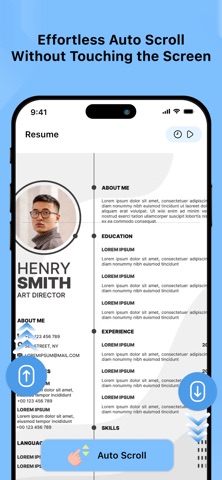
Multiple automation modes give you complete flexibility. Create single or multi-point tap sequences, synchronized tap patterns, custom tap paths, swipe gestures, long-press actions, smart refresh routines, and automatic scrolling flows. Every gesture is reproduced smoothly and consistently, helping you save time while maintaining natural interaction behavior.

Additional smart tools enhance both convenience and safety. Automatic screen capture records screenshots based on specific conditions you define, while the built-in link safety check quickly evaluates URLs before you open them, adding an extra layer of protection during browsing.

With a clean, easy-to-use interface and deep customization options, Auto Clicker – Automatic Tap transforms everyday interactions into efficient automated workflows. Once configured, your actions repeat reliably and accurately—reducing effort, improving consistency, and letting your device work the way you want it to.

Set it once. Relax.
The automation continues—smooth, precise, and fully under your control.

Privacy Policy : https://autoclickerautomatictap.blogspot.com/2025/12/privacy-policy-for-auto-clicker.html
Terms Condition : https://autoclickerautomatictap.blogspot.com/2025/12/terms-conditions-for-auto-clicker.html
EULA : https://autoclickerautomatictap.blogspot.com/2025/12/end-user-license-agreement-eula-of-auto.html

Safety and technology

Found in the app by AppBrain
Price
Free
App size
13.6 MB
Content rating
High

Technologies used by Auto Clicker: Super Fast Click

Releases

Updates seen on the App Store
Version
1.2
Launched
December 2025

No changelog data

Alternatives

Similar apps and more from Pankil Patel

More from Pankil Patel

Music Volume EQ - Equalizer icon Music Volume EQ - Equalizer
Pankil Patel
4.5
Free
120 ratings
4K Video Player & Edit icon 4K Video Player & Edit
Pankil Patel
4.7
Free
6 ratings
Dual Apps Space icon Dual Apps Space
Pankil Patel
3.0
Free
4 ratings
Water Ejector : Water Eject icon Water Ejector : Water Eject
Pankil Patel
5.0
Free
3 ratings
Messages Recovery : Restore icon Messages Recovery : Restore
Pankil Patel
3.0
Free
1 ratings
Reels Video Status icon Reels Video Status
Pankil Patel
0.0
Free

Rankings

App Store top charts
Highest rank
#25
Chart
Top Free
Utilities
Country
Indonesia

App Store Rankings for Auto Clicker: Super Fast Click

Top rankings

Rank Country Category List
25 Indonesia Utilities Top Free
86 Turkey Utilities Top Free

Ranking history in Indonesia

About the app and developer

About Auto Clicker: Super Fast Click

Auto Clicker: Super Fast Click is an utilities app developed by Pankil Patel.

User Ratings

Auto Clicker: Super Fast Click is rated 4.17 out of 5 stars. The rating is based on 300 ratings.

App Information

Auto Clicker: Super Fast Click is freely available from the App Store. The app size is 13.64 MB. The latest version available is 1.2. The last update was on February 12, 2026.

Technical Requirements

The app has a content rating of High Maturity. The app has been available on the App Store since December 2025.

Auto Clicker: Super Fast Click is made and published by Pankil Patel. AppBrain is an independent app data site and isn't affiliated with Pankil Patel. The app name, icon, screenshots and description belong to Pankil Patel and are shown as published on the App Store.

Developer information for Pankil Patel

Pankil Patel

Address:

Share Auto Clicker: Super Fast Click

Top new apps Popular Utilities Apps Today's trending apps Apps other people are watching Price drops on Google Play
More hot apps 🔥
Overview Reviews Rankings Technology
AppBrain Intelligence premium content

Subscribe now to get full and unlimited access to AppBrain Intelligence. You'll have access to:

  • App Intelligence dashboard (performance timeline, competitor comparison, country rankings, insight cards)
  • Detailed ranking data per app
  • Full timeline per developer
  • Device market shares data per country
  • Unlimited keyword tracking
  • AI assistant access via MCP (Claude, Cursor or any MCP client)
1 Month

$75/mo
(billed every month)

SAVE 0%
Subscribe
3 Months

$65/mo
($195 billed every 3 months)

SAVE 13%
Subscribe
1 Year

$57.50/mo
($690 billed every year)

SAVE 23%
Subscribe
Each subscription will automatically renew 3 days before the expiration date for the same time period. Subscriptions can be cancelled at any time before the renewal.

AppBrain is an app data site, we track rankings, ratings, installs for all apps and games on Google Play and the App Store. AppBrain doesn't host app files or APKs, all install links go directly to the official store. All trademarks are owned by their respective owners.

More apps

  • Top Android apps being viewed
  • AntivirusClean Pro & Security
  • Format SD Card - Memory Format
  • Street Lines: BMX

App statistics

  • Android statistics
  • Google Play Developer stats
  • Trending Android Apps
  • Trending iOS apps
  • Top popular Apps
  • Buy the best Android phone
  • Buy & sell app businesses

About AppBrain

  • Contact
  • Privacy
  • Documentation
  • DMCA takedowns
  • Blog
  • Free webpage for your Android app
© 2010-2026 - AppBrain