

Auto Clicker Tap Automation
Auto Clicker Tap Automation is made and published by Appsy Digital. AppBrain is an independent app data site and isn't affiliated with Appsy Digital. The app name, icon, screenshots and description belong to Appsy Digital and are shown as published on the App Store.
AppBrain's verdict
Well rated- Rating on App Store
- 4.43
- 197 ratings
- Last updated
- September 20, 2026
Users rate it well: 4.4 stars from 197 ratings.
Rankings
App Store top chartsApp Store Rankings for Auto Clicker Tap Automation
Competitors
Similar apps and more from Appsy DigitalMore from Appsy Digital




Releases
Updates seen on the App Store- Version
- 1.3.4
- Launched
- January 2026
No changelog data
User feedback
Ratings and reviews on the App StoreComments on Auto Clicker Tap Automation for iOS
We don't have enough comments to show example comments. Please check back later.
Technology
Found in the app by AppBrain- Price
- Free
- App size
- 22.0 MB
- Content rating
- Everyone
Technologies used by Auto Clicker Tap Automation
About the app and developer
About Auto Clicker Tap Automation
Auto Clicker Tap Automation is an utilities app developed by Appsy Digital.
What is the rating of Auto Clicker Tap Automation?
Auto Clicker Tap Automation is rated 4.43 out of 5 stars, based on 200 ratings.
Is Auto Clicker Tap Automation free?
Auto Clicker Tap Automation is free. The app size is 21.99 MB. The latest version available is 1.3.4. The last update was on September 20, 2026.
What are the requirements for Auto Clicker Tap Automation?
The app has a content rating of Everyone. The app has been available on the App Store since January 2026.
Developer information for Appsy Digital
Address:
Frequently asked questions about Auto Clicker Tap Automation
Is Auto Clicker Tap Automation free?
Yes. Auto Clicker Tap Automation is free on the App Store.
Is Auto Clicker Tap Automation still available?
Yes. Auto Clicker Tap Automation is on the App Store, and the last update we saw was on September 20, 2026.
How large is Auto Clicker Tap Automation?
Auto Clicker Tap Automation is 21.99 MB.
Is Auto Clicker Tap Automation suitable for children?
App Store rates the content of Auto Clicker Tap Automation as suitable for everyone.
How do people rate Auto Clicker Tap Automation?
Auto Clicker Tap Automation scores 4.43 out of 5 stars, from 197 ratings on the App Store.
Who made Auto Clicker Tap Automation?
Auto Clicker Tap Automation was developed by Appsy Digital. It is listed in the utilities category on the App Store.
Store listing
By Appsy Digital, from the App Store


Description by Appsy Digital Written by the developer, not by AppBrain. Click to read.
Whether you need a fast clicker for mobile games, an auto click for idle games, or a multi point auto clicker to farm resources in idle game sessions, this repetitive tap tool handles continuous clicking so you can keep game running while away.
Why Choose Auto Click Tap?
- Stop Tapping Screen: Eliminate repetitive finger pain and automate repetitive tap routines with a responsive screen tap tool.
- Custom Click Interval: Configure your auto tap interval, click delay, click frequency, and adjust tap rate for farming game tasks.
- Multi Point Auto Clicker: Set up a multiple point auto tap sequence across custom click coordinates for complex macro routines.
- Floating Control Panel: Start, pause, or adjust clicker settings instantly via a floating control overlay and compact clicker button.
- Gesture and Swipe Automation: Combine auto swipe, auto scroll, and swipe automation for fluid page reading and navigation.
- Gaming and AFK Automation: Acts as a dedicated idle game clicker, RPG auto clicker, idle game auto tap assistant, and game grind helper to farm idle game rewards and bypass AFK timeout.
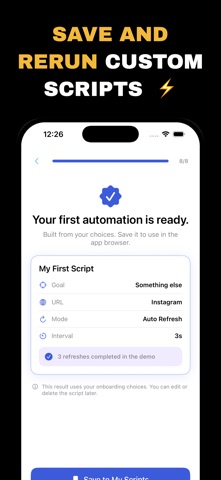
- Save Click Sequence: Save custom click profiles, tap macro recorder patterns, and clicker shortcut setups for instant one tap replay.
Core Features:
- Single target auto press mode to click same spot repeatedly
- Multi target clicker and multiple target tapper for advanced workflows
- Fast auto clicker with rapid clicking, high tap speed, and CPS counter
- Tap timer, countdown clicker, and tap repeater with custom loop count
- Automatic screen tap engine with random delay to simulate natural human touch
- Gesture recorder and touch simulator for automated swipe and scroll routines
- Screen auto clicker overlay designed to keep screen awake during active runs
- Local processing protecting user privacy without unnecessary device permissions
- Premium Automation Suite (Premium): Unlock unlimited touch targets, advanced tap macro sequences, and saved click profiles with our auto tap subscription plan.
Simple Setup:
1. Open Auto Click Tap and enable required accessibility permissions.
2. Choose single point or multi point click sequence tool.
3. Configure target coordinates, click speed, and auto tap interval.
4. Activate the floating control panel and tap start to begin automated tapping.
Privacy and Transparency:
Your privacy is fully protected. Auto Click Tap operates strictly on your local device without harvesting or transmitting personal data.
Say goodbye to tedious tapping. Download Auto Click Tap now and upgrade your screen automation experience.
=========
Privacy: https://br-appsydigital-auto-click-tap.freeprivacypolicy.app/privacy-policy
Terms: https://br-appsydigital-auto-click-tap.freeprivacypolicy.app/terms-of-service