

Auto Paste Keyboard+Clipboard
Auto Paste Keyboard+Clipboard is made and published by Pavlo Moiseienko. AppBrain is an independent app data site and isn't affiliated with Pavlo Moiseienko. The app name, icon, screenshots and description belong to Pavlo Moiseienko and are shown as published on the App Store.
AppBrain's verdict
- Rating on App Store
- 4.29
- 49 ratings
- Last updated
- October 2, 2023
It doesn't have enough ratings yet to judge what users think.
Rankings
App Store top chartsApp Store Rankings for Auto Paste Keyboard+Clipboard
Competitors
Similar apps and more from Pavlo MoiseienkoAlternatives to Auto Paste Keyboard+Clipboard





More from Pavlo Moiseienko

Releases
Updates seen on the App Store- Version
- 1.1.2.
- Launched
- December 2021
No changelog data
User feedback
Ratings and reviews on the App StoreComments on Auto Paste Keyboard+Clipboard for iOS
We don't have enough comments to show example comments. Please check back later.
Technology
Found in the app by AppBrain- Price
- Free
- App size
- 31.8 MB
- Content rating
- Everyone
Technologies used by Auto Paste Keyboard+Clipboard
About the app and developer
About Auto Paste Keyboard+Clipboard
Auto Paste Keyboard+Clipboard is an utilities app developed by Pavlo Moiseienko.
User Ratings
Auto Paste Keyboard+Clipboard is rated 4.29 out of 5 stars. The rating is based on 49 ratings.
App Information
Auto Paste Keyboard+Clipboard is freely available from the App Store. The app size is 31.76 MB. The latest version available is 1.1.2. The last update was on October 2, 2023.
Technical Requirements
The app has a content rating of Everyone. The app has been available on the App Store since December 2021.
Developer information for Pavlo Moiseienko
Address:
Frequently asked questions about Auto Paste Keyboard+Clipboard
Is Auto Paste Keyboard+Clipboard free?
Yes. Auto Paste Keyboard+Clipboard is free on the App Store.
Is Auto Paste Keyboard+Clipboard still available?
Yes. Auto Paste Keyboard+Clipboard is on the App Store, and the last update we saw was on October 2, 2023.
How large is Auto Paste Keyboard+Clipboard?
Auto Paste Keyboard+Clipboard is 31.76 MB.
Is Auto Paste Keyboard+Clipboard suitable for children?
App Store rates the content of Auto Paste Keyboard+Clipboard as suitable for everyone.
How do people rate Auto Paste Keyboard+Clipboard?
Auto Paste Keyboard+Clipboard scores 4.29 out of 5 stars, from 49 ratings on the App Store.
Who made Auto Paste Keyboard+Clipboard?
Auto Paste Keyboard+Clipboard was developed by Pavlo Moiseienko. It is listed in the utilities category on the App Store.
What are the best alternatives to Auto Paste Keyboard+Clipboard?
People looking at Auto Paste Keyboard+Clipboard also look at these utilities apps: Text Repeater Generator, Text Repeater - Repeat Text 1K, ReText: repeat text repeater, Emoji Bomber & Text Repeater, Text Tool - Text Repeater.
Store listing
By Pavlo Moiseienko, from the App Store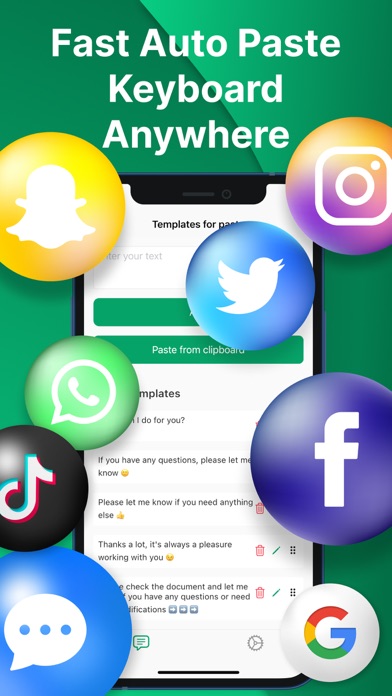
Description by Pavlo Moiseienko Written by the developer, not by AppBrain. Click to read.
Too often we use the same daily phrases in our text messages! Now, with the help of "Fast Auto Paste Keyboard+Clipboard", you can easily add frequently used text or phrases to templates for the purpose of quick insertion them into new messages!
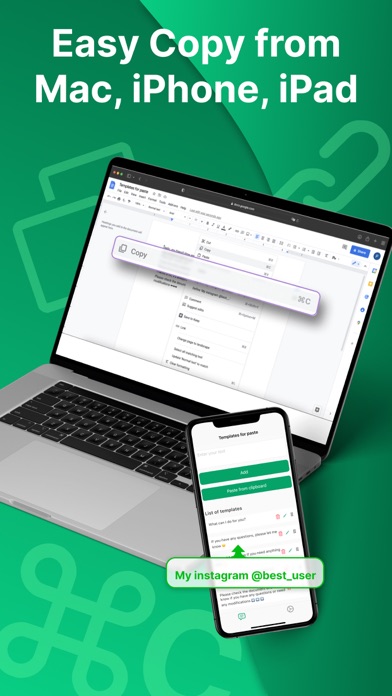
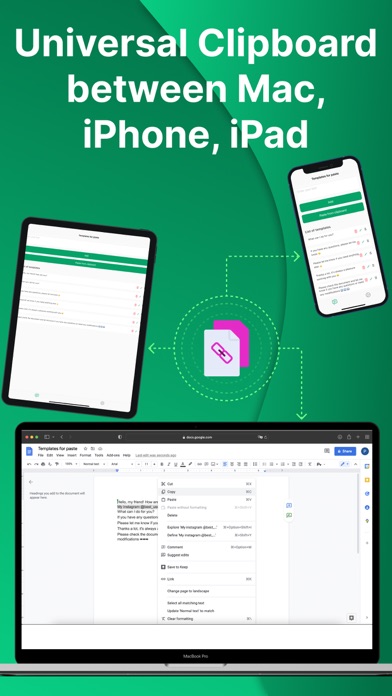
The main feature (uniqueness) of our app is the ability to quickly and easily create text templates for immediate paste on any of your devices: Mac, iPhone, iPad, or iPod.
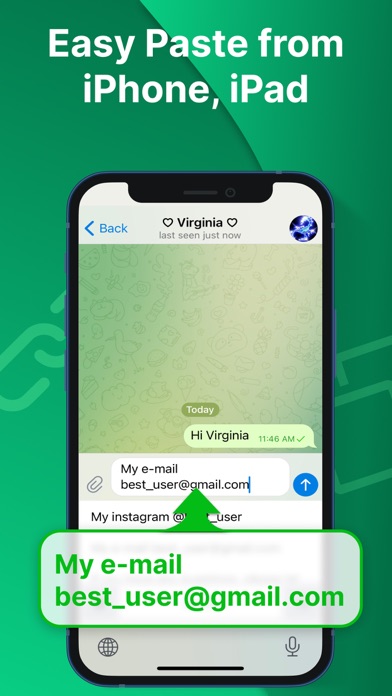
It provides you with the ability to create your own templates for text paste on Mac, iPhone, iPad, or iPod as well as easily and conveniently add it to your iPhone, Pad, or iPod using the Universal Clipboard.
Set up Universal Clipboard:
https://support.apple.com/en-us/HT209460
How to use our useful personalized clipboard tool?
By using our app, you can repeat the message multiple times.
You can easily type answers to the most frequently asked questions using Fast Auto Paste Keyboard+Clipboard.
No longer need to type messages everytime you have to share something urgent.
You can also use it to type links for websites, social media as well as send prompt responses (with memes, gifs, hashtags), comments, other notes and sentences.
Send text message again by tapping one button on your keyboard
Create text shortcuts that will save your time.
Reply to the specific message with a single tap.
Best creator for iPhone texting templates.
App allows you to have unlimited entries ready for messages to repeat.
Send private text messages or share through any chats, sms, messengers (Snapchat, Whatsapp, Imessage), social media (Facebook, Instagram, Linkedin, Tiktok, Youtube, Twitter).
Ready-made customer service response templates for business on Amazon, Etsy etc.
Canned response templates for dating on Tinder, Hinge, Badoo etc.
Undoubtly, this app is one of the best message repeaters that allows you to send the same messages repeatedly with no effort.
Download our helpful app (Fast Auto Paste Keyboard+Clipboard), and don’t forget to share it with your friends on social media or messengers.
The app contains the following subscription options:
- 1 month membership costs from $1.99.
- 3 month membership costs from $4.99.
- 1 year membership costs from $9.99 after 7 days free trial.
- The price is for US customers. Pricing in other countries may vary and actual charges may be converted to your local currency depending on the country of residence.
- Payment will be charged to iTunes Account at confirmation of purchase.
- Subscription automatically renews unless auto-renew is turned off at least 24-hours before the end of the current period.
- Account will be charged for renewal within 24-hours prior to the end of the current period, and identify the cost of the renewal.
- Subscriptions may be managed by the user and auto-renewal may be turned off by going to the user’s Account Settings after purchase.
- Any unused portion of the free trial will be forfeited when the user purchases a subscription.
Privacy Policy
https://docs.google.com/document/d/1I2XUMqL6SRZuCQPdB60aHiqeBWo_IP4dXNkO_5UvlbM/edit?usp=sharing
Terms of Use
https://docs.google.com/document/d/1s2v9kOAPkEUnl9pV9QMF-GSqJMwRvjGB--phLNFNcxY/edit?usp=sharing