

Auto Proximity Detection Pro
Auto Proximity Detection Pro is made and published by 方 沈. AppBrain is an independent app data site and isn't affiliated with 方 沈. The app name, icon, screenshots and description belong to 方 沈 and are shown as published on the App Store.
AppBrain's verdict
- Last updated
- April 23, 2024
Rankings
App Store top chartsApp Store Rankings for Auto Proximity Detection Pro
Competitors
Similar apps and more from 方 沈Alternatives to Auto Proximity Detection Pro


More from 方 沈


Releases
Updates seen on the App Store- Version
- 5.0.5
- Launched
- June 2016
No changelog data
User feedback
Ratings and reviews on the App StoreComments on Auto Proximity Detection Pro for iOS
We don't have enough comments to show example comments. Please check back later.
Technology
Found in the app by AppBrain- Price
- $0.99
- App size
- 3.72 MB
- Content rating
- Everyone
Technologies used by Auto Proximity Detection Pro
About the app and developer
About Auto Proximity Detection Pro
Auto Proximity Detection Pro is an utilities app developed by 方 沈.
What is the rating of Auto Proximity Detection Pro?
Auto Proximity Detection Pro has no ratings yet.
Is Auto Proximity Detection Pro free?
Auto Proximity Detection Pro costs $0.99. The app size is 3.72 MB. The latest version available is 5.0.5. The last update was on April 23, 2024.
What are the requirements for Auto Proximity Detection Pro?
The app has a content rating of Everyone. The app has been available on the App Store since June 2016.
Developer information for 方 沈
Address:
Frequently asked questions about Auto Proximity Detection Pro
Is Auto Proximity Detection Pro free?
No. Auto Proximity Detection Pro costs $0.99 on the App Store.
Is Auto Proximity Detection Pro still available?
Yes. Auto Proximity Detection Pro is on the App Store, and the last update we saw was on April 23, 2024.
How large is Auto Proximity Detection Pro?
Auto Proximity Detection Pro is 3.72 MB.
Is Auto Proximity Detection Pro suitable for children?
App Store rates the content of Auto Proximity Detection Pro as suitable for everyone.
Who made Auto Proximity Detection Pro?
Auto Proximity Detection Pro was developed by 方 沈. It is listed in the utilities category on the App Store.
What are the best alternatives to Auto Proximity Detection Pro?
People looking at Auto Proximity Detection Pro also look at these utilities apps: TI:ME, RCS iPush, Checklist Widget - Check List, Turns Counter (Magnetic), Timer 555 Calculator.
Store listing
By 方 沈, from the App Store

Description by 方 沈 Written by the developer, not by AppBrain. Click to read.
This App is developed for the situations above. It depends on the Proximity Sensor in iPhone. The proximity Sensor is located at the top part of the screen of iPhone, the left side of front camera.
We need to use the following two special actions:
1. Cover+Left: Cover the top part of the iphone's screen and left.
2.Hold: Cover the top part of the iphone's screen, wait for a longer time, at least ten seconds and finally left.
We could cover the screen by our hands, our clothes, our arms, our face,our body, or our books.
For talking the name of location, the iPhone need to connect the internet
Usage:
When we tap the cover button, the App will be in the covering status. When we tap the hold button, the App will be in the holding status.
In the covering status, if we take photos (default eight photos), record video, record sound, play sound and talk notes, we need to cover and left the top of the screen first, then the job will start, after at least seven seconds, we could cover again to stop the job.
In the holding status, if we take photos (default eight photos), record video, record sound, play sound and talk notes, we need to cover the top of the screen first, without leaving, then the job will start, when we want to stop the job, we need to left.
Tap the count button, the talking counter will be launched.Just cover the screen, the Talking counter could help us to count the number by talking in English.
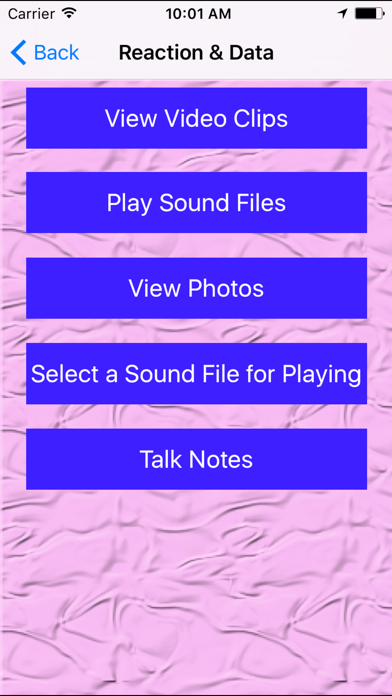
Tap the menu button at the bottom left corner, the menu will be displayed. This menu includes five items.
1 View Video Clips.
2 Play Sound files. In this view, we could play sound , delete sound files and rename the file.
3 View Photos. Tap this item, we could see the photo list with the small photo preview. When we tap the photo item, this view will close.
4 Select a sound file for playing. Select the sound file for the playing. The sound files includes the file record by the recording reaction or the sound files imported from the iTune file sharing.
5 Talk Notes. Edit and Add the text notes.
Solution Examples
Solution 1: When we are walking in darkness, turn on or turn off the flash light quickly and frequently.
Step 1: Launch this App.
Step 2: Select the cover button.
Step 3: Select the flash light button
Step 4: Start to walk as usual.
Step 5: If you decide to turn on the light ,then make the iPhone screen close to your clothes and left.If you decide to turn off the light ,then make the iPhone screen close to your clothes and left again.
Solution 2: Make the app talk the current location while we are walking.
Step 1: Launch this App.
Step 2: Select the cover button.
Step 3: Select the location button
Step 4: Start to walk as usual.
Step 5: If you need to listen the talking of the current location ,then make the iPhone screen close to your clothes and left the screen from your clothes.The app will talk the information about the location.
Solution 3: Record the sound while studying in Classroom
Step 1: Launch this App.
Step 2: Confirm already tap the Record Sound button.
Step 3: Select the cover button.
Step 4: Put the iPhone on your desk
Step 5: If you decide to record the sound, then put your hand on the top left corner of the iPhone screen, then left your hand
Step 6: When you want to stop recording, just put your hand again on the top left corner and left.