



AppBrain's verdict
Established- Rating on App Store
- 4.00
- 17 ratings
- Last updated
- July 23, 2025
- Size
- 15.9 MB
It doesn't have enough ratings yet to judge what users think.
User feedback
Ratings and reviews on the App StoreComments on Auto timestamp & text to video for iOS
We don't have enough comments to show example comments. Please check back later.
Store listing
By SUSAMP INFOTECH, from the App StoreDescription by SUSAMP INFOTECH Written by the developer, not by AppBrain. Click to read.
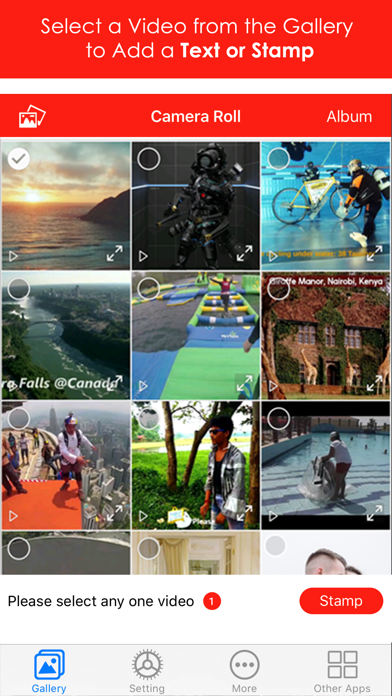
- Add Text or Words as a Caption to your pre-recorded Videos.
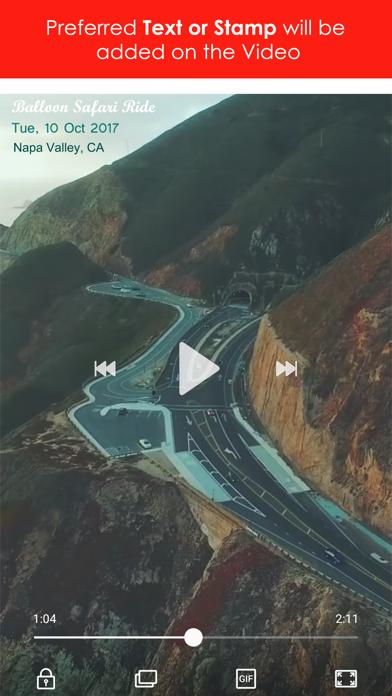
- Add a Customized Date and Timestamp to your pre-recorded Videos.
- Add a Logo Watermark to your pre-recorded Videos.
- Add a Location as GPS Geotag Stamp to your pre-recorded Videos.
• With fascinating variations of:
- Font Color, Positioning, Size and Formats
Videos can be termed as a series of beautiful moving photographs recorded to preserve the memories of that peculiar occasion. And therefore, captioning it would be an ideal concept to do!
Video Stamp Editor offers you a complete package for video stamping where all your requirements to put captions, date and timestamp or texts to videos in any form can be fulfilled with various options as per the theme and background.
- Why Choose Us?
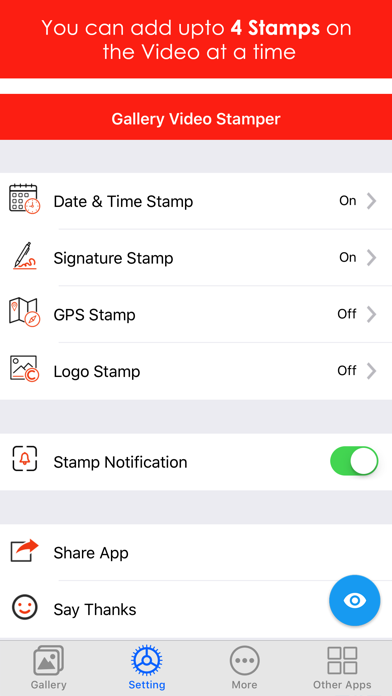
- Only video editor to provide 4 stamps for adding a caption to video.
- Adjustable Text Position, Size, Format and Color
- Live option for previewing stamps look and feel.
- Developed and Managed by Auto Stamper
If you have words on videos that express 3 W’s (When, Where and Why), your moment is built up with unique video memories.
- 4 stamps functionalities:
1) Video Date and Time Stamp:
Aarrgghh!! That moment when you abruptly willed to recall the Date and Time of the video it was shot and you are short on answers :(
Using Video Stamper app, you can quickly insert any customized Date and Timestamp on your pre-recorded video clips conveniently and overcome the hangover of afterthoughts.
Neither it will occupy too larger space nor it will be distracting while viewing the video. Simply put the date and time stamp at any feasible corner of Video with variations of color, text and size combinations and let it speak by itself it’s inception time.
• Perfectly used for:
Video Timestamping, Memories Markup
2) Video Signature Text Stamp:
Willing to add a text or caption to your videos stored in the Gallery? Well, it's much simpler with video stamper editor app. You can write any cluster of words or phrases over the video as per your likings by altering the stamp formats and previewing them for the best look and feel.
An ideal way of inserting a text in the video is to brief it up with moment description and a customized signature is all about summing it up with caption phrases.
- A Text tag on the video will look pleasant when you’ll recall it in future maybe with your Grandchildren :)
• Perfectly used for:
Branding, Video Captioning, Video Text Editing, Make video with Text, Add Titles to Video
3) Video Geotag Stamp:
There are so many activities we perform while traveling to different places like scuba and skydiving, parachuting, sightseeing, etc. and record the videos of those enticing experiences that we enjoyed thoroughly.
How about adding that Location on to the video? Will do wonders :)
Using video stamper, you can quickly add a geotag stamp of your current or any other customized location to videos. The editor will duly work as a GPS Map Camera for you!
Perfectly used for:
Geotagging Video, GPS Map Camera, Event Tagging
4) Video Logo Watermark:
Piracy is evolving heaps and bounds in this technological era and everyone wants to acquire something instead of creating it! Therefore, video needs to be secured with a Logo Watermark to prevent any misuse without your prior permission.
Using video stamper ios application, you can easily add a logo to videos in a flash. It can be anything like a copyright logo, company name, brand name, your business logo and much more which will act as a security layer to all of your videos.
Along with, you can even adjust logo stamp’s position and opacity as per your preference.
• Perfectly used for:
Video Copyright, Add logo to Video, Video Security, Brand Copyright, Video Watermarking
Video stamper is the perfect video editing tool accessible that satisfies all your inserting text requirements in a go. Have a happy and joyful videography!
Safety and technology
Found in the app by AppBrain- Price
- $4.99
- App size
- 15.9 MB
- Content rating
- Everyone
Technologies used by Auto timestamp & text to video
Releases
Updates seen on the App Store- Version
- 1.2.5
- Launched
- December 2017
No changelog data
Alternatives
Similar apps and more from SUSAMP INFOTECHAlternatives to Auto timestamp & text to video


More from SUSAMP INFOTECH





Rankings
App Store top chartsApp Store Rankings for Auto timestamp & text to video
About the app and developer
About Auto timestamp & text to video
Auto timestamp & text to video is a photo & video app developed by SUSAMP INFOTECH.
User Ratings
Auto timestamp & text to video is rated 4.00 out of 5 stars. The rating is based on 17 ratings.
App Information
Auto timestamp & text to video costs $4.99. The app size is 15.89 MB. The latest version available is 1.2.5. The last update was on July 23, 2025.
Technical Requirements
The app has a content rating of Everyone. The app has been available on the App Store since December 2017.
Auto timestamp & text to video is made and published by SUSAMP INFOTECH. AppBrain is an independent app data site and isn't affiliated with SUSAMP INFOTECH. The app name, icon, screenshots and description belong to SUSAMP INFOTECH and are shown as published on the App Store.
Developer information for SUSAMP INFOTECH
Address:
Frequently asked questions about Auto timestamp & text to video
Is Auto timestamp & text to video free?
No. Auto timestamp & text to video costs $4.99 on the App Store.
Is Auto timestamp & text to video still available?
Yes. Auto timestamp & text to video is on the App Store, and the last update we saw was on July 23, 2025.
How large is Auto timestamp & text to video?
Auto timestamp & text to video is 15.89 MB.
Is Auto timestamp & text to video suitable for children?
App Store rates the content of Auto timestamp & text to video as suitable for everyone.
How do people rate Auto timestamp & text to video?
Auto timestamp & text to video scores 4.00 out of 5 stars, from 17 ratings on the App Store.
Who made Auto timestamp & text to video?
Auto timestamp & text to video was developed by SUSAMP INFOTECH. It is listed in the photo & video category on the App Store.
What are the best alternatives to Auto timestamp & text to video?
People looking at Auto timestamp & text to video also look at these photo & video apps: Timestamp Camera EnterprisePro, Timestamp Photo and Video pro, Timesnap: Time & Date Stamper, Auto Time Stamp Photo, Timestamp Camera Pro.