




AppBrain's verdict
- Last updated
- November 1, 2026
- Size
- 93.7 MB
User feedback
Ratings and reviews on the App StoreComments on Auto Video Captions: CapPro for iOS
We don't have enough comments to show example comments. Please check back later.
Store listing
By OLIVE WORKS LLC, from the App StoreDescription by OLIVE WORKS LLC Written by the developer, not by AppBrain. Click to read.
CapPro automatically transcribes your video, syncs every word, styles your captions, translates them, cleans up your audio, and exports your final video in up to 4K.
No typing captions by hand. No complicated editing.
AUTO CAPTIONS
Upload a video and tap Generate.
CapPro automatically creates accurate captions with word-by-word timing and supports 77 languages.
• Automatic captions
• Word-by-word highlights
• Automatic language detection
• 9 highlight effects, including karaoke
• Import SRT and VTT subtitle files
33 PROFESSIONAL CAPTION STYLES
Make your videos look like the content you see on TikTok, Instagram Reels, and YouTube Shorts.
Choose from 33 animated styles including:
• Karaoke
• Bold Caps
• Typewriter
• Neon
• Cinematic
• And more
Customize fonts, colors, highlights, outlines, shadows, glow, backgrounds, animations, position, rotation, and how many words appear at once.
TRANSLATE YOUR VIDEOS INTO 77 LANGUAGES
Reach more viewers without creating another video.
Translate your captions into any of 77 supported languages in a few taps.
Keep your original captions, replace them with the translation, or display two languages at the same time.
Arabic and Hebrew are supported with true right-to-left layouts.
AI VIDEO TOOLS INCLUDED
CapPro gives you more than captions.
• Remove background noise
• Enhance voice clarity
• Automatically find and remove dead air
• Replace your background with AI
• Blur your background
• Create a green-screen effect
• Add music
• Automatically lower music while you speak
• Add your own logo
EDIT EVERYTHING BEFORE YOU EXPORT
Trim and split your video, adjust caption timing, move captions, change styles, and preview exactly how your final video will look.
What you see in CapPro is what you get in the export.
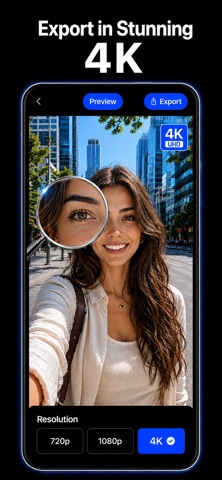
EXPORT UP TO 4K
Create videos for any platform:
• 9:16 for TikTok, Reels and Shorts
• 4:5 for social posts
• 1:1 square
• 16:9 landscape
• Original format
Export in 480p, 720p, 1080p or 4K 2160p.
You can also export your captions separately as SRT, VTT or TXT.
NO ACCOUNT REQUIRED
No sign-up.
No email.
No password.
Your projects stay on your device. Only the audio needed to generate captions is processed and deleted once your captions are ready.
MADE FOR CREATORS WHO WANT TO MOVE FAST
CapPro is built for creators, businesses, influencers, podcasters, marketers, coaches, and anyone who wants professional videos without spending hours editing captions manually.
Generate captions.
Style them.
Translate them.
Clean up your audio.
Export in 4K.
All in one app.
Download CapPro and turn your next video into polished, captioned content in minutes.
SUBSCRIPTION TERMS
CapPro Pro is an auto renewing subscription and is required to use the app.
Plans (US pricing, shown in the app before you buy):
- CapPro Pro Monthly: $9.99 per month
- CapPro Pro 6 Months: $39.99 every 6 months
- CapPro Pro Yearly: $59.99 per year, with a 3 day free trial for new subscribers
Payment is charged to your Apple ID account at confirmation of purchase, or when the free trial ends. Subscriptions renew automatically unless cancelled at least 24 hours before the end of the current period. Manage or cancel in your Apple ID account settings. Fair use limits apply to AI captioning and translation.
Privacy Policy: https://cappro.barood.cc
Terms of Use (EULA): https://www.apple.com/legal/internet-services/itunes/dev/stdeula/
Safety and technology
Found in the app by AppBrain- Price
- Free
- App size
- 93.7 MB
- Content rating
- Everyone
Technologies used by Auto Video Captions: CapPro
Releases
Updates seen on the App Store- Version
- 1.2
- Launched
- October 2026
No changelog data
Alternatives
Similar apps and more from OLIVE WORKS LLCMore from OLIVE WORKS LLC

Rankings
App Store top chartsApp Store Rankings for Auto Video Captions: CapPro
About the app and developer
About Auto Video Captions: CapPro
Auto Video Captions: CapPro is a photo & video app developed by OLIVE WORKS LLC.
User Ratings
The app has no ratings yet.
App Information
Auto Video Captions: CapPro is freely available from the App Store. The app size is 93.75 MB. The latest version available is 1.2. The last update was on November 1, 2026.
Technical Requirements
The app has a content rating of Everyone. The app has been available on the App Store since October 2026.
Auto Video Captions: CapPro is made and published by OLIVE WORKS LLC. AppBrain is an independent app data site and isn't affiliated with OLIVE WORKS LLC. The app name, icon, screenshots and description belong to OLIVE WORKS LLC and are shown as published on the App Store.
Developer information for OLIVE WORKS LLC
Address: