AppBrain
AppBrain
  • Apps
  • Apps being viewed right now Trending apps today Most popular apps All-time most installed apps Top rated apps iPhone and iPad apps
  • Intelligence ▾
    Intelligence overview → Track any Android app or your whole market
    Track & analyze
    Keyword Tracker & OptimizerTrack & improve Play rankings App Performance ReportOne-off PDF for any app StatisticsFree Android & Play market stats
    Promote your app
    Featured Apps App Links
  • Intelligence
  • Pricing
  • Dashboard
  • Sign up
  • Log in
App Store Apps > Productivity > AutoSignMark: PDF Assistant
App profile & analytics · Productivity · Data updated 2026-10-06
AutoSignMark: PDF Assistant icon

AutoSignMark: PDF Assistant

by CHUNG CHENG CHIU · Free · Version 2.1.1
Availability On the App Store since June 2026 ↗
Rating on App Store
–
Rating
–
0 reviews
Best rank
–
not in the top lists
Last updated
August 5, 2026
2.1.1

AutoSignMark: PDF Assistant is made and published by CHUNG CHENG CHIU. AppBrain is an independent app data site and isn't affiliated with CHUNG CHENG CHIU. The app name, icon, screenshots and description belong to CHUNG CHENG CHIU and are shown as published on the App Store.

About AutoSignMark: PDF Assistant

AutoSignMark: PDF Assistant is a productivity app developed by CHUNG CHENG CHIU.

User Ratings

The app has no ratings yet.

App Information

AutoSignMark: PDF Assistant is freely available from the App Store. The app size is 13.70 MB. The latest version available is 2.1.1. The last update was on August 5, 2026.

Technical Requirements

The app has a content rating of Everyone. The app has been available on the App Store since June 2026.

Description by CHUNG CHENG CHIU (from the App Store)
AutoSignMark is a fast, private PDF editor for iPhone, iPad, and Mac. Sign documents, mark them up by hand or with text, stamp your
signature, merge files, and save — all on device, with no account required.

Requires iOS/iPadOS 17.6 or later, or macOS 14.6 or later. One purchase unlocks all three platforms with the same Apple ID.

FREE TO USE
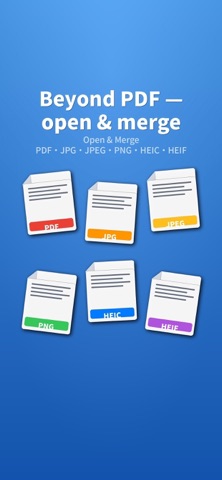
• Open and view PDF, JPG, PNG, and HEIC files
• Open password-protected PDFs (enter the password to unlock)
• Zoom, rotate, and navigate pages
• Paste a URL to download and open a PDF
• Scan documents with the camera (iPhone/iPad)

PRO FEATURES
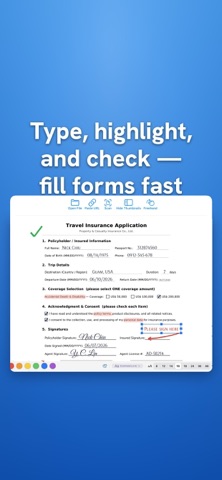
• Freehand drawing with adjustable color and thickness (Apple Pencil supported on iPad)
• Add text boxes with custom color and size
• Save and reuse your signature; import an image as a stamp with automatic background removal
• Eraser to remove annotations
• Markup Presets: save a markup layout once and apply it to similar documents
• Merge multiple PDFs and photos into one file; convert photos to PDF
• Save (overwrite) or Save As (export a clean, password-free copy)
• Export pages as JPG images
• Quick Passwords: store frequently used passwords and auto-try them on encrypted PDFs
• Export and import your templates and signatures as a backup

PRIVATE BY DESIGN
AutoSignMark does not collect, track, or sell any data. Your files, signatures, and settings stay on your device. There is no
analytics, no advertising, and no third-party SDKs. The app connects to the internet only when you explicitly download a PDF.

PRICING
Start with a 7-day free trial that unlocks all Pro features. After the trial, keep Pro with an Annual subscription or a one-time
Lifetime purchase. Free viewing features remain available without a purchase.

https://www.apple.com/legal/internet-services/itunes/dev/stdeula/

The developer provides a software tool only and does not participate in,
monitor, or endorse any specific use by the user. The user bears sole
responsibility for any dispute or liability arising from improper use.
Stamps and signatures produced by this app are image files and are not
electronic or digital signatures under applicable law.
Show more Show less

Screenshots

AutoSignMark: PDF Assistant Screenshot 1 of 9
AutoSignMark: PDF Assistant Screenshot 2 of 9
AutoSignMark: PDF Assistant Screenshot 3 of 9
AutoSignMark: PDF Assistant Screenshot 4 of 9
AutoSignMark: PDF Assistant Screenshot 5 of 9
AutoSignMark: PDF Assistant Screenshot 6 of 9
AutoSignMark: PDF Assistant Screenshot 7 of 9
AutoSignMark: PDF Assistant Screenshot 8 of 9
AutoSignMark: PDF Assistant Screenshot 9 of 9
Screenshots by CHUNG CHENG CHIU, from the the App Store listing
Official page on the App Store

Alternatives to AutoSignMark: PDF Assistant

BulkCert: Certificate Maker icon BulkCert: Certificate Maker
Furkan Alcik
0.0
Free
PDF Fill & Sign Editor icon PDF Fill & Sign Editor
ZENBYTE DIJITAL TEKNOLOJILER LIMITED SIRKETI
0.0
Free
BeeCamera icon BeeCamera
Synology Inc.
0.0
Free
OutCheck: Ready to Go List icon OutCheck: Ready to Go List
子阳 范
0.0
Free
振興電子簽名 icon 振興電子簽名
Cheng Hsin General Hospital
0.0
Free
業務人脈王 icon 業務人脈王
賀柏企管科技顧問股份有限公司
0.0
Free
Vital CRM icon Vital CRM
Galaxy Software Services Corporation
0.0
Free
Jobdone icon Jobdone
Pyramius
0.0
Free

More from CHUNG CHENG CHIU

Whisdom — Daily Chinese Wisdom icon Whisdom — Daily Chinese Wisdom
CHUNG CHENG CHIU
0.0
Free

Changelog of AutoSignMark: PDF Assistant

No changelog data

Developer information for CHUNG CHENG CHIU

CHUNG CHENG CHIU

Address:

Share AutoSignMark: PDF Assistant

Comments on AutoSignMark: PDF Assistant for iOS

We don't have enough comments to show example comments. Please check back later.

App Store Rankings for AutoSignMark: PDF Assistant

This app is not ranked

Technologies used by AutoSignMark: PDF Assistant

Frequently asked questions about AutoSignMark: PDF Assistant

Is AutoSignMark: PDF Assistant free?

Yes. AutoSignMark: PDF Assistant is free on the App Store.

Is AutoSignMark: PDF Assistant still available?

Yes. AutoSignMark: PDF Assistant is on the App Store, and the last update we saw was on August 5, 2026.

How large is AutoSignMark: PDF Assistant?

AutoSignMark: PDF Assistant is 13.70 MB.

Is AutoSignMark: PDF Assistant suitable for children?

App Store rates the content of AutoSignMark: PDF Assistant as suitable for everyone.

Who made AutoSignMark: PDF Assistant?

AutoSignMark: PDF Assistant was developed by CHUNG CHENG CHIU. It is listed in the productivity category on the App Store.

What are the best alternatives to AutoSignMark: PDF Assistant?

People looking at AutoSignMark: PDF Assistant also look at these productivity apps: BulkCert: Certificate Maker, PDF Fill & Sign Editor, BeeCamera, OutCheck: Ready to Go List, 振興電子簽名.

Popular Productivity Apps Today's trending apps Top new apps Apps other people are watching Price drops on Google Play
BulkCert: Certificate Maker icon BulkCert: Certificate Maker
PDF Fill & Sign Editor icon PDF Fill & Sign Editor
BeeCamera icon BeeCamera
OutCheck: Ready to Go List icon OutCheck: Ready to Go List
振興電子簽名 icon 振興電子簽名
業務人脈王 icon 業務人脈王
Vital CRM icon Vital CRM
Jobdone icon Jobdone
Overview Alternatives Reviews Rankings Technology
AppBrain Intelligence premium content

Subscribe now to get full and unlimited access to AppBrain Intelligence. You'll have access to:

  • App Intelligence dashboard (performance timeline, competitor comparison, country rankings, insight cards)
  • Detailed ranking data per app
  • Full timeline per developer
  • Device market shares data per country
  • Unlimited keyword tracking
1 Month

$75/mo
(billed every month)

SAVE 0%
Subscribe
3 Months

$65/mo
($195 billed every 3 months)

SAVE 13%
Subscribe
1 Year

$57.50/mo
($690 billed every year)

SAVE 23%
Subscribe
Each subscription will automatically renew 3 days before the expiration date for the same time period. Subscriptions can be cancelled at any time before the renewal.

AppBrain is an app data site, we track rankings, ratings, installs for all apps and games on Google Play and the App Store. AppBrain doesn't host app files or APKs, all install links go directly to the official store. All trademarks are owned by their respective owners.

More apps

  • Top Android apps being viewed
  • MoboDrama - AI Comic Dramas Android App
  • ToyJoy Android App
  • Photorealism: Grid Method stats

App statistics

  • Android statistics
  • Google Play Developer stats
  • Trending Android Apps
  • Trending iOS apps
  • Top popular Apps
  • Buy the best Android phone
  • Buy & sell app businesses

About AppBrain

  • Contact
  • Privacy
  • Documentation
  • DMCA takedowns
  • Articles
  • Blog
  • Android Interstitial Ads: Best practices to optimize your app's earnings
© 2010-2026 - AppBrain