

AVCommander is made and published by Alex Astafew. AppBrain is an independent app data site and isn't affiliated with Alex Astafew. The app name, icon, screenshots and description belong to Alex Astafew and are shown as published on the App Store.
AppBrain's verdict
- Last updated
- June 19, 2026
- Size
- 2.77 MB
User feedback
Ratings and reviews on the App StoreComments on AVCommander for iOS
We don't have enough comments to show example comments. Please check back later.
Store listing
By Alex Astafew, from the App Store


Description by Alex Astafew Written by the developer, not by AppBrain. Click to read.
AVCommander is a dynamic control application designed to interface directly with professional AV equipment over IP networks. Rather than relying on pre-programmed logic or third-party control processors, the app generates UI on-the-fly based on added devices.
KEY FEATURES
Dynamic UI Generation
The interface is built automatically from your devices. Add any device, and the app creates the appropriate controls — power buttons, volume sliders, input selectors, and more.
Scene Management
Create scenes to execute multiple commands with a single tap. Configure "All On" to power up your entire system, or "All Off" for shutdown. Add any number of commands to each scene.
Command Automation
Set repeat timers for any button (0.5 to 3600 seconds). Perfect for automated presentations, looped content playback, or scheduled commands.
UI Password Protection
Secure your interface with a 6-digit password. Use with Guided Access to prevent app exit and disable Edit Mode for end users. Recommended for installed systems.
17 Languages
The app supports 17 languages, making it accessible to users worldwide.
Dark & Light Themes
Comfortable interface in any environment. Dark theme for dimly lit control rooms, light theme for bright spaces.
Screen Rotation
The UI adapts automatically to any orientation. Rotate your device and the controls adjust instantly.
SUPPORTED DEVICE CATEGORIES
Audio DSP Processors: Volume control, mute, recall, and preset management
Video Matrix: HDMI matrices, seamless switches, multiviewers, and scalers
Video Wall: Processors, LED screen controllers, projection systems, TV panels
PTZ Cameras: VISCA protocol, preset recall, and tracking control
VCS Codecs: API command support for video conferencing systems
Congress Systems: Microphone control, chairman side, active mic management
Lighting & Automation: Light control systems, motorized shades, blinds
Custom Devices: Digital signage players, any TCP/IP controllable device with API support
SUPPORTED CONTROL PROTOCOLS
TCP, UDP, Telnet, HTTP, JSON-RPC, WebSocket, TCP Server (receive commands from equipment)
DRIVER LIBRARY
Download ready-made configurations for popular devices from the built-in driver library. Drivers are automatically updated and added via GitHub repository. Simply download the required driver and import it into the app with one tap.
FULL SYSTEM CONFIGURATION
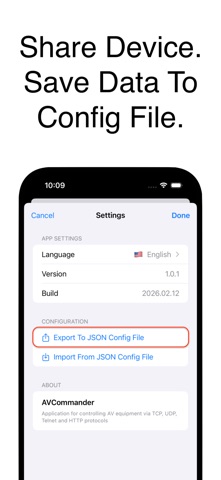
Download complete equipment configurations with full command sets to your device. Share entire room configurations with colleagues. With JSON import and export, you can load, save, or transfer the complete configuration of multiple devices at once. Perfect for replicating settings across projects with identical equipment.
BRAND COMPATIBILITY
Barco, Biamp, BrightSign, Crestron, Kramer, NEC, Novastar, Panasonic, Sony, Spinetix, Televic, TVOne and others
STANDARTS
PJLink, VISCA and others
COMMAND MANAGEMENT
Manual device addition with IP address and port configuration
Base command sets for each device type
Create custom commands — buttons, sliders, toggles
Bulk import and export via JSON files
Driver library with ready-made configurations
Safety and technology
Found in the app by AppBrain- Price
- Free
- App size
- 2.77 MB
- Content rating
- Everyone
Technologies used by AVCommander
Releases
Updates seen on the App Store- Version
- 1.1.1
- Launched
- March 2026
No changelog data
Rankings
App Store top chartsApp Store Rankings for AVCommander
About the app and developer
About AVCommander
AVCommander is an utilities app developed by Alex Astafew.
User Ratings
The app has no ratings yet.
App Information
AVCommander is freely available from the App Store. The app size is 2.77 MB. The latest version available is 1.1.1. The last update was on June 19, 2026.
Technical Requirements
The app has a content rating of Everyone. The app has been available on the App Store since March 2026.
Developer information for Alex Astafew
Address: