AVer Control Panel is an overall app developed by AVer Information Inc..
How many times has AVer Control Panel been downloaded?
What is the rating of AVer Control Panel?
AVer Control Panel is rated 3.00 out of 5 stars, based on 4 ratings.
Is AVer Control Panel free?
AVer Control Panel is free to download. The APK download size is 30.29 MB. The latest version available is 1.2.1042.0. The last update was on October 8, 2025.
What are the requirements for AVer Control Panel?
The app has a content rating of Everyone. The app has been available on Google Play November 2020.
Description
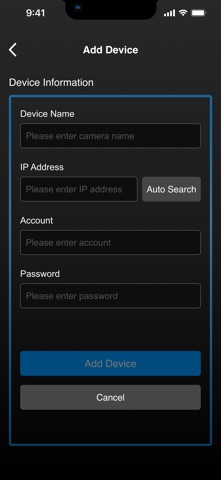
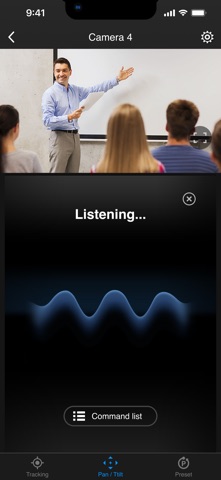
AVer Control Panel puts you in charge of PTZ camera and MT box controls in an easy user interface within your internal network. It gives you access to live video and audio streams from AVer Pro AV, DL Series cameras and MT boxes on an iPad or iPhone, and it allows you to control the camera’s capture, PTZ functions and MT box profiles, even enables voice command which provides hands-free experience. You can also enable or disable tracking features like Presenter, Zone, or Hybrid mode, store and call up to 256 presets. With the AVer Control Panel, there’s no need for complicated controllers, heavy software applications, or professional AV operators to run your AVer PTZ cameras and MT boxes.
Product Features - Instantly find and connect to available AVer Professional Auto Tracking and PTZ Cameras. - Voice control supported, control your AVer cameras handsfree. - Currently supports only one camera connection at a time.
PTZ and Tracking Controls - Capture camera images and save them to the device album. - Pan, tilt, and zoom your camera to capture different areas of your room. - Adjust the pan/tilt speed, and switch between autofocus and manual focus. - Enable and disable tracking features, including Presenter/Zone/Hybrid Mode, and Click Track. - Save and call up to 256 preset points.
Compatibility - Requires iOS & iPadOS® 9 and later. Compatible with iPad® and iPhone®.
Supported Camera Models -USA TR310/TR311/TR311HN/TR313/TR331/TR333 V0.0.0000.21 and later TR530/TR320/TR530+/TR320+ V0.0.1000.47 and later PTZ310/PTZ310N/PTZ330/PTZ330N V0.0.0000.56 and later DL30 V7.0.0010.13 and later TR313V2 V0.1.0000.18 and later TR333V2/TR333NV2/TR313V2/TR313UV2 V0.1.0000.19 and later PTZ310UV2/PTZ310UNV2/PTZ330UV2/ PTZ330UNV2 V0.0.0000.15 and later MD330 series V1.1.1006.0 and later MD120U 1.1.1003.0 and later TR/211/TR315/TR315N/TR335/TR335N 0.0.0000.12 MT100 0.1.0000.63 and later MT300(N) 0.0.0000.11 and later TR535 0.0.0000.18 or later TR615 V0.0.0000.21 and later
-Non USA PTC310/PTC310U/PTC310H/PTC310N/PTC310UN/PTC310HN V0.0.0000.21 and later PTC330/PTC330N/PTC330U V0.0.0000.21 and later PTC115/PTC500S/PTC115+/PTC500+ V0.0.1000.47 and later PTZ310/PTZ310N/PTZ330/PTZ330N V0.0.0000.56 and later PTZ310UV2/PTZ310UNV2/PTZ330UV2/ PTZ330UNV2 V0.0.0000.15 and later PTC330UV2/PTC330UNV2/PTC330V2/PTC330NV2 V0.1.0000.19 and later DL30 V7.0.0010.13 and later DL10 V7.0.0031.32 and later MD330 series V1.1.1006.0 and later MD120U 1.1.1003.0 and later TR211/TR315/TR315N/TR335/TR335N 0.0.0000.12 MT100 0.1.0000.63 and later MT300(N) 0.0.0000.11 and later TR535 0.0.0000.18 or later TR615 V0.0.0000.21 and late
Visit websites below to get assistance or find user manual:
- Global Download Center: https://www.aver.com/download-center Technical Support: https://www.aver.com/technical-support
- USA Download Center: https://www.averusa.com/pro-av/support/ Technical Support: https://averusa.force.com/support/s/contactsupport
- European Headquarters Download Center: https://www.aver.com/download-center Technical Support: https://www.avereurope.com/technical-support
Each subscription will automatically renew 3 days before the expiration date for
the same time period. Subscriptions can be cancelled at any time before the renewal.