

Aviation Altimeter Pro
Aviation Altimeter Pro is made and published by Emanuel David Weber. AppBrain is an independent app data site and isn't affiliated with Emanuel David Weber. The app name, icon, screenshots and description belong to Emanuel David Weber and are shown as published on the App Store.
AppBrain's verdict
- Last updated
- March 29, 2026
Rankings
App Store top chartsApp Store Rankings for Aviation Altimeter Pro
Competitors
Similar apps and more from Emanuel David WeberMore from Emanuel David Weber


Releases
Updates seen on the App Store- Version
- 1.3
- Launched
- August 2025
No changelog data
User feedback
Ratings and reviews on the App StoreComments on Aviation Altimeter Pro for iOS
We don't have enough comments to show example comments. Please check back later.
Technology
Found in the app by AppBrain- Price
- $2.99
- App size
- 1.94 MB
- Content rating
- Everyone
Technologies used by Aviation Altimeter Pro
About the app and developer
About Aviation Altimeter Pro
Aviation Altimeter Pro is a navigation app developed by Emanuel David Weber.
User Ratings
The app has no ratings yet.
App Information
Aviation Altimeter Pro costs $2.99. The app size is 1.94 MB. The latest version available is 1.3. The last update was on March 29, 2026.
Technical Requirements
The app has a content rating of Everyone. The app has been available on the App Store since August 2025.
Developer information for Emanuel David Weber
Address:
Frequently asked questions about Aviation Altimeter Pro
Is Aviation Altimeter Pro free?
No. Aviation Altimeter Pro costs $2.99 on the App Store.
Is Aviation Altimeter Pro still available?
Yes. Aviation Altimeter Pro is on the App Store, and the last update we saw was on March 29, 2026.
How large is Aviation Altimeter Pro?
Aviation Altimeter Pro is 1.94 MB.
Is Aviation Altimeter Pro suitable for children?
App Store rates the content of Aviation Altimeter Pro as suitable for everyone.
Who made Aviation Altimeter Pro?
Aviation Altimeter Pro was developed by Emanuel David Weber. It is listed in the navigation category on the App Store.
Store listing
By Emanuel David Weber, from the App Store




Description by Emanuel David Weber Written by the developer, not by AppBrain. Click to read.
Aviation Altimeter Pro transforms your iPhone or Apple Watch into a professional barometric altimeter and vertical speed indicator (VSI). This isn't just another GPS app - it uses your device's built-in barometer to measure altitude and vertical speed, just like a real aircraft.
In aviation, pilots rely on barometric pressure for accurate altitude readings, adjusting their altimeter with the local QNH pressure to ensure safe separation from other aircraft. Aviation Altimeter Pro puts this precise control in your hands.
Key Features:
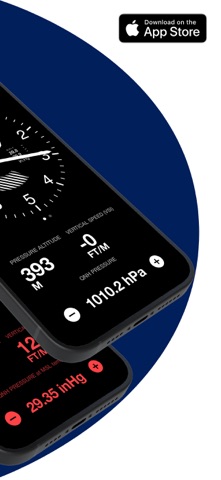
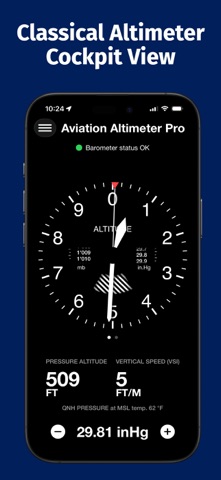
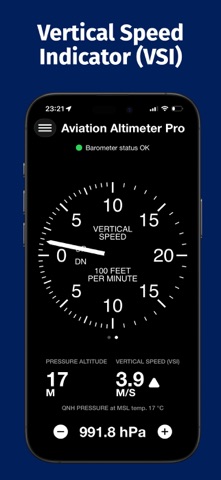
Authentic Cockpit Dials: See your altitude and vertical speed displayed on classic Kollsmann altimeter and analog VSI dials, complete with the crosshatch window for altitudes below 10,000 feet.
Manual & Auto-Calibration: Easily adjust the QNH pressure to match local air traffic control data. Or, use the sophisticated auto-calibration function, which uses GPS altitude and local pressure to set the QNH for you.
ISA & Non-ISA Models: Fine-tune your altitude calculation by applying the International Standard Atmosphere (ISA) model or by manually setting the mean sea level temperature for even greater precision.
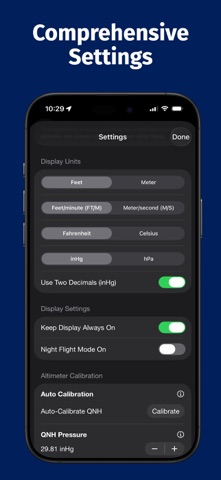
Comprehensive Unit Settings: Customize your display with a full range of units: feet/meters for altitude, feet per minute/meters per second for vertical speed, Fahrenheit/Celsius, and inHg/hPa for pressure.
Night Flight Mode: The dials turn red to preserve your night vision, just like in a real cockpit.
Landscape Mode: View both the altimeter and vertical speed indicator on a single screen for a complete flight instrument panel.
Full Apple Watch App: Get a standalone, classic altimeter and VSI on your wrist, using the watch's own barometer. All settings from the iPhone app, including night flight mode, are synced.
Sensor Fine-Tuning: Compensate for minor inaccuracies in your device's barometer with an easy-to-use offset adjustment. A barometer status indicator warns you if the data is no longer current.
Disclaimer: This application is for entertainment and informational purposes only. It is not a substitute for a certified aircraft altimeter and must not be used for flying. The pressure sensor in your device is not calibrated to aviation standards and is more susceptible to error. Do not rely on this app for flight safety. For pilots, be aware that cockpit cabin pressure is an unreliable data source and does not reflect accurate readings from a static pitot system.