

Avionics Buddy
Avionics Buddy is made and published by Sharif El Fatatry. AppBrain is an independent app data site and isn't affiliated with Sharif El Fatatry. The app name, icon, screenshots and description belong to Sharif El Fatatry and are shown as published on the App Store.
AppBrain's verdict
- Last updated
- October 15, 2026
Rankings
App Store top chartsApp Store Rankings for Avionics Buddy
Releases
Updates seen on the App Store- Version
- 1.5
- Launched
- June 2026
No changelog data
User feedback
Ratings and reviews on the App StoreComments on Avionics Buddy for iOS
We don't have enough comments to show example comments. Please check back later.
Technology
Found in the app by AppBrain- Price
- $3.99
- App size
- 68.1 MB
- Content rating
- Everyone
Technologies used by Avionics Buddy
About the app and developer
About Avionics Buddy
Avionics Buddy is an utilities app developed by Sharif El Fatatry.
User Ratings
The app has no ratings yet.
App Information
Avionics Buddy costs $3.99. The app size is 68.06 MB. The latest version available is 1.5. The last update was on October 15, 2026.
Technical Requirements
The app has a content rating of Everyone. The app has been available on the App Store since June 2026.
Developer information for Sharif El Fatatry
Address:
Frequently asked questions about Avionics Buddy
Is Avionics Buddy free?
No. Avionics Buddy costs $3.99 on the App Store.
Is Avionics Buddy still available?
Yes. Avionics Buddy is on the App Store, and the last update we saw was on October 15, 2026.
How large is Avionics Buddy?
Avionics Buddy is 68.06 MB.
Is Avionics Buddy suitable for children?
App Store rates the content of Avionics Buddy as suitable for everyone.
Who made Avionics Buddy?
Avionics Buddy was developed by Sharif El Fatatry. It is listed in the utilities category on the App Store.
Store listing
By Sharif El Fatatry, from the App Store




Description by Sharif El Fatatry Written by the developer, not by AppBrain. Click to read.
See your aircraft position on the map, monitor altitude, heading, airspeed, ground speed and vertical speed, browse airports, inspect runways, check live airport weather and use visual approach helpers while you fly.
Take on Missions & Challenges and give your flights a destination. Choose from included challenges or download additional mission packs, explore airports around the world and complete each objective by flying there in Microsoft Flight Simulator. Avionics Buddy automatically recognizes your landings, tracks your challenge progress and awards medals as you complete them.
Avionics Buddy is built for sim pilots who want to extend their Microsoft Flight Simulator setup beyond the main screen. Use it as a beautifully designed cockpit display on your desk or as an additional avionics screen in a larger multi-monitor simulator setup. Its adaptive interface makes use of the available screen space across iPhone, iPad and Mac, letting you build your own flight deck using the Apple devices you already own.
Track your current flight with the Trip Computer, including distance, fuel, speed, altitude, wind and temperature. Continue building your Lifetime Logbook with accumulated flight time, takeoffs, landings, distance flown and personal records across all your simulator sessions.
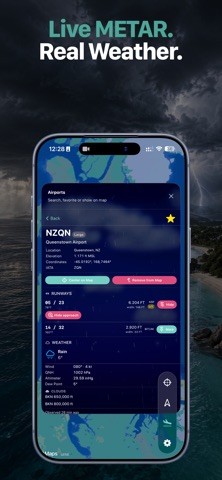
Search more than 80,000 airports, save your favorites, display selected airports on the map, inspect runways and review live weather before departure. Export and import your Airport Library to back up your saved airports or transfer them between your iPhone, iPad and Mac.
Stay connected to your flight, even when Microsoft Flight Simulator is running on another screen.
Key Features
• Missions & Challenges with automatic landing detection, progress tracking and medals
• Downloadable mission packs with detailed mission briefings – https://www.avionicsbuddy.com/missions/
• Live aircraft telemetry from Microsoft Flight Simulator
• Follow-mode map with aircraft position, heading and selectable aircraft icons
• Customizable cockpit gauges with multiple layouts, styles and live Session Gauge metrics
• Trip Computer with live flight statistics for every session
• Lifetime Logbook with cumulative flight time, takeoffs, landings, distance and records
• Awards and medals earned through your flying
• Search over 80,000 airports with favorites and map integration
• Export and import your Airport Library between Apple devices
• Runway approach helpers for visual alignment during simulator arrivals
• Live airport weather with wind, pressure, clouds and current conditions
• Optional cabin sound effects, including seatbelt announcements and other immersive details
• Adaptive layouts across iPhone, iPad and Apple Silicon Mac
• Local network connection through the free Avionics Buddy Bridge for Windows
• No account required
• No cloud telemetry
How it works
1. Start Microsoft Flight Simulator on your Windows PC.
2. Download and run the free Avionics Buddy Bridge for Windows – https://www.avionicsbuddy.com/#bridge
3. Scan the QR code with Avionics Buddy on your iPhone, iPad or Mac.
4. Fly with live telemetry on your second screen.
Avionics Buddy is intended for Microsoft Flight Simulator entertainment use only. It is not designed for real-world navigation, flight training, flight planning or operational aviation use. Avionics Buddy is not affiliated with Microsoft, Asobo Studio, Working Title, OurAirports or any aircraft manufacturer.