
Await Cal Events
Await Cal Events is made and published by Muthuveerappan Alagappan. AppBrain is an independent app data site and isn't affiliated with Muthuveerappan Alagappan. The app name, icon, screenshots and description belong to Muthuveerappan Alagappan and are shown as published on the App Store.
AppBrain's verdict
- Rating on App Store
- 4.88
- 8 ratings
- Last updated
- September 15, 2023
It doesn't have enough ratings yet to judge what users think.
Rankings
App Store top chartsApp Store Rankings for Await Cal Events
Competitors
Similar apps and more from Muthuveerappan AlagappanAlternatives to Await Cal Events


Releases
Updates seen on the App Store- Version
- 1.3.1
- Launched
- January 2023
No changelog data
User feedback
Ratings and reviews on the App StoreComments on Await Cal Events for iOS
We don't have enough comments to show example comments. Please check back later.
Technology
Found in the app by AppBrain- Price
- Free
- App size
- 2.80 MB
- Content rating
- Everyone
Technologies used by Await Cal Events
About the app and developer
About Await Cal Events
Await Cal Events is a productivity app developed by Muthuveerappan Alagappan.
What is the rating of Await Cal Events?
Await Cal Events is rated 4.88 out of 5 stars, based on 8 ratings.
Is Await Cal Events free?
Await Cal Events is free. The app size is 2.80 MB. The latest version available is 1.3.1. The last update was on September 15, 2023.
What are the requirements for Await Cal Events?
The app has a content rating of Everyone. The app has been available on the App Store since January 2023.
Developer information for Muthuveerappan Alagappan
Address:
Frequently asked questions about Await Cal Events
Is Await Cal Events free?
Yes. Await Cal Events is free on the App Store.
Is Await Cal Events still available?
Yes. Await Cal Events is on the App Store, and the last update we saw was on September 15, 2023.
How large is Await Cal Events?
Await Cal Events is 2.80 MB.
Is Await Cal Events suitable for children?
App Store rates the content of Await Cal Events as suitable for everyone.
How do people rate Await Cal Events?
Await Cal Events scores 4.88 out of 5 stars, from 8 ratings on the App Store.
Who made Await Cal Events?
Await Cal Events was developed by Muthuveerappan Alagappan. It is listed in the productivity category on the App Store.
What are the best alternatives to Await Cal Events?
People looking at Await Cal Events also look at these productivity apps: monotasker: tasks & to do list, Special Dates, Countdown - Days Until, Days 2.0, Countdown Me: Event Widgets.
Store listing
By Muthuveerappan Alagappan, from the App Store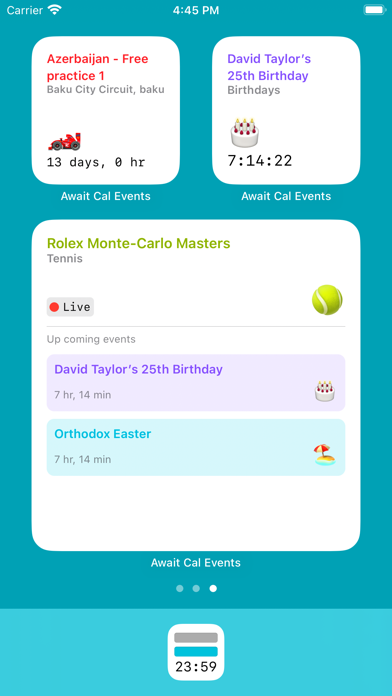



Description by Muthuveerappan Alagappan Written by the developer, not by AppBrain. Click to read.
- The app allows you to create event groups.
- Each group can syncs data from the calendar to populate events.
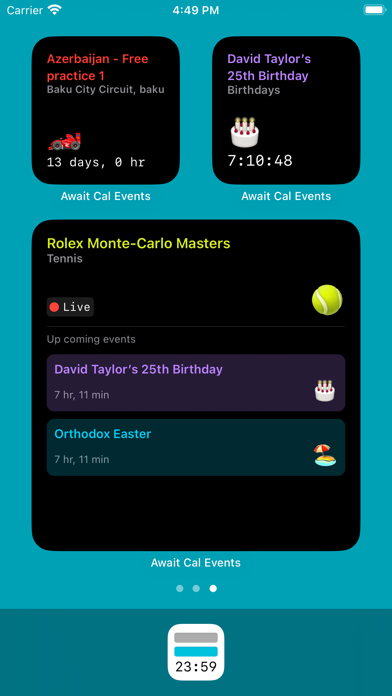
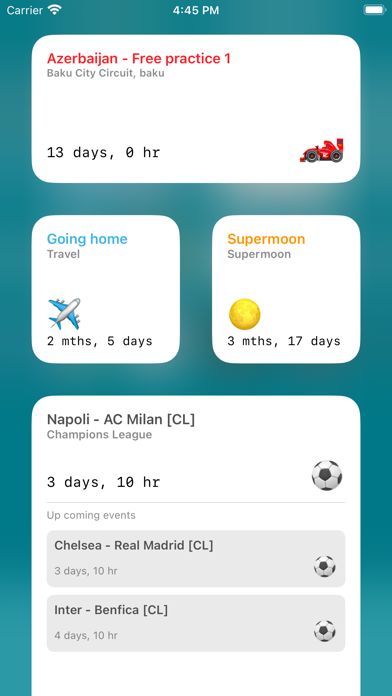
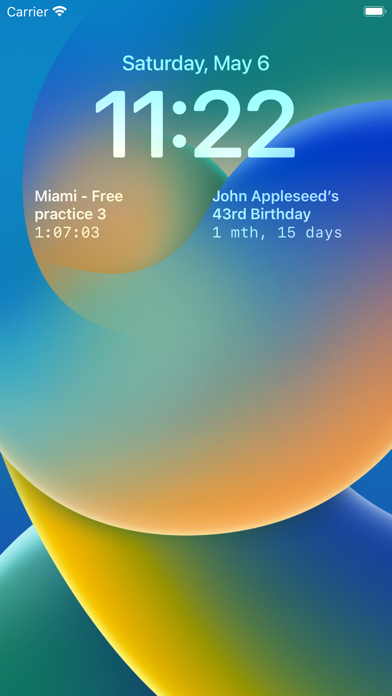
- The groups can be added as widgets showing the count down timer (time / days / months) for the events.
- Turn on notifications for the group to receive notification when an event occurs.
- Syncs data using iCloud across your devices (iPhone / iPad / Mac).
Note: The app doesn't modify the calendar, the calendar is used only to keep events in sync (calendar to app - one way) when the app is open.
Features:
- Widgets can be added to your Home Screen, Today View and Lock Screen (iPhone).
- Events can be pulled from your calendar or added manually.
- Syncs events from the calendar (calendar to app) when the app is open.
- Notifications can be set for each group, all events in the group would be notified.
- Filter events from the calendar based on matching text and Regex.
- Search event titles and locations.
- Find and replace multiple event titles at once using matching text and Regex.
- Uses iCloud to sync data across your devices.
- Supports iPhone, iPad and Mac.
Widget Sizes:
- Small, Medium, Large, Rectangular accessory (iPhone Lock Screen).
How to create a widget:
1. Open the app and create a group by clicking on the + button.
2. The group can either sync from a calendar or you can add events manually to the group.
3. Go to your Home Screen and long press till app icons wiggle.
4. Press the + button on the top left corner of the home screen.
5. Select Await Cal Events.
6. Choose the widget size.
7. Tap outside.
How to configure a widget:
1. Long press on Await Cal Events widget.
2. Tap on Edit Widget.
3. Tap on the group name highlighted in green (accent color).
4. Select one of the group names (default is All).
5. Tap outside to save the configuration.
Tips:
- For your favourite sporting events you could add / subscribe to a calendar using the default iOS Calendar app.
- When Await Cal Events is granted access to your calendar, the app would be able to pull events from that calendar.
- That way you could have count down timer widgets for your favourite sporting events.
Note: The app doesn't modify the calendar, the calendar is used only to keep events in sync (calendar to app - one way) when the app is open.