

AXL Alignment
AXL Alignment is made and published by D'Nyeal Wilson. AppBrain is an independent app data site and isn't affiliated with D'Nyeal Wilson. The app name, icon, screenshots and description belong to D'Nyeal Wilson and are shown as published on the App Store.
AppBrain's verdict
- Best rank
- #55
- Top Paid, Sweden
- Last updated
- October 13, 2026
Rankings
App Store top charts- Highest rank
- #55
- Chart
- Top Paid
- Utilities
- Country
- Sweden
App Store Rankings for AXL Alignment
Top rankings
| Rank | Country | Category | List |
|---|---|---|---|
| 55 | Sweden | Utilities | Top Paid |
Ranking history in Sweden
Releases
Updates seen on the App Store- Version
- 1.7
- Launched
- September 2026
No changelog data
User feedback
Ratings and reviews on the App StoreComments on AXL Alignment for iOS
We don't have enough comments to show example comments. Please check back later.
Technology
Found in the app by AppBrain- Price
- $19.99
- App size
- 10.1 MB
- Content rating
- Everyone
Technologies used by AXL Alignment
About the app and developer
About AXL Alignment
AXL Alignment is an utilities app developed by D'Nyeal Wilson.
What is the rating of AXL Alignment?
AXL Alignment has no ratings yet.
Is AXL Alignment free?
AXL Alignment costs $19.99. The app size is 10.06 MB. The latest version available is 1.7. The last update was on October 13, 2026.
What are the requirements for AXL Alignment?
The app has a content rating of Everyone. The app has been available on the App Store since September 2026.
Developer information for D'Nyeal Wilson
Address:
Store listing
By D'Nyeal Wilson, from the App Store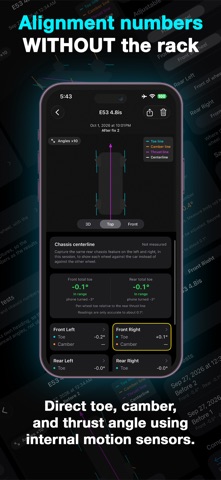


Description by D'Nyeal Wilson Written by the developer, not by AppBrain. Click to read.
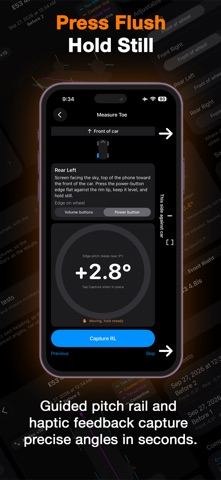
AXL turns your iPhone into a precision alignment tool. Hold it against each wheel and against your chassis, and AXL reads toe, camber, and how your rear axle actually sits on the car — the same angles a shop checks, in your driveway, in minutes.
Why it matters
Bad toe eats tires. A few tenths of a degree off and you're replacing rubber months early, or driving around with a pull you've learned to ignore. AXL shows you exactly where you stand, so you know whether that's a real problem or nothing to worry about — before you spend money finding out the hard way.
How it works
Three quick captures per wheel, walked in order: centerline, toe, camber. AXL tells you when each reading has settled and moves you to the next spot automatically. A full pass — all four wheels — takes just a few minutes.
What you see
Toe and camber for every wheel, plus front and rear axle totals
How your rear axle's thrust line compares to the true chassis centerline
A 3D view that exaggerates the angles so small readings are easy to see at a glance — the numbers on the cards are the real measurement
Color-coded results: green means straight, yellow means it's worth adjusting, red means it's wearing your tires right now
Track it over time
Save tests to named vehicles, add a note like "before adjustment," and pull up any past test later. With two or more saved visits, AXL shows you exactly what changed — every wheel, every axle, side by side.
What you need
Any flat-sided iPhone case works. For the most accurate readings, our free 3D-printable case design (Soon available on our website) holds the phone perfectly flush against the wheel.