

azooKey - Flex Japanese Input
azooKey - Flex Japanese Input is made and published by Keita Miwa. AppBrain is an independent app data site and isn't affiliated with Keita Miwa. The app name, icon, screenshots and description belong to Keita Miwa and are shown as published on the App Store.
AppBrain's verdict
Established- Rating on App Store
- 4.20
- 5 ratings
- Last updated
- September 27, 2026
It doesn't have enough ratings yet to judge what users think.
Rankings
App Store top chartsApp Store Rankings for azooKey - Flex Japanese Input
Competitors
Similar apps and more from Keita MiwaAlternatives to azooKey - Flex Japanese Input





Releases
Updates seen on the App Store- Version
- 3.1.2
- Launched
- December 2020
No changelog data
User feedback
Ratings and reviews on the App StoreComments on azooKey - Flex Japanese Input for iOS
We don't have enough comments to show example comments. Please check back later.
Technology
Found in the app by AppBrain- Price
- Free
- App size
- 179.4 MB
- Content rating
- Everyone
Technologies used by azooKey - Flex Japanese Input
About the app and developer
About azooKey - Flex Japanese Input
azooKey - Flex Japanese Input is an utilities app developed by Keita Miwa.
What is the rating of azooKey - Flex Japanese Input?
azooKey - Flex Japanese Input is rated 4.20 out of 5 stars, based on 5 ratings.
Is azooKey - Flex Japanese Input free?
azooKey - Flex Japanese Input is free. The app size is 179.40 MB. The latest version available is 3.1.2. The last update was on September 27, 2026.
What are the requirements for azooKey - Flex Japanese Input?
The app has a content rating of Everyone. The app has been available on the App Store since December 2020.
Developer information for Keita Miwa
Address:
Frequently asked questions about azooKey - Flex Japanese Input
Is azooKey - Flex Japanese Input free?
Yes. azooKey - Flex Japanese Input is free on the App Store.
Is azooKey - Flex Japanese Input still available?
Yes. azooKey - Flex Japanese Input is on the App Store, and the last update we saw was on September 27, 2026.
How large is azooKey - Flex Japanese Input?
azooKey - Flex Japanese Input is 179.40 MB.
Is azooKey - Flex Japanese Input suitable for children?
App Store rates the content of azooKey - Flex Japanese Input as suitable for everyone.
How do people rate azooKey - Flex Japanese Input?
azooKey - Flex Japanese Input scores 4.20 out of 5 stars, from 5 ratings on the App Store.
Who made azooKey - Flex Japanese Input?
azooKey - Flex Japanese Input was developed by Keita Miwa. It is listed in the utilities category on the App Store.
What are the best alternatives to azooKey - Flex Japanese Input?
People looking at azooKey - Flex Japanese Input also look at these utilities apps: RailControl Pro, NEC WiMAX +5G Tool, SpiceCompanion, Flying Carpet File Transfer, Mugen Clock.
Store listing
By Keita Miwa, from the App Store


Description by Keita Miwa Written by the developer, not by AppBrain. Click to read.
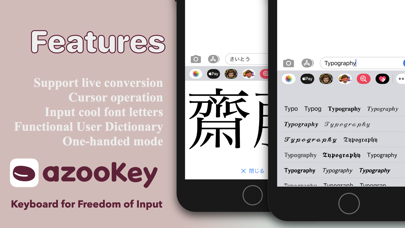
High-accuracy conversion, deep customization, and live conversion—all in one app for effortless typing.
Open-source, completely free, and built with a privacy-first design so you can use it with confidence.
▶ Cutting-Edge Conversion System
・Powered by “Zenzai,” our neural kana-kanji conversion engine
・Smarter, context-aware conversion that runs entirely offline
▶ Customization
・Edit anything from a single key to entire layouts
・Call up symbols, kaomoji, and snippets instantly with Custom Tabs
・Create GODAN or your own layouts with just a few taps
・Personalize the keyboard’s appearance with easy theming
▶ Live Conversion
・macOS-style real-time conversion optimized for iOS
・Our lightweight engine delivers fast, accurate text conversion
▶ Smooth Typing Assistance
・Hold the spacebar to move the cursor; hold Delete for one-stroke delete and undo
・One-handed mode, adjustable height, and text size for comfortable use on large screens
・Enlarge conversion candidates for quick confirmation of complex kanji
・Cursor movement by flick and a convenient Paste button are also supported
▶ Power-User Features
・Clipboard history saved automatically
・Full support for the iOS user dictionary
・Unicode conversion, half-width kana, random conversion, date insertion, and more advanced options
▶ Privacy & Trust
・Completely offline design that never collects your input
・Source code available on GitHub for anyone to inspect and improve
・No ads, no in-app purchases—every feature is free
Supported OS: iOS / iPadOS 17.6 or later (latest version recommended)
How to use: Download → Enable in the app → Select azooKey from the globe icon
Try a typing environment tailored to you with azooKey.