




AppBrain's verdict
- Last updated
- October 3, 2026
- Size
- 67.5 MB
User feedback
Ratings and reviews on the App StoreComments on Azule Timecard for iOS
We don't have enough comments to show example comments. Please check back later.
Store listing
By Linarc Inc., from the App StoreDescription by Linarc Inc. Written by the developer, not by AppBrain. Click to read.
Built for the Job Site
• Clock In/Out with Geofencing — Clock in and out at your assigned project site. GPS polygon geofencing verifies you're on-site before you start. The app automatically clocks you out when your shift ends or when you leave the boundary.
• Task-Based Time Tracking — Log time against specific tasks — system tasks, field tasks, punchlists, task codes, and T&M items. Switch between tasks throughout the day with a single tap.
• Offline-First, Always — Every clock-in, task punch, note, photo, and clock-out is written locally the moment you tap. A background sync queue with automatic retry pushes it all to the server once signal returns. The app shows you exactly how many records are pending sync so nothing ever goes missing.
• Session Resilience — Force-close the app, kill it mid-shift, or lose your phone screen lock — your active session is fully restored when you reopen. A 60-second minimum session gate prevents accidental ghost entries.
• Multi-Site Support — Assigned to more than one project? Switch between sites without logging out. When you're clocked into one project, other sites stay isolated so time never bleeds across jobs.
• Task Photos — Attach up to 5 photos per field task to document work progress. Photos are compressed and queued for upload offline, then synced automatically. View attachments full-screen with swipe navigation.
• Task Notes — Add append-only notes to field tasks with a running history. Notes are available offline and visible to supervisors in real time once synced.
• Logs Review & Editing — Review up to 14 days of logged time. Edit entries, correct task assignments, and add missing time before submitting your time card.
• Time Card Sign-Off — Submit your time card with a digital signature. Biometric step-up (Face ID or fingerprint) keeps the process fast and tamper-proof.
• Injury Confirmation on Clock-Out — When closing out, confirm whether any injury occurred during the shift. If yes, the app routes you directly into an incident report before submission.
• Incident Reporting — Report safety incidents on the spot. Log severity (Minor, Significant, or Critical), date, cause, injury details, notes, and supporting documents.
• Crew Notes — Add notes directly to tasks so your team and supervisors stay in the loop.
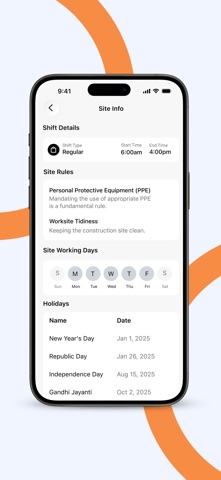
• Site Rules & Shift Alerts — View site-specific rules before you start. Get notified about shift changes, crew assignments, and geofence events in real time.
• Time Off Requests — Submit PTO and sick leave requests and track their status without calling the office.
• License Management — Upload and manage your Driving and Operator Licenses directly in the app.
• Secure Access — Biometric login, OTP-based password reset, and role-based permissions.
Linarc Timecard keeps construction crews accurate, accountable, and audit-ready — on site or off signal.
Safety and technology
Found in the app by AppBrain- Price
- Free
- App size
- 67.5 MB
- Content rating
- Everyone
Technologies used by Azule Timecard
Releases
Updates seen on the App Store- Version
- 2.2.0
- Launched
- February 2025
No changelog data
Alternatives
Similar apps and more from Linarc Inc.More from Linarc Inc.


Rankings
App Store top chartsApp Store Rankings for Azule Timecard
About the app and developer
About Azule Timecard
Azule Timecard is a business app developed by Linarc Inc.
What is the rating of Azule Timecard?
Azule Timecard has no ratings yet.
Is Azule Timecard free?
Azule Timecard is free. The app size is 67.53 MB. The latest version available is 2.2.0. The last update was on October 3, 2026.
What are the requirements for Azule Timecard?
The app has a content rating of Everyone. The app has been available on the App Store since February 2025.
Azule Timecard is made and published by Linarc Inc. AppBrain is an independent app data site and isn't affiliated with Linarc Inc. The app name, icon, screenshots and description belong to Linarc Inc. and are shown as published on the App Store.
Developer information for Linarc Inc.
Address: