

Azure SC-200 Security Analyst
Azure SC-200 Security Analyst is made and published by CHOI SEONGMIN. AppBrain is an independent app data site and isn't affiliated with CHOI SEONGMIN. The app name, icon, screenshots and description belong to CHOI SEONGMIN and are shown as published on the App Store.
AppBrain's verdict
- Last updated
- October 7, 2026
Rankings
App Store top chartsApp Store Rankings for Azure SC-200 Security Analyst
Competitors
Similar apps and more from CHOI SEONGMINAlternatives to Azure SC-200 Security Analyst


More from CHOI SEONGMIN


Releases
Updates seen on the App Store- Version
- 1.0.14
- Launched
- June 2026
No changelog data
User feedback
Ratings and reviews on the App StoreComments on Azure SC-200 Security Analyst for iOS
We don't have enough comments to show example comments. Please check back later.
Technology
Found in the app by AppBrain- Price
- Free
- App size
- 164.2 MB
- Content rating
- Everyone
Technologies used by Azure SC-200 Security Analyst
About the app and developer
About Azure SC-200 Security Analyst
Azure SC-200 Security Analyst is an education app developed by CHOI SEONGMIN.
User Ratings
The app has no ratings yet.
App Information
Azure SC-200 Security Analyst is freely available from the App Store. The app size is 164.21 MB. The latest version available is 1.0.14. The last update was on October 7, 2026.
Technical Requirements
The app has a content rating of Everyone. The app has been available on the App Store since June 2026.
Developer information for CHOI SEONGMIN
Address:
Frequently asked questions about Azure SC-200 Security Analyst
Is Azure SC-200 Security Analyst free?
Yes. Azure SC-200 Security Analyst is free on the App Store.
Is Azure SC-200 Security Analyst still available?
Yes. Azure SC-200 Security Analyst is on the App Store, and the last update we saw was on October 7, 2026.
How large is Azure SC-200 Security Analyst?
Azure SC-200 Security Analyst is 164.21 MB.
Is Azure SC-200 Security Analyst suitable for children?
App Store rates the content of Azure SC-200 Security Analyst as suitable for everyone.
Who made Azure SC-200 Security Analyst?
Azure SC-200 Security Analyst was developed by CHOI SEONGMIN. It is listed in the education category on the App Store.
What are the best alternatives to Azure SC-200 Security Analyst?
People looking at Azure SC-200 Security Analyst also look at these education apps: SC-200 Dojo Exam, SC-200 Security Operations, 산업위생관리기사 필기 시험 대비, AB-731 Practice Test, SC-300 Identity Access Admin.
Store listing
By CHOI SEONGMIN, from the App Store


Description by CHOI SEONGMIN Written by the developer, not by AppBrain. Click to read.
Use your phone on the move and a tablet or desktop when you want more room to study. Connect the same StudyCert account to continue your learning in the app and on the desktop web.
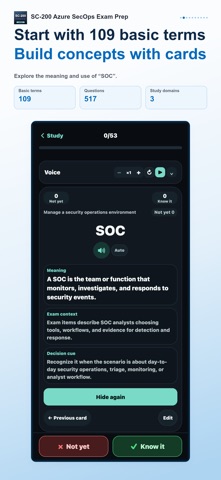
Prepare for Microsoft Security Operations Analyst (SC-200) with 517 practice questions and 109 key terms.
Study coverage · 3 areas
• Manage a security operations environment
• Respond to security incidents
• Perform threat hunting
1. Build your foundation with key terms
Use flashcards to learn meanings, exam context and selection cues. Mark terms as known or not yet known, then revisit unstudied or unfamiliar cards. Edit card content to suit your learning and restore the original when needed.
2. Practice and understand each answer
Study in 50-question sets, by domain or by difficulty. Work through single- and multiple-choice questions, then read the explanation for the answer and each option. Choose all, unfinished or wrong questions; shuffle questions and choices; use a study timer; and resume where you left off.
3. Review mistakes and uncertain concepts
Collect questions marked for review, recent errors and repeated mistakes. Filter by cumulative wrong-answer count and focus on weaker domains or difficulty levels. The glossary report connects your known/not-yet records with accuracy on related questions.
4. Check your preparation with a mock exam
Practice time management with 50 questions in 100 minutes. Change answers before submission, resume a saved exam and receive grading when time expires. Afterwards, see correct, wrong and unanswered counts, your score and domain results, then revisit mistakes.
Tools that fit your study routine
Optional audio study reads terms and meanings aloud. Choose whether to include exam context and selection cues, set repeats and pauses, and control playback with the mini player. In the mobile app, audio can continue in the background and with the screen locked. A study calendar, learning streaks, weekly goals, reminders for unmet goals and light, dark or system themes support your routine. Learning records are managed for each supported language.
Some features require paid access. Check the included features and price on the purchase screen. Purchase restoration is supported.
This is an independent study aid, not an official, affiliated or endorsed app of any exam administrator or certification body. Exam names and trademarks belong to their respective owners.