

BaiPDF: Scan & PDF Convert
BaiPDF: Scan & PDF Convert is made and published by Uzero Technology. AppBrain is an independent app data site and isn't affiliated with Uzero Technology. The app name, icon, screenshots and description belong to Uzero Technology and are shown as published on the App Store.
AppBrain's verdict
- Last updated
- August 27, 2026
- Size
- 8.85 MB
User feedback
Ratings and reviews on the App StoreComments on BaiPDF: Scan & PDF Convert for iOS
We don't have enough comments to show example comments. Please check back later.
Store listing
By Uzero Technology, from the App Store




Description by Uzero Technology Written by the developer, not by AppBrain. Click to read.
From capture and editing to recognition and export, BaiPDF helps you complete your document tasks in one app—making it easier to work efficiently from your phone.
- All-in-one document processing: Scanning, recognition, translation, and PDF tools in one app
- Complete scanning features: Document scanning, ID scanning, batch capture, auto-cropping, and editing
- Practical OCR capabilities: Convert images to text or tables and reduce manual data entry
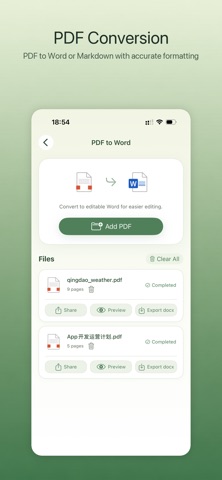
- Powerful PDF tools: Convert PDFs to Word, Markdown, Excel, and PPT; translate, compress, split, and merge PDFs
- Built for frequent office tasks: Manage your history in one place and easily find or continue previous work
- Convenient device collaboration: Transfer files between your phone and computer over the same local network
Supports both Dark Mode and Light Mode.
Scanning and Capture
- Document scanning: Quickly capture paper documents and turn them into clearer digital files or PDFs
- ID scanning: An optimized capture and processing workflow for identification documents
- Batch capture: Ideal for scanning multiple pages of study materials, handouts, contracts, assignments, and more
- Editing: Continue cropping, adjusting, and exporting your scans in the editing workspace
Recognition and Translation
- Image to text: Extract text from photos for organizing notes, study materials, and screenshots
- Image to table: Recognize table data for easier organization and reuse
- Image translation: Translate image content instantly, making it easier to read foreign-language materials
- Document-friendly recognition: Suitable for receipts, course materials, forms, paper documents, and more
PDF Tools
- PDF to Word: Preserve the original Word layout as closely as possible. Supports both scanned-image and text-based PDFs for easy editing
- PDF to Markdown: Ideal for organizing content, managing knowledge, and writing
- PDF to Excel: Extract table data for reuse and further processing
- PDF to PPT: Make presentation materials easier to edit
- PDF translation: Translate foreign-language PDF documents
- PDF compression: Reduce file size for easier storage and sharing
- PDF splitting: Extract selected pages or sections as needed
- PDF merging: Combine multiple PDFs into a single document
ID Photos and Practical Tools
- ID photo maker: Create finished ID photos for different purposes
- Local network file transfer: Transfer files between your phone and computer on the same network
- History management: Automatically archive processed images and PDFs for easy review and reuse
Who It’s For
- Students: Scan handouts, extract notes, and organize table data
- Office professionals: Process contracts, forms, PDFs, and common office formats
- Teachers and trainers: Batch-scan materials, extract text, and organize course content
- Everyday users: Scan IDs, create ID photos, translate images, and organize files
BaiPDF brings photo scanning, OCR, image translation, PDF processing, and file organization together in one app.
BaiPDF offers the following auto-renewable membership plans:
- Monthly Membership: ¥20/month
- Quarterly Membership: ¥40 every 3 months
- Yearly Membership: ¥68/year
Payment is charged to your Apple Account upon confirmation of purchase. Subscriptions renew automatically unless canceled at least 24 hours before the end of the current subscription period. You can manage or cancel your subscription in your Apple Account subscription settings. Actual prices may vary by region and are shown on the App Store.
EULA: https://www.apple.com/legal/internet-services/itunes/dev/stdeula/
Privacy Policy: https://pdf.baimiaoapp.com/doc/privacy-policy
Safety and technology
Found in the app by AppBrain- Price
- Free
- App size
- 8.85 MB
- Content rating
- Everyone
Technologies used by BaiPDF: Scan & PDF Convert
Releases
Updates seen on the App Store- Version
- 1.0.2
- Launched
- August 2026
No changelog data
Alternatives
Similar apps and more from Uzero TechnologyAlternatives to BaiPDF: Scan & PDF Convert


More from Uzero Technology


Rankings
App Store top chartsApp Store Rankings for BaiPDF: Scan & PDF Convert
About the app and developer
About BaiPDF: Scan & PDF Convert
BaiPDF: Scan & PDF Convert is a productivity app developed by Uzero Technology.
User Ratings
The app has no ratings yet.
App Information
BaiPDF: Scan & PDF Convert is freely available from the App Store. The app size is 8.85 MB. The latest version available is 1.0.2. The last update was on August 27, 2026.
Technical Requirements
The app has a content rating of Everyone. The app has been available on the App Store since August 2026.
Developer information for Uzero Technology
Address:
Frequently asked questions about BaiPDF: Scan & PDF Convert
Is BaiPDF: Scan & PDF Convert free?
Yes. BaiPDF: Scan & PDF Convert is free on the App Store.
Is BaiPDF: Scan & PDF Convert still available?
Yes. BaiPDF: Scan & PDF Convert is on the App Store, and the last update we saw was on August 27, 2026.
How large is BaiPDF: Scan & PDF Convert?
BaiPDF: Scan & PDF Convert is 8.85 MB.
Is BaiPDF: Scan & PDF Convert suitable for children?
App Store rates the content of BaiPDF: Scan & PDF Convert as suitable for everyone.
Who made BaiPDF: Scan & PDF Convert?
BaiPDF: Scan & PDF Convert was developed by Uzero Technology. It is listed in the productivity category on the App Store.
What are the best alternatives to BaiPDF: Scan & PDF Convert?
People looking at BaiPDF: Scan & PDF Convert also look at these productivity apps: FlashScan - Simple doc scanner, 选这个, GrabIt Library Manager, 深腾云服VDI, OpenNow - Markdown HTML.