Your checkbook register, kept the way you have always kept it.
Write down what you spend. Tick off what the bank has cleared. Balance to the penny at the end of the month. That is the whole job of a checkbook register, and it is all this app does.
THREE PROMISES
No ads. Not on the free version, not after you pay, not ever, on any screen.
No subscription. One payment and it is yours. Nothing renews.
No account and no bank login. There is nothing to sign into, so there is nothing to be signed out of.
YOUR REGISTER STAYS ON YOUR PHONE
Everything you enter is stored on your own iPhone. It works with no internet connection at all, on a plane or out of signal. Your register is never sent to us and never sold to anyone.
There is one way a copy leaves your phone, and it belongs to you. If iCloud Backup is switched on, your register is included in it, so it comes back when you set up a new phone. That copy sits in your own Apple account, not ours, and you turn it on or off in Settings.
The app never shows you a permission prompt. It does not ask for your contacts, your location, your photos or your camera.
WHAT IT DOES
- Works fully offline, every feature, all of the time
- Multiple accounts: checking, savings, credit, cash, each with its own running balance
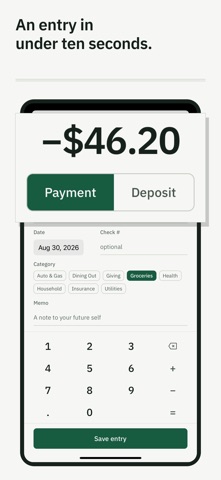
- Fast entry: date, payee, amount, check number, category, memo. Repeat entries take seconds, and check numbers advance on their own.
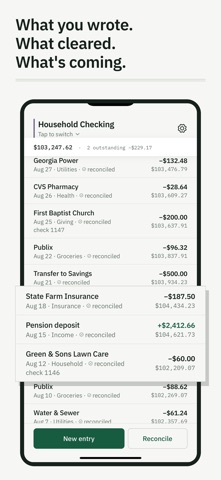
- A proper register list with a running balance on every single line
- Reconcile mode: enter the statement date and ending balance, tick off what cleared, and watch the difference count down to 0.00
- Scheduled and recurring entries: weekly, every two weeks, monthly, yearly. They show up as scheduled and only affect your projected balance until you post them. Nothing is ever posted behind your back.
- Transfers between your own accounts, entered once and mirrored on both sides
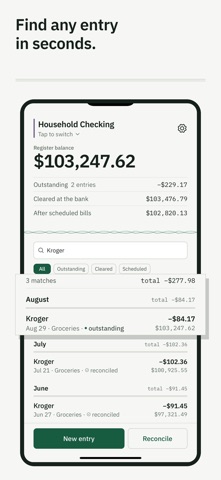
- Search by payee, memo, amount or check number, with filters for what is outstanding, what cleared, and what is scheduled
- Categories, both the presets and your own
- Totals by category for a month, three months or a year, with the exact figures printed beside the chart. Scheduled bills are not counted until you post them.
- Bring your history in from a CSV file, with a column mapper for spreadsheet users
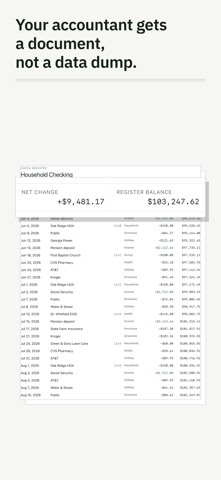
- Print or save a PDF of your register or of those category totals, or export a CSV of any account
BACKUPS, BECAUSE THAT IS THE PART THAT MATTERS
The app backs itself up on its own, every day you open it, and gives you a Restore screen to go back to any copy it has kept.
You can also send a copy out of the app, so deleting the app does not reach it. Pick a folder and every copy after that goes there too. If you are signed in to iCloud with iCloud Drive turned on, the app also keeps a BalanceWright folder there by itself, and you can open it in the Files app. If you are not signed in, the Backup screen says so rather than claiming a copy it did not make.
Your data is never held hostage. Export and backup keep working whether you have paid or not.
TRY THE WHOLE THING FIRST
Everything works from the moment you install it. Nothing is crippled, grayed out or hidden to push you into paying. The app asks for payment only after you have closed your first statement, so you decide once you have watched it do the exact thing you came for. If you never reconcile, a generous entry limit applies instead.
BIG, PLAIN TYPE
Built to be read. Large numbers, strong contrast, plain words, no jargon.
WHAT IT WILL NEVER DO
No bank connection. No budgets, no spending advice, no AI. No ads, no subscription. If a feature would need your register to leave your phone, it is not going in.
ANSWERED BY A REAL PERSON
Every review here is read and answered. The support address on this page reaches someone who can actually fix things.
Written for anyone who keeps a check register or a checkbook ledger by hand, and wants the same habit on a phone.
Show more
Show less