BamFleet is a productivity app developed by JAMIE CURNOW.
What is the rating of BamFleet?
BamFleet has no ratings yet.
Is BamFleet free?
BamFleet costs $1.99. The app size is 23.24 MB. The latest version available is 1.2. The last update was on October 12, 2026.
What are the requirements for BamFleet?
The app has a content rating of Everyone. The app has been available on the App Store since September 2026.
Description by JAMIE CURNOW(from the App Store)
BamFleet puts your 3D-print fleet in your pocket. It's a fast, native iPhone and iPad client for BamBuddy and PrintBuddy — the open-source managers for 3D printers — so you can watch and control every printer without walking back to the workshop.
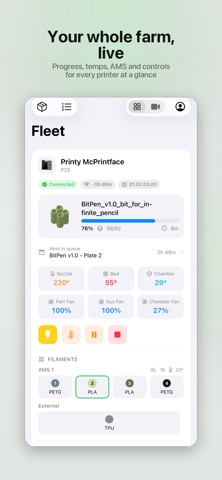
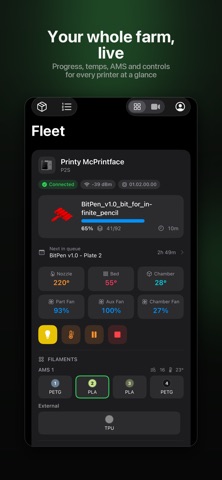
Connect to your own BamBuddy or PrintBuddy server and get a live view of the whole fleet: what's printing, how far along, and what's coming next.
MONITOR EVERY PRINTER • Live status for each printer — progress, layer count and time remaining • Nozzle, bed and chamber temperatures, plus part, aux and chamber fans • Cover image of the current print and a live camera view • AMS units at a glance: material, colour and remaining amount per tray, plus external spools • Plain-English HMS alerts — error codes are translated into readable explanations, not just numbers
STAY IN CONTROL • Pause, resume and stop prints • Toggle the chamber light and set temperature and fan targets • "Clear plate" when a finished print is waiting, so the queue keeps moving • Smart-plug power control with live draw and energy usage, where a plug is assigned • Control AMS Filament: load, unload, re-read and configure
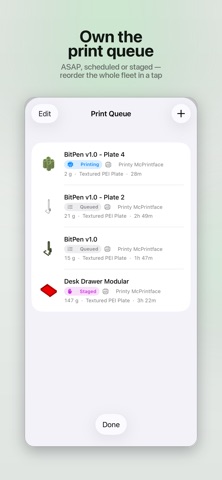
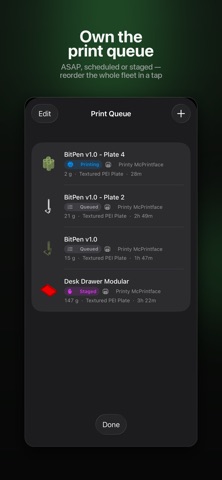
MANAGE THE QUEUE • See the whole fleet's queue with each job's printer, filament weight and plate type • Timing at a glance — ASAP, Scheduled or Staged (manual start) • Reorder by dragging, start now, cancel or delete • Edit any queued job: assign it to a specific printer or any idle printer of a model • Map each filament to an AMS slot — pulled from the printer's live AMS — or leave it on Auto • Tune advanced options: bed levelling, flow and vibration calibration, first-layer inspection, timelapse and preheat
TRACK YOUR FILAMENT • Full spool inventory with material, colour, remaining weight and storage location • Add, edit, assign, archive or delete spools • Low-stock indicators so you reorder in time
BROWSE YOUR ARCHIVE • Every archived print with its render, stats and metadata • Send any archived print back to the queue in a couple of taps • View finish photos and timelapses, and save them to Photos
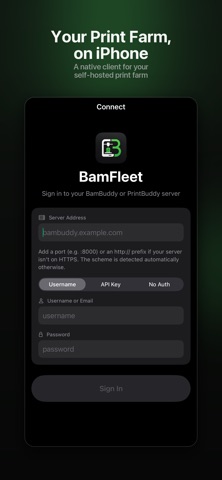
AND MORE • Home Screen widgets — a fleet overview, and a "Now Printing" widget for any printer you pick • Print history and statistics — success rate, print time, filament and cost • Light and dark themes • Flexible sign-in: API key, or username and password with two-factor (TOTP) support — plus servers that have authentication disabled • Permission-aware: BamFleet only shows the actions your account is allowed to perform
REQUIRES A BAMBUDDY OR PRINTBUDDY SERVER BamFleet is a client app. You need your own running BamBuddy or PrintBuddy server (self-hosted) to sign in — it does not include or provide a server. Connections go only to the server you configure, over your own network or the address you provide.
BamFleet is an independent client and is not affiliated with, authorised by, or endorsed by Bambu Lab, BamBuddy, or PrintBuddy.
PRIVACY Your credentials are stored securely in the iOS Keychain and used only to talk to your server. BamFleet doesn't track you.
Point BamFleet at your server and your whole fleet is a tap away.
AppBrain offers valuable information about your app and those of your competitors. Join AppBrain for free and claim this app to view more ranking data, view history etc.
Each subscription will automatically renew 3 days before the expiration date for
the same time period. Subscriptions can be cancelled at any time before the renewal.