BANDY - Music Practice Tracker is made and published by
PANGEUN JEON.
AppBrain is an independent app data site and isn't affiliated with PANGEUN JEON.
The app name, icon, screenshots and description belong to PANGEUN JEON and are shown as
published on the App Store.
About BANDY - Music Practice Tracker
BANDY - Music Practice Tracker is a music app developed by PANGEUN JEON.
User Ratings
The app has no ratings yet.
App Information
BANDY - Music Practice Tracker is freely available from the App Store. The app size is 14.93 MB. The latest version available is 1.0.0. The last update was on March 21, 2026.
Technical Requirements
The app has a content rating of Everyone. The app has been available on the App Store since March 2026.
Description by PANGEUN JEON(from the App Store)
Your Personal Music Practice Partner — BANDY
BANDY is an all-in-one music practice app for guitar, bass, drum, keyboard, and vocal players. Track your practice time, manage routines, and level up with a built-in metronome and tuner.
-----
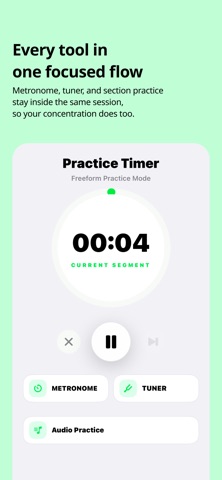
◆ PRACTICE TIMER Start a session and your practice time is accurately recorded. Check your progress in real time from the Lock Screen and Dynamic Island — even when you leave the app.
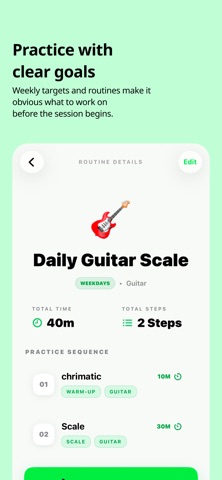
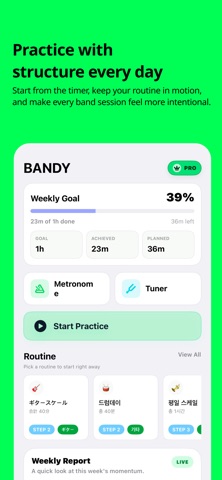
◆ PRACTICE ROUTINES Set up your own practice flow in advance. Create step-by-step routines like Warm-up → Scales → Song Practice, and start each day with zero hesitation.
◆ METRONOME Adjust BPM, set time signatures, and choose subdivisions (8th, 16th, triplets). Toggle it on and off during practice without breaking your flow.
◆ TUNER Tune your guitar or bass right inside the app. Real-time pitch detection through the microphone helps you stay in tune effortlessly.
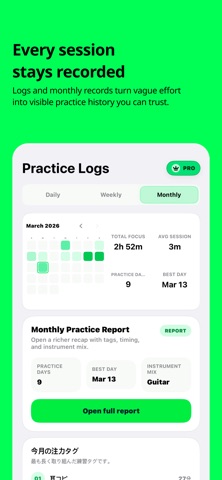
◆ PRACTICE CALENDAR & STATS See all your practice days at a glance on the calendar. Analyze your daily, weekly, and monthly practice time, session counts, and practice tag breakdowns.
◆ PRACTICE REPORTS Review your practice flow with weekly and monthly reports. Discover your best practice day, longest session, instrument mix, and tag-based insights.
◆ WEEKLY GOALS Set a weekly practice hour target and track your progress from the Home screen. Build consistent practice habits that stick.
◆ PREMIUM MEMBERSHIP Core features are free. With Premium, unlock unlimited routines, weekly/monthly reports, auto-metronome, and every feature BANDY has to offer.
Subscriptions are billed through your Apple ID. Auto-renewal occurs unless canceled at least 24 hours before the renewal date. Manage or cancel in iPhone Settings > Apple ID > Subscriptions.
Each subscription will automatically renew 3 days before the expiration date for
the same time period. Subscriptions can be cancelled at any time before the renewal.