AppBrain
AppBrain
  • Apps
  • Apps being viewed right now Trending apps today Most popular apps All-time most installed apps Top rated apps iPhone and iPad apps
  • Intelligence ▾
    Intelligence overview → Track any Android app or your whole market
    Track & analyze
    Keyword Tracker & OptimizerTrack & improve Play rankings App Performance ReportOne-off PDF for any app StatisticsFree Android & Play market stats
    Promote your app
    Featured Apps App Links
  • Intelligence
  • Pricing
  • Dashboard
  • Sign up
  • Log in
App Store Apps > Finance > Bank Statement Converter Excel
Bank Statement Converter Excel icon

Bank Statement Converter Excel

1.0
Andrii Kulchytskyi
0.00
0 reviews
Free

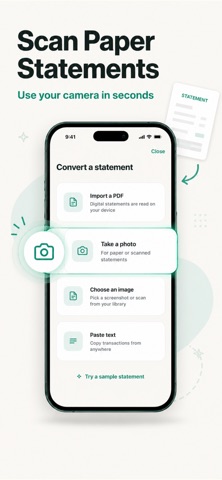
Bank Statement Converter Excel Screenshot 1 of 4
Bank Statement Converter Excel Screenshot 2 of 4
Bank Statement Converter Excel Screenshot 3 of 4
Bank Statement Converter Excel Screenshot 4 of 4
Screenshots by Andrii Kulchytskyi, from the the App Store listing
View on the App Store

About Bank Statement Converter Excel

Bank Statement Converter Excel is a finance app developed by Andrii Kulchytskyi.

User Ratings

The app has no ratings yet.

App Information

Bank Statement Converter Excel is freely available from the App Store. The app size is 47.24 MB. The latest version available is 1.0. The last update was on August 25, 2026.

Technical Requirements

The app has a content rating of Everyone. The app has been available on the App Store since August 2026.

Bank Statement Converter Excel is made and published by Andrii Kulchytskyi. AppBrain is an independent app data site and isn't affiliated with Andrii Kulchytskyi. The app name, icon, screenshots and description belong to Andrii Kulchytskyi and are shown as published on the App Store.

Description by Andrii Kulchytskyi (from the App Store)
Stop retyping bank statements by hand. Bank Statement turns any PDF, scanned page, or photo of a statement into a ready-to-use spreadsheet in seconds.

Whether you are reconciling accounts for a small business, preparing records for your accountant, or just trying to understand where your money went last month, Bank Statement removes the manual data entry and gets you straight to the numbers.

HOW IT WORKS
Import a PDF statement, take a photo of a printed page, or pick an image from your library. Bank Statement reads the transaction table, dates, and amounts automatically and builds a structured spreadsheet you can export and use anywhere.

KEY FEATURES

Import from anywhere
Upload a PDF statement directly from your bank, snap a photo of a paper statement, or choose a screenshot or scan from your photo library.

Accurate transaction parsing
Dates, descriptions, debits, and credits are automatically detected and organized into rows and columns, even across multi-page statements.

Export to Excel and CSV
Download your converted statement as an XLSX or CSV file, ready to open in Excel, Numbers, Google Sheets, or your accounting software.

Automatic reconciliation
Running balances are checked against transaction totals so you can catch missing or misread entries before you rely on the data.

Multi-currency and multi-language support
Built for statements from banks around the world, with the app available in English, Japanese, Korean, German, French, Spanish, Portuguese, Italian, Chinese, Arabic, Turkish, and Ukrainian.

Privacy by design
You choose whether a photo is sent for processing, and it is never stored afterward. Your statements and financial data stay under your control.

Built for real use cases
Freelancers and small business owners reconciling monthly books. Anyone preparing documents for an accountant or tax filing. Individuals building a personal budget from paper or PDF statements. Bookkeepers converting client statements without manual retyping.

WHY BANK STATEMENT
Manually transcribing a bank statement is slow and error-prone. Bank Statement gives you an accurate, editable spreadsheet in the time it takes to take a photo, so you can spend your time on analysis and decisions instead of data entry.

Download Bank Statement and turn your next statement into a spreadsheet in under a minute.

Privacy Policy: https://www.termsfeed.com/live/2bd40302-707c-43fa-b8af-affe8dfeb4b1
Terms of Use: https://docs.google.com/document/d/1n1unFsupymXBjB8AvakjPLBs6fB9Dya_ppgOsRD5i1Y/edit?usp=sharing
Show more Show less

Alternatives to Bank Statement Converter Excel

PDFtoXL:Bank Statement toExcel icon PDFtoXL:Bank Statement toExcel
ERX CONNECT
0.0
Free
StatementSnap: Bank Converter icon StatementSnap: Bank Converter
KRISHNA PINNAMANENI
0.0
Free
Pilo: Budget & Expense Tracker icon Pilo: Budget & Expense Tracker
Andrei Konoplev
0.0
Free
Spending Analysis: BudgetSwipe icon Spending Analysis: BudgetSwipe
Rowan Rhodes
1.0
Free
1 ratings
Auritrack: AI Expense Tracker icon Auritrack: AI Expense Tracker
Koladele Olaitan
0.0
Free
Debt Eraser icon Debt Eraser
Christopher Kuczynski
5.0
Free
5 ratings
FinWall Budget & Savings icon FinWall Budget & Savings
Gregory Dementev
0.0
Free
AutoShares WebTrader icon AutoShares WebTrader
Global Market Holdings, LLC
3.6
Free
5 ratings

More from Andrii Kulchytskyi

Increase Volume: Sound Enhance icon Increase Volume: Sound Enhance
Andrii Kulchytskyi
4.3
Free
49 ratings
Video to Audio Converter: MP3 icon Video to Audio Converter: MP3
Andrii Kulchytskyi
4.6
Free
43 ratings
Photo to PDF Converter: Image icon Photo to PDF Converter: Image
Andrii Kulchytskyi
4.4
Free
29 ratings
Word to PDF Converter: Docx icon Word to PDF Converter: Docx
Andrii Kulchytskyi
4.5
Free
26 ratings
Bluetooth mic: Mic to Speaker icon Bluetooth mic: Mic to Speaker
Andrii Kulchytskyi
4.3
Free
11 ratings
Write on PDF: Print to PDF icon Write on PDF: Print to PDF
Andrii Kulchytskyi
4.5
Free
8 ratings
Image to PDF Converter: Photo icon Image to PDF Converter: Photo
Andrii Kulchytskyi
4.4
Free
7 ratings
Roast Bot & AI Roast Generator icon Roast Bot & AI Roast Generator
Andrii Kulchytskyi
5.0
Free
5 ratings

Changelog of Bank Statement Converter Excel

No changelog data

Developer information for Andrii Kulchytskyi

Andrii Kulchytskyi

Address:

Share Bank Statement Converter Excel

Comments on Bank Statement Converter Excel for iOS

We don't have enough comments to show example comments. Please check back later.

App Store Rankings for Bank Statement Converter Excel

This app is not ranked

Technologies used by Bank Statement Converter Excel

Frequently asked questions about Bank Statement Converter Excel

Is Bank Statement Converter Excel free?

Yes. Bank Statement Converter Excel is free on the App Store.

Is Bank Statement Converter Excel still available?

Yes. Bank Statement Converter Excel is on the App Store, and the last update we saw was on August 25, 2026.

How large is Bank Statement Converter Excel?

Bank Statement Converter Excel is 47.24 MB.

Is Bank Statement Converter Excel suitable for children?

App Store rates the content of Bank Statement Converter Excel as suitable for everyone.

Who made Bank Statement Converter Excel?

Bank Statement Converter Excel was developed by Andrii Kulchytskyi. It is listed in the finance category on the App Store.

What are the best alternatives to Bank Statement Converter Excel?

People looking at Bank Statement Converter Excel also look at these finance apps: PDFtoXL:Bank Statement toExcel, StatementSnap: Bank Converter, Pilo: Budget & Expense Tracker, Spending Analysis: BudgetSwipe, Auritrack: AI Expense Tracker.

Apps other people are watching Price drops on Google Play Today's trending apps Popular Finance Apps Top new apps
PDFtoXL:Bank Statement toExcel icon PDFtoXL:Bank Statement toExcel
StatementSnap: Bank Converter icon StatementSnap: Bank Converter
Pilo: Budget & Expense Tracker icon Pilo: Budget & Expense Tracker
Spending Analysis: BudgetSwipe icon Spending Analysis: BudgetSwipe
Auritrack: AI Expense Tracker icon Auritrack: AI Expense Tracker
Debt Eraser icon Debt Eraser
FinWall Budget & Savings icon FinWall Budget & Savings
AutoShares WebTrader icon AutoShares WebTrader
AppBrain Intelligence premium content

Subscribe now to get full and unlimited access to AppBrain Intelligence. You'll have access to:

  • App Intelligence dashboard (performance timeline, competitor comparison, country rankings, insight cards)
  • Detailed ranking data per app
  • Full timeline per developer
  • Device market shares data per country
  • Unlimited keyword tracking
1 Month

$75/mo
(billed every month)

SAVE 0%
Subscribe
3 Months

$65/mo
($195 billed every 3 months)

SAVE 13%
Subscribe
1 Year

$57.50/mo
($690 billed every year)

SAVE 23%
Subscribe
Each subscription will automatically renew 3 days before the expiration date for the same time period. Subscriptions can be cancelled at any time before the renewal.

AppBrain is an app data site, we track rankings, ratings, installs for all apps and games on Google Play and the App Store. AppBrain doesn't host app files or APKs, all install links go directly to the official store. All trademarks are owned by their respective owners.

More apps

  • Top Android apps being viewed
  • Juwa 2.0 Casino 777 Slots
  • Romantic Valkyria: Card Battle
  • Bingo Cash for Android

App statistics

  • Android statistics
  • Google Play Developer stats
  • Trending Android Apps
  • Trending iOS apps
  • Top popular Apps
  • Buy the best Android phone
  • Buy & sell app businesses

About AppBrain

  • Contact
  • Privacy
  • Documentation
  • DMCA takedowns
  • Blog
  • Monetization tips: Understanding your eCPM
© 2010-2026 - AppBrain