

Bantam AI
Bantam AI is made and published by Daniel O'Laughlin. AppBrain is an independent app data site and isn't affiliated with Daniel O'Laughlin. The app name, icon, screenshots and description belong to Daniel O'Laughlin and are shown as published on the App Store.
AppBrain's verdict
- Rating on App Store
- 4.90
- 20 ratings
- Last updated
- April 28, 2026
It doesn't have enough ratings yet to judge what users think.
Rankings
App Store top chartsApp Store Rankings for Bantam AI
Competitors
Similar apps and more from Daniel O'LaughlinAlternatives to Bantam AI


Releases
Updates seen on the App Store- Version
- 1.6
- Launched
- March 2026
No changelog data
User feedback
Ratings and reviews on the App StoreComments on Bantam AI for iOS
We don't have enough comments to show example comments. Please check back later.
Technology
Found in the app by AppBrain- Price
- Free
- App size
- 5.87 MB
- Content rating
- Medium
Technologies used by Bantam AI
About the app and developer
About Bantam AI
Bantam AI is a productivity app developed by Daniel O'Laughlin.
User Ratings
Bantam AI is rated 4.90 out of 5 stars. The rating is based on 20 ratings.
App Information
Bantam AI is freely available from the App Store. The app size is 5.87 MB. The latest version available is 1.6. The last update was on April 28, 2026.
Technical Requirements
The app has a content rating of Medium Maturity. The app has been available on the App Store since March 2026.
Developer information for Daniel O'Laughlin
Address:
Frequently asked questions about Bantam AI
Is Bantam AI free?
Yes. Bantam AI is free on the App Store.
Is Bantam AI still available?
Yes. Bantam AI is on the App Store, and the last update we saw was on April 28, 2026.
How large is Bantam AI?
Bantam AI is 5.87 MB.
Is Bantam AI suitable for children?
App Store gives Bantam AI a medium maturity rating, so it is not meant for young children.
How do people rate Bantam AI?
Bantam AI scores 4.90 out of 5 stars, from 20 ratings on the App Store.
Who made Bantam AI?
Bantam AI was developed by Daniel O'Laughlin. It is listed in the productivity category on the App Store.
What are the best alternatives to Bantam AI?
People looking at Bantam AI also look at these productivity apps: copycopy: Copy & Paste History, NoteCalc - Notepad Calculator, Spanarc - Calendar At a Glance, Clipboard AI - Paste Keyboard, AI Keyboard – ClarifierAI.
Store listing
By Daniel O'Laughlin, from the App Store


Description by Daniel O'Laughlin Written by the developer, not by AppBrain. Click to read.
that simple.
---
CHOOSE FROM 7 AI MODELS
Text Generation:
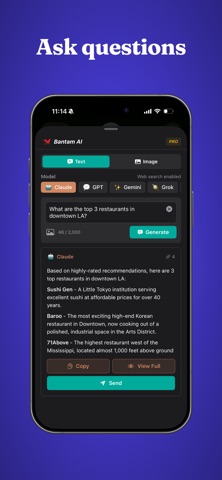
• Claude — Thoughtful, detailed responses
• GPT — Versatile and capable for everyday questions
• Gemini — Google's powerful and capable AI
• Perplexity — Research-focused with expert web search
• Grok — Real-time insights sourced from X (Twitter)
Image Generation:
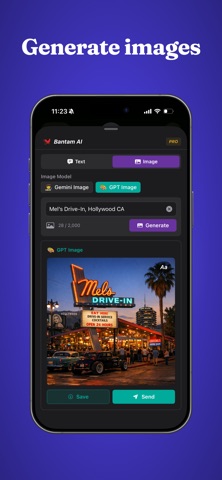
• GPT Image — Create stunning visuals from a text description
• Gemini Image — Expressive, AI-generated artwork on demand
---
REAL-TIME WEB SEARCH
Every text model is connected to the web. Get current, accurate answers — not just what the model knew months ago.
CITED SOURCES
See exactly where answers came from. Each citation includes a URL so you can verify the information for yourself.
GENERATE & SEND IMAGES
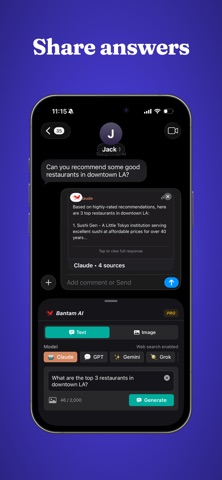
Describe what you want to see, pick your image model, and send AI-generated images directly in your conversation. Add text for captioning or meme creation.
ANALYZE & EDIT IMAGES
Attach any photo to your request and let AI do more with it. Ask text models to describe, analyze, or answer questions about an image. Or pass it to an
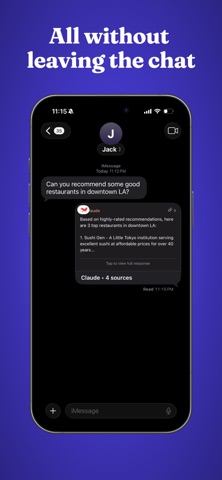
image model to edit it, swap styles, change backgrounds, add elements, and more — all without leaving iMessage.
RICH MESSAGE CARDS
Responses appear as clean, tappable cards inside the chat thread — with the model name, response preview, and source count displayed right inline.
OPTIONAL ACCESS TO LOCATION
Allow Bantam to use your location for questions like 'best restaurants near me' or 'weather today' — giving you answers tailored to where you are.
---
FREE
Get 50 free requests every day across all supported image and text models. Limits refresh every 24 hours. No payment info required.
GO UNLIMITED WITH PRO
Upgrade to Bantam AI Pro for $4.99/month:
• Unlimited requests every day
• Unlimited image generation
• Support independent development
---
Stop switching between apps. Bring AI into the conversation.
Terms of Use: https://www.apple.com/legal/internet-services/itunes/dev/stdeula/