

BaristaTimer: Brew Timer & Log
BaristaTimer: Brew Timer & Log is made and published by takashi nakatani. AppBrain is an independent app data site and isn't affiliated with takashi nakatani. The app name, icon, screenshots and description belong to takashi nakatani and are shown as published on the App Store.
AppBrain's verdict
- Last updated
- October 9, 2026
- Size
- 112.7 MB
User feedback
Ratings and reviews on the App StoreComments on BaristaTimer: Brew Timer & Log for iOS
We don't have enough comments to show example comments. Please check back later.
Store listing
By takashi nakatani, from the App Store

Description by takashi nakatani Written by the developer, not by AppBrain. Click to read.
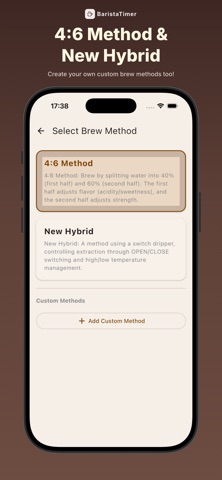
It supports popular methods like the 4:6 Method and the New Hybrid Method.
From custom recipes to brew history and stats, it has everything you need for a better cup.
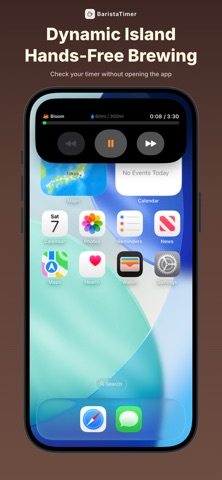
■ Dynamic Island & Live Activity
See the current step, time, and water on your Lock Screen — even while using another app.
■ Voice Commands — Hands-Free Control
Control the timer with your voice — no need to touch your phone.
・"next" / "back" / "done" (Japanese & English)
・Voice button can be hidden in settings
■ Supported Methods
【4:6 Method】
Developed by the World Brewers Cup 2016 Champion.
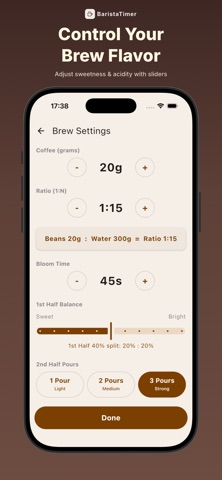
Split water into the first 40% (flavor) and the last 60% (strength) for intuitive taste control.
・Adjust flavor balance (sweet to bright) with a slider
・Control strength with the number of pours (1–3)
・Customize steaming (bloom) time
【New Hybrid Method】
Combines percolation and immersion using a switch dripper (e.g., HARIO Switch).
・Auto water temp by roast level (light, medium, dark)
・Dripper open/close shown per step
・Fine-tune temps manually
【JAC2015 Winning Recipe】
The inverted AeroPress recipe that won JAC2015.
・30g at 1:6, poured at 82°C, then 90°C
・Step water scales with your dose and ratio
【Custom Method】
Create your own recipes from scratch.
Set each step's time and water (grams or brew ratio); drag to reorder.
・Dripper type: Normal, Switch, or AeroPress (labeled on methods and brews)
・"Agitate" steps for stirring, swirling, or tapping
【Brew to Create】
Brew without time targets, then turn what you brewed into a custom method.
Swipe any method right to add it to Favorites at the top.
■ Timer Features
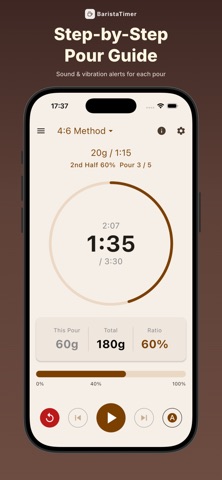
・Real-time target time and water volume per step
・Show pours in grams or brew ratio (1:n)
・Auto step transitions for hands-busy brewing
・Start countdown & assist sounds for step transitions
・Runs in the background
■ Brew Log
After each brew, log the details to improve your next cup.
・Bean origin, roast, grinder, grind size, dripper, filter
・Free-form notes & automatic step times
・Browse, view, and edit history
・Rate your satisfaction
■ Flavor Notes
Log the flavors you taste, in the shared language of tasting.
・As many flavors as you like from 110 attributes across three tiers
・Tap a category to expand it, then log just "Fruity" or go on to "Blackberry"
・A specific note adds its parent categories automatically
・Shown on brew details and in the share image
・Vocabulary from the Coffee Taster's Flavor Wheel by SCA and World Coffee Research
■ Share Your Brew on Social Media
Share an image of your recipe, rating, and times to X, Messages, Mail, and more.
A #BaristaTimer hashtag and App Store URL are attached — edit freely before posting.
■ Inventory — Never Run Out
Track how much coffee is left, in grams.
・Search to add a product; tap to adjust the amount
・Saving a new brew log subtracts the beans you just used
・Alerts when running low or out (adjustable threshold, or turn off)
・Swipe left to stop tracking (the product itself is kept)
■ Works Offline — No Internet Required
Every feature works offline — even at a remote campsite, brew your usual recipe.
■ Brew Summary & Top 10
・Stats by period (Last 30 days / Custom / All time)
・Total brews, average rating, and highest-rated cup
・Most-used method, dripper, filter, and water
・Top 10 highest-rated brews ranked
・AND filters across product, origin, dripper, and more
■ High-Rated Pattern Analysis
Histograms for water ratio, total brew time, temperature, and roast level reveal what your highest-rated brews have in common.
・Tabs per method (4:6 / New Hybrid / Custom)
・Customizable high-rating threshold (default 8/10)
・Jump to the matching high-rated records
■ Terms of Use & Privacy Policy
Terms of Use: https://baristimer.github.io/privacy/terms
Privacy Policy: https://baristimer.github.io/privacy/
* This description is a machine translation based on the original Japanese.
Safety and technology
Found in the app by AppBrain- Price
- Free
- App size
- 112.7 MB
- Content rating
- Medium
Technologies used by BaristaTimer: Brew Timer & Log
Releases
Updates seen on the App Store- Version
- 3.0.0
- Launched
- April 2026
No changelog data
Rankings
App Store top chartsApp Store Rankings for BaristaTimer: Brew Timer & Log
About the app and developer
About BaristaTimer: Brew Timer & Log
BaristaTimer: Brew Timer & Log is a food & drink app developed by takashi nakatani.
User Ratings
The app has no ratings yet.
App Information
BaristaTimer: Brew Timer & Log is freely available from the App Store. The app size is 112.69 MB. The latest version available is 3.0.0. The last update was on October 9, 2026.
Technical Requirements
The app has a content rating of Medium Maturity. The app has been available on the App Store since April 2026.
Developer information for takashi nakatani
Address:
Frequently asked questions about BaristaTimer: Brew Timer & Log
Is BaristaTimer: Brew Timer & Log free?
Yes. BaristaTimer: Brew Timer & Log is free on the App Store.
Is BaristaTimer: Brew Timer & Log still available?
Yes. BaristaTimer: Brew Timer & Log is on the App Store, and the last update we saw was on October 9, 2026.
How large is BaristaTimer: Brew Timer & Log?
BaristaTimer: Brew Timer & Log is 112.69 MB.
Is BaristaTimer: Brew Timer & Log suitable for children?
App Store gives BaristaTimer: Brew Timer & Log a medium maturity rating, so it is not meant for young children.
Who made BaristaTimer: Brew Timer & Log?
BaristaTimer: Brew Timer & Log was developed by takashi nakatani. It is listed in the food & drink category on the App Store.