BasenCloud is made and published by
TRAILER SOL (PTY) LIMITED.
AppBrain is an independent app data site and isn't affiliated with TRAILER SOL (PTY) LIMITED.
The app name, icon, screenshots and description belong to TRAILER SOL (PTY) LIMITED and are shown as
published on the App Store.
About BasenCloud
BasenCloud is an utilities app developed by TRAILER SOL (PTY) LIMITED.
User Ratings
The app has no ratings yet.
App Information
BasenCloud is freely available from the App Store. The app size is 51.96 MB. The latest version available is 2.0.3. The last update was on October 22, 2026.
Technical Requirements
The app has a content rating of Everyone. The app has been available on the App Store since October 2026.
Description by TRAILER SOL (PTY) LIMITED(from the App Store)
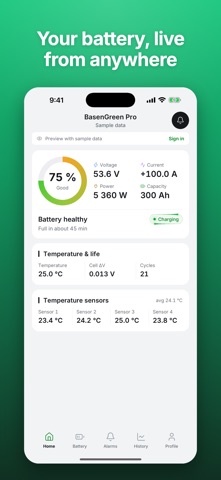
BasenCloud is the app for BasenGreen home batteries. The battery's touch display connects to Wi-Fi and reports to BasenCloud, and the app shows you what your battery is doing, wherever you are. No Bluetooth is needed: the app works wherever your phone is online.
Live status • State of charge, voltage, current and power • Charging, discharging or standby, and whether a protection is active • Whether the display and each pack are online
Cells and temperatures • Every cell voltage, with the lowest, the highest and the difference • Cell balancing, as the battery management system (BMS) reports it • Parallel packs side by side, and every temperature sensor
Alarms and notifications • Protection events and warnings from the BMS • Notifications for protection events always, and you choose which of the others you get: warnings, low and full charge, a pack that goes offline and firmware updates installed by BasenGreen • Acknowledge an alarm to clear your badge
History and BMS log • See the battery's history at any time: state of charge over time, cycles, energy throughput, deepest discharge and the largest cell difference • Read the BMS log: how many times each protection of the battery's management system has been triggered
Several batteries • Link up to 20 batteries to one account, name them and switch between them • Read-only protection parameters and installed firmware versions • The inverter protocol of the battery's CAN and RS485 ports, which you can change as on the display
Getting started 1. Sign in with Apple or Google, or create an account with your email address. 2. On the battery's display, open Settings > Network > Link to Mobile. 3. In the app, tap Add battery and scan the QR code on the display.
Want to look around first? Guest mode shows the app with a sample battery and simulated data, no account needed.
Good to know • BasenCloud is for monitoring. It cannot switch, charge or discharge your battery or change its protection settings; the battery's own BMS protects it at all times. • Notifications are for information and can be delayed. Never rely on the app for safety. • A battery belongs to one account at a time. Before you hand it over, unlink it in the app or at the display. • No ads and no tracking. You can delete your account in the app at any time. • In English, Simplified Chinese, Arabic and Kurdish (Sorani).
BasenCloud is provided by Shenzhen Basen Technology Co., Ltd. Terms of Use: https://basencloud.com/terms Privacy Policy: https://basencloud.com/privacy Support: support@basengreen.com
AppBrain offers valuable information about your app and those of your competitors. Join AppBrain for free and claim this app to view more ranking data, view history etc.
Each subscription will automatically renew 3 days before the expiration date for
the same time period. Subscriptions can be cancelled at any time before the renewal.