

BeadPainter: Beading Studio
BeadPainter: Beading Studio is made and published by Alexandra Duzhinskaya. AppBrain is an independent app data site and isn't affiliated with Alexandra Duzhinskaya. The app name, icon, screenshots and description belong to Alexandra Duzhinskaya and are shown as published on the App Store.
AppBrain's verdict
- Last updated
- June 14, 2026
Rankings
App Store top chartsApp Store Rankings for BeadPainter: Beading Studio
Releases
Updates seen on the App Store- Version
- 1.6.1
- Launched
- January 2026
No changelog data
User feedback
Ratings and reviews on the App StoreComments on BeadPainter: Beading Studio for iOS
We don't have enough comments to show example comments. Please check back later.
Technology
Found in the app by AppBrain- Price
- Free
- App size
- 64.3 MB
- Content rating
- High
Technologies used by BeadPainter: Beading Studio
About the app and developer
About BeadPainter: Beading Studio
BeadPainter: Beading Studio is a lifestyle app developed by Alexandra Duzhinskaya.
User Ratings
The app has no ratings yet.
App Information
BeadPainter: Beading Studio is freely available from the App Store. The app size is 64.29 MB. The latest version available is 1.6.1. The last update was on June 14, 2026.
Technical Requirements
The app has a content rating of High Maturity. The app has been available on the App Store since January 2026.
Developer information for Alexandra Duzhinskaya
Address:
Frequently asked questions about BeadPainter: Beading Studio
Is BeadPainter: Beading Studio free?
Yes. BeadPainter: Beading Studio is free on the App Store.
Is BeadPainter: Beading Studio still available?
Yes. BeadPainter: Beading Studio is on the App Store, and the last update we saw was on June 14, 2026.
How large is BeadPainter: Beading Studio?
BeadPainter: Beading Studio is 64.29 MB.
Is BeadPainter: Beading Studio suitable for children?
App Store gives BeadPainter: Beading Studio a high maturity rating. It is meant for adults.
Who made BeadPainter: Beading Studio?
BeadPainter: Beading Studio was developed by Alexandra Duzhinskaya. It is listed in the lifestyle category on the App Store.
Store listing
By Alexandra Duzhinskaya, from the App Store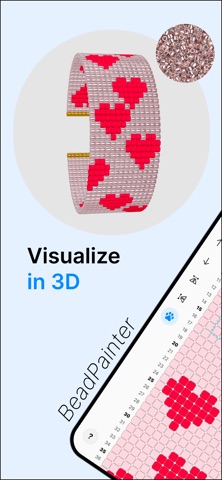




Description by Alexandra Duzhinskaya Written by the developer, not by AppBrain. Click to read.
Design beadwork on an interactive canvas built for real making. Preview every bead in live 3D, work with real MIYUKI Delica images, track your progress, follow bead-by-bead weaving tutorials, and export branded PDFs.
FEATURES
Design beadwork
• Create rings, earrings, bracelets, pendants and custom patterns
• Work with peyote, brick, and loom stitch layouts
• Choose cylinder or rounded bead shapes
• Adjust bead proportions for seed beads, tube beads, or larger rounded beads
Draw and edit patterns
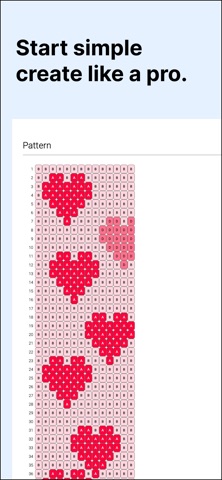
• Draw on an interactive bead grid
• Full Apple Pencil support
• Use pencil, eraser, bucket, and pipette tools
• Select areas to move, duplicate, repeat, or edit (NEW)
• Turn selected areas into reusable stamps (NEW)
• Freely move, zoom and rotate the grid by 90 degrees
• Use row numbers and symbols for clearer pattern reading
• Add, remove, or shift rows and columns
• Rename, duplicate, and version patterns
• Use Image tracing/reference with pin, layers and opacity controls (NEW)
Build color palettes
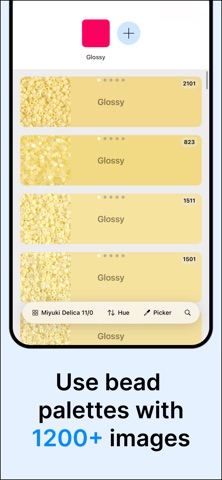
• Explore Miyuki Delica 8/0, 10/0, 11/0, and 15/0 catalogue
• Work with 1,200+ real bead images
• Search instantly by bead number or hue
• Find the closest Delica matches for custom colors
• Simulate glossy, matte, metallic and sparkle beads
Preview in live 3D
• See every edit update instantly in 3D
• Preview beadwork as flat or cylindrical designs
• Edit in 2D and preview in 3D side by side on iPad
• Change bead shapes, colors, sizes, and finishes in 3D
Follow guided weaving
• Stay organized with material checklists
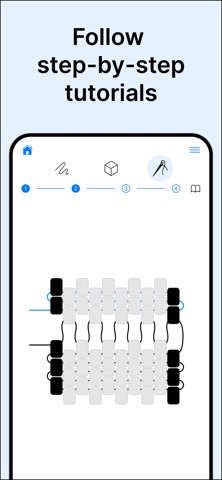
• Learn with step-by-step stitch tutorials
• Follow adaptive row-by-row guidance for your own patterns
• Mark the last bead if you paused
• Track your progress while you bead
Export and share
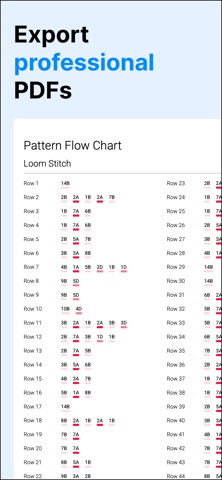
• Create professional PDF pattern documents
• PDF include charts, material lists, bead counts, and flow charts
• Branding kit: add your logo, author info, copyright, and license text
• Choose portrait or landscape PDF layouts
• Export editable BeadPainter files
• Save PNG files for sharing and reference
START FREE
Start creating with the essentials for free: ready-made jewelry layouts, live 3D preview, Apple Pencil support, and core drawing tools.
Design loom bracelets, fringe earrings, peyote rings, and your own custom bead patterns in full 3D from day one.
HOBBY PLAN
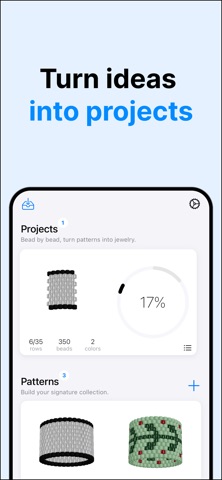
Upgrade to Hobby for guided making tools, including step-by-step tutorials, adaptive weaving guidance, progress tracking, and unlimited projects.
PRO PLAN
Go Pro for professional pattern design tools, including commercial use rights, PDF export, advanced pattern editing tools, bead material calculation, bead size controls, and additional bead finish styles such as matte, metallic, and sparkle.
Whether you are sketching a quick idea, planning a handmade gift, learning bead weaving, or preparing polished PDFs for your pattern collection, BeadPainter gives you a creative studio made for seed bead jewelry.
Download BeadPainter and turn your bead patterns into beautiful wearable jewelry.
Terms of Service: https://beadpainter.nl/terms
Privacy Policy: https://beadpainter.nl/privacy
EULA: https://www.apple.com/legal/internet-services/itunes/dev/stdeula/