

Beam VNC is made and published by Bernard Struelens. AppBrain is an independent app data site and isn't affiliated with Bernard Struelens. The app name, icon, screenshots and description belong to Bernard Struelens and are shown as published on the App Store.
AppBrain's verdict
- Last updated
- June 18, 2026
Rankings
App Store top chartsApp Store Rankings for Beam VNC
Competitors
Similar apps and more from Bernard StruelensMore from Bernard Struelens


Releases
Updates seen on the App Store- Version
- 1.0
- Launched
- June 2026
No changelog data
User feedback
Ratings and reviews on the App StoreComments on Beam VNC for iOS
We don't have enough comments to show example comments. Please check back later.
Technology
Found in the app by AppBrain- Price
- $8.99
- App size
- 2.05 MB
- Content rating
- Everyone
Technologies used by Beam VNC
About the app and developer
About Beam VNC
Beam VNC is an utilities app developed by Bernard Struelens.
User Ratings
The app has no ratings yet.
App Information
Beam VNC costs $8.99. The app size is 2.05 MB. The latest version available is 1.0. The last update was on June 18, 2026.
Technical Requirements
The app has a content rating of Everyone. The app has been available on the App Store since June 2026.
Developer information for Bernard Struelens
Address:
Frequently asked questions about Beam VNC
Is Beam VNC free?
No. Beam VNC costs $8.99 on the App Store.
Is Beam VNC still available?
Yes. Beam VNC is on the App Store, and the last update we saw was on June 18, 2026.
How large is Beam VNC?
Beam VNC is 2.05 MB.
Is Beam VNC suitable for children?
App Store rates the content of Beam VNC as suitable for everyone.
Who made Beam VNC?
Beam VNC was developed by Bernard Struelens. It is listed in the utilities category on the App Store.
Store listing
By Bernard Struelens, from the App Store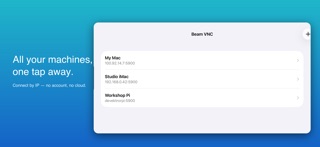

Description by Bernard Struelens Written by the developer, not by AppBrain. Click to read.
Buy it once. It's yours.
WHY BEAM VNC
• Direct connections — just enter an IP or hostname (great with Tailscale)
• No account, no sign-up, no tracking, no ads
• Pay once — no subscription, ever
• Passwords stored securely in the iOS Keychain
BUILT FOR TOUCH
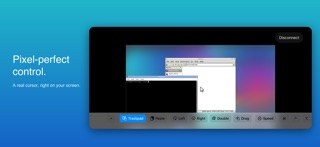
• Direct mode — tap where you want to click
• Trackpad mode — move a precise on-screen cursor, like a laptop trackpad
• On-screen Left, Right and Double-click buttons
• Drag lock for moving windows and selecting text
• Adjustable cursor speed
• Pinch to zoom, two-finger scroll, haptic feedback
FULL KEYBOARD
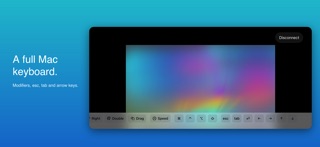
• On-screen keyboard with sticky Command, Control, Option and Shift modifiers
• esc, tab, return and arrow keys
• Paste from your iPhone clipboard into the remote machine
WORKS GREAT WITH MACS
Enable Screen Sharing on your Mac (System Settings → General → Sharing) and connect with your Mac username and password. Use a Tailscale address to reach it securely from anywhere.
Standard VNC authentication and macOS Screen Sharing (ARD) are supported.