

BeanDo: To Do List & Tasks
BeanDo: To Do List & Tasks is made and published by ChangLin Yang. AppBrain is an independent app data site and isn't affiliated with ChangLin Yang. The app name, icon, screenshots and description belong to ChangLin Yang and are shown as published on the App Store.
AppBrain's verdict
- Rating on App Store
- 5.00
- 2 ratings
- Last updated
- October 27, 2026
- Size
- 92.8 MB
It doesn't have enough ratings yet to judge what users think.
User feedback
Ratings and reviews on the App StoreComments on BeanDo: To Do List & Tasks for iOS
We don't have enough comments to show example comments. Please check back later.
Store listing
By ChangLin Yang, from the App Store

Description by ChangLin Yang Written by the developer, not by AppBrain. Click to read.
From everyday tasks to complex recurring schedules, BeanDo provides versatile tools to help you manage your personal life with ease.
Simple and Flexible Task Management
• Organize tasks with dates, times, tags, notes, priority markers, subtasks, attachments, and reminders.
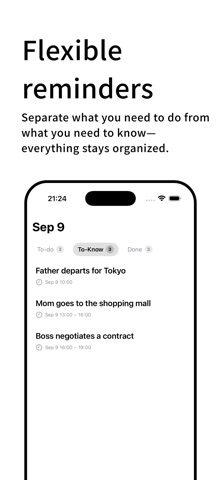
• Separate actionable tasks from information you simply need to know.
• View today's tasks, completed items, and important information in one place.
• Customize themes and reminder preferences.
Flexible Recurring Reminders
Choose from a wide range of reminder rules to fit different routines and needs.
• One-time, daily, weekly, monthly, and yearly reminders.
• Workday, public holiday, and adjusted working day reminders.
• A/B week schedules, specific dates, date ranges, and interval-based repeats.
• Multiple reminder times, snooze options, notifications, and enhanced system reminders.
Holiday and adjusted workday settings support Mainland China, Hong Kong, Japan, and South Korea, with more regions planned.
Habit Tracking
Build consistent habits and track your progress.
• Set target counts and tracking periods.
• Schedule habit reminders.
• Track consecutive check-ins.
• Review habit records and statistics.
Small Do · Quick Pickup Slips
Designed for parcel pickup and food collection, Small Do recognizes relevant information from screenshots and images, helping you organize pickup codes, identifiable brand names, and addresses into convenient slips.
• Quickly capture pickup information.
• View and present details when needed.
• Focused recognition scope: parcel pickup and food collection. Uncertain information is not arbitrarily classified.
Small Do processes information primarily on-device. Results depend on image content and recognition conditions.
Smart Date Recognition · Pro+
Enter natural language and let BeanDo recognize dates, times, and recurring rules. Tap recognized date information to apply the corresponding settings and create tasks more efficiently.
Smart Date Recognition works offline and is available with Pro+.
Built for iPhone
• Home Screen and Lock Screen widgets.
• Live Activities and Dynamic Island in supported scenarios.
• Siri and Shortcuts for supported actions.
• Optional calendar integration with your permission.
• Notifications and snooze options.
Availability depends on your iOS version and settings.
Local-First and Privacy-Focused
BeanDo's core task management features do not rely on a self-hosted server.
• Data is stored locally on your device by default.
• Use local features without enabling iCloud.
• Optionally sync supported data across devices through iCloud.
• Calendar access requires your permission.
Sync and attachment availability may depend on network connectivity, account settings, and available storage.
BeanDo Pro / Pro+
BeanDo includes core features, with optional subscriptions for additional capabilities.
• BeanDo: Essential personal task management.
• Pro: Advanced features included in the Pro subscription.
• Pro+: Pro benefits plus exclusive features such as Smart Date Recognition.
Current benefits, pricing, and free trial terms are shown in the app and on the App Store. Subscriptions renew automatically unless canceled. Manage or cancel your subscription in your Apple Account settings. If a free trial is offered, review its terms and cancel before it ends if you do not wish to continue.
Supported Languages
Simplified Chinese, Traditional Chinese, English, Japanese, and Korean.
Technical Support:
https://jishudao.github.io/BeanDo.github.io/BeanDoTechnicalSupportPage
Privacy Policy:
https://jishudao.github.io/BeanDo.github.io/BeanDoPrivacyPolicy
Terms of Service:
https://jishudao.github.io/BeanDo.github.io/BeanDoTermsOfService
Feedback: yangcongpro@gmail.com
X: @yangcong_pro
Safety and technology
Found in the app by AppBrain- Price
- Free
- App size
- 92.8 MB
- Content rating
- Everyone
Technologies used by BeanDo: To Do List & Tasks
Releases
Updates seen on the App Store- Version
- 1.261025
- Launched
- February 2026
No changelog data
Alternatives
Similar apps and more from ChangLin YangAlternatives to BeanDo: To Do List & Tasks


Rankings
App Store top chartsApp Store Rankings for BeanDo: To Do List & Tasks
About the app and developer
About BeanDo: To Do List & Tasks
BeanDo: To Do List & Tasks is a productivity app developed by ChangLin Yang.
User Ratings
BeanDo: To Do List & Tasks is rated 5.00 out of 5 stars. The rating is based on 2 ratings.
App Information
BeanDo: To Do List & Tasks is freely available from the App Store. The app size is 92.80 MB. The latest version available is 1.261025. The last update was on October 27, 2026.
Technical Requirements
The app has a content rating of Everyone. The app has been available on the App Store since February 2026.
Developer information for ChangLin Yang
Address: