

Beatly Pro is made and published by Antonin Charvat. AppBrain is an independent app data site and isn't affiliated with Antonin Charvat. The app name, icon, screenshots and description belong to Antonin Charvat and are shown as published on the App Store.
AppBrain's verdict
Established- Rating on App Store
- 4.46
- 37 ratings
- Last updated
- October 27, 2026
It doesn't have enough ratings yet to judge what users think.
Rankings
App Store top chartsApp Store Rankings for Beatly Pro
Competitors
Similar apps and more from Antonin CharvatAlternatives to Beatly Pro







More from Antonin Charvat

Releases
Updates seen on the App Store- Version
- 2.2
- Launched
- April 2021
No changelog data
User feedback
Ratings and reviews on the App StoreComments on Beatly Pro for iOS
We don't have enough comments to show example comments. Please check back later.
Technology
Found in the app by AppBrain- Price
- $4.99
- App size
- 204.0 MB
- Content rating
- Everyone
Technologies used by Beatly Pro
About the app and developer
About Beatly Pro
Beatly Pro is a music app developed by Antonin Charvat.
User Ratings
Beatly Pro is rated 4.46 out of 5 stars. The rating is based on 37 ratings.
App Information
Beatly Pro costs $4.99. The app size is 204.02 MB. The latest version available is 2.2. The last update was on October 27, 2026.
Technical Requirements
The app has a content rating of Everyone. The app has been available on the App Store since April 2021.
Developer information for Antonin Charvat
Address:
Store listing
By Antonin Charvat, from the App Store



Description by Antonin Charvat Written by the developer, not by AppBrain. Click to read.
Beatly Pro is not an AI music generator. It creates music on your device from curated patterns, musical rules, and controlled randomness. There are no prompts, cloud generation, or trained AI models.
Style-aware melodies follow the harmony and develop across the arrangement. Varied instrument levels and effects give each track its own balance and character. Beatly Pro takes you from the first idea to a finished track.
FEATURES
• Generate as many new musical ideas as you like
• Create and arrange up to 8 bars of music
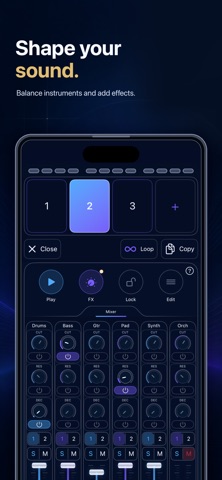
• Build tracks across up to 7 mixer channels
• Edit notes in a piano roll with pinch-to-zoom, playhead following, undo, velocity, copy and paste, per-beat transposition, a chord-aware keyboard lock, and custom patterns
• Build chord progressions and change the key or chord of individual beats
• Regenerate one instrument part while keeping the rest of your track
• Let Song Mode arrange the generated bars for you
• Set the key and tempo, or let Beatly choose them
• Mix every channel with volume, solo, mute, low-pass filtering, resonance, decimation, reverb, delay, and compression
• Browse, search, and audition built-in sounds in the Sample Manager
• Record samples or import WAV and AIFF files individually, by folder, or with drag and drop
• Trim, fade, normalize, reverse, tune, warm, and drive your samples
• Import, audition, rename, and manage SF2 SoundFont banks
• Save and recall reusable drum kits
• Play tuned built-in instruments more naturally across the keyboard with multisample playback
• Import a four-beat region from a MIDI file into the piano roll, with optional transposition
• Export the complete track as MIDI or create separate MIDI files for each instrument
• Render a WAV mix, individual stems, or a seamless loop of the active mix
• Record a live performance to WAV
• Share Beatly tracks with their custom samples included
• Send MIDI with configurable channel assignments and drum-note mappings
• Connect through Audiobus with the full audio mix and separate MIDI outputs for drums and each instrument group
• Synchronize tempo and transport with Ableton Link
WHO IS BEATLY PRO FOR?
Beatly Pro is made for producers, composers, singers, artists, filmmakers, game developers, content creators, practicing musicians, and anyone curious about generative music.
HOW DOES IT WORK?
Open Beatly Pro and tap Play. The app chooses instruments, tempo, key, and musical patterns, then creates up to 8 bars, or 32 beats, of instrumental music. Tap Next whenever you want a different idea.
Every generated track is yours to shape. Rearrange or repeat its bars, change the tempo or key, swap sounds, adjust the mix, regenerate one instrument, or edit notes in the piano roll.
Choose from five styles: Default, Lo-fi, Chiptune, Cinematic, and Dance. Default suits rap-inspired beats. Each style has its own instruments and character. Define the harmony with the chord progression builder, or create custom bar patterns for future tracks. Change the key or chord of any beat, and Beatly will transpose its notes to match.
When your track is ready, save or share it, export MIDI, record a performance, render a WAV mix, create stems, or export a seamless loop. Connect Beatly Pro to your studio through MIDI, Audiobus, or Ableton Link.
CAN I USE MY OWN SOUNDS?
Yes. Use the Sample Manager to record audio, import WAV or AIFF files and folders, or load SF2 SoundFont banks. Preview, search, rename, duplicate, and edit samples without leaving the app. Samples tuned to C usually give the most predictable melodic results.
Enjoying Beatly Pro? A rating or review on the App Store means a great deal. You can also support future development through the optional tip jar.