AppBrain
AppBrain
  • Apps
  • Apps being viewed right now Trending apps today Most popular apps All-time most installed apps Top rated apps iPhone and iPad apps
  • Intelligence ▾
    Intelligence overview → Track any Android app or your whole market
    Track & analyze
    Keyword Tracker & OptimizerTrack & improve Play rankings App Performance ReportOne-off PDF for any app StatisticsFree Android & Play market stats
    Promote your app
    Featured Apps App Links
  • Intelligence
  • Pricing
  • Dashboard
  • Sign up
  • Log in
App Store Apps > Productivity > Beautiful AI: Slides Maker
App profile & analytics · Productivity · Data updated 2026-10-27
Beautiful AI: Slides Maker icon

Beautiful AI: Slides Maker

by Ihor Havryliuk · Free · Version 1.05
Availability On the App Store since July 2026 ↗
Rating on App Store
3.67/5
3 ratings
Rating
3.67
3 reviews
Best rank
–
not in the top lists
Last updated
October 20, 2026
1.05
AppBrain's verdict

It doesn't have enough ratings yet to judge what users think.

Beautiful AI: Slides Maker is made and published by Ihor Havryliuk. AppBrain is an independent app data site and isn't affiliated with Ihor Havryliuk. The app name, icon, screenshots and description belong to Ihor Havryliuk and are shown as published on the App Store.

About Beautiful AI: Slides Maker

Beautiful AI: Slides Maker is a productivity app developed by Ihor Havryliuk.

What is the rating of Beautiful AI: Slides Maker?

Beautiful AI: Slides Maker is rated 3.67 out of 5 stars, based on 3 ratings.

Is Beautiful AI: Slides Maker free?

Beautiful AI: Slides Maker is free. The app size is 22.90 MB. The latest version available is 1.05. The last update was on October 20, 2026.

What are the requirements for Beautiful AI: Slides Maker?

The app has a content rating of Everyone. The app has been available on the App Store since July 2026.

Description by Ihor Havryliuk (from the App Store)
Turn a single sentence into a finished, designed presentation. Describe your
topic and AI writes the content, picks the images, and lays out every slide —
ready to present in under a minute.
No templates to wrestle with. No fonts to align. Just your idea, in slides.
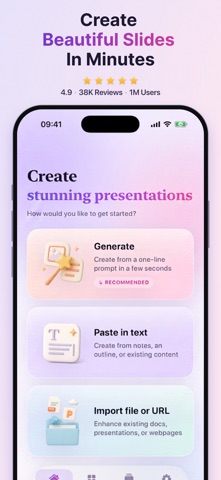
THREE WAYS TO START
• Generate — type one line about your topic and get a complete deck
• Paste in text — turn notes, an outline, or a rough draft into slides
• Import — upload a PowerPoint, Word, PDF, or text file, or paste a link to a
webpage, a public Google Doc, or Google Slides
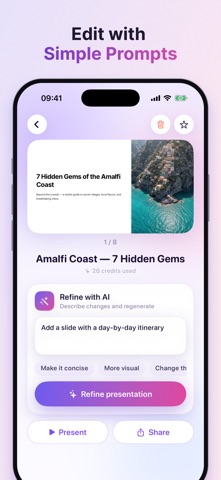
EDIT BY DESCRIBING IT
Don't fight with text boxes. Say what you want changed — "make slide 2 more
concise", "add a pricing slide", "make it more visual", "change the tone" — and
the deck is rebuilt for you.
DESIGNED TO LOOK GOOD
• Premium themes with professional typography and layout
• AI-generated images matched to your content
• Pick the image style and AI model: Standard, Advanced, or Ultra
• Ready-made templates for pitch decks, business reviews, portfolios,
lessons, demo days, and more
CONTROL EVERY DETAIL
• 3 to 20 slides
• Presentation, Document, Webpage, or Social formats
• 16:9 and other aspect ratios
• Set the tone, the audience, and how much text you want
• Generate in your own language
EXPORT ANYWHERE
• PDF
• PPTX for PowerPoint and Keynote
• Images — one PNG per slide
• Save to Files, or share a link
• Full-screen Present mode with a slide navigator
Built for iPhone and iPad.

Slide PPT AI Pro
Unlimited AI presentations, premium themes, and exports in every format.
• Weekly
• Monthly
• Annual

Payment is charged to your Apple ID at confirmation of purchase. The
subscription renews automatically unless auto-renew is turned off at least 24
hours before the end of the current period. Your account is charged for renewal
within 24 hours before the end of the current period. You can manage or cancel
your subscription in your App Store account settings after purchase
Terms of Use:
https://docs.google.com/document/d/1RjCIby0V2RQ18loLhyjR1nJ4KzLzQ5mj6l0VxLD2mk8/preview
Privacy Policy:
https://docs.google.com/document/d/1qfN3EKVItJUSA61gGVR37vUjk8mqFlbXRudrmfoSpdk/preview
Show more Show less

Screenshots

Beautiful AI: Slides Maker Screenshot 1 of 4
Beautiful AI: Slides Maker Screenshot 2 of 4
Beautiful AI: Slides Maker Screenshot 3 of 4
Beautiful AI: Slides Maker Screenshot 4 of 4
Screenshots by Ihor Havryliuk, from the the App Store listing
Official page on the App Store

More from Ihor Havryliuk

Luxio: G7X Digital Camera icon Luxio: G7X Digital Camera
Ihor Havryliuk
5.0
Free
2 ratings
Calorie Tracker - EatMate icon Calorie Tracker - EatMate
Ihor Havryliuk
5.0
Free
1 ratings

Changelog of Beautiful AI: Slides Maker

No changelog data

Developer information for Ihor Havryliuk

Ihor Havryliuk

Address:

Share Beautiful AI: Slides Maker

Comments on Beautiful AI: Slides Maker for iOS

We don't have enough comments to show example comments. Please check back later.

App Store Rankings for Beautiful AI: Slides Maker

This app is not ranked

Technologies used by Beautiful AI: Slides Maker

Frequently asked questions about Beautiful AI: Slides Maker

Is Beautiful AI: Slides Maker free?

Yes. Beautiful AI: Slides Maker is free on the App Store.

Is Beautiful AI: Slides Maker still available?

Yes. Beautiful AI: Slides Maker is on the App Store, and the last update we saw was on October 20, 2026.

How large is Beautiful AI: Slides Maker?

Beautiful AI: Slides Maker is 22.90 MB.

Is Beautiful AI: Slides Maker suitable for children?

App Store rates the content of Beautiful AI: Slides Maker as suitable for everyone.

How do people rate Beautiful AI: Slides Maker?

Beautiful AI: Slides Maker scores 3.67 out of 5 stars, from 3 ratings on the App Store.

Who made Beautiful AI: Slides Maker?

Beautiful AI: Slides Maker was developed by Ihor Havryliuk. It is listed in the productivity category on the App Store.

Popular Productivity Apps Apps other people are watching Top new apps Price drops on Google Play Today's trending apps
More hot apps 🔥
Overview Reviews Rankings Technology
AppBrain Intelligence premium content

Subscribe now to get full and unlimited access to AppBrain Intelligence. You'll have access to:

  • App Intelligence dashboard (performance timeline, competitor comparison, country rankings, insight cards)
  • Detailed ranking data per app
  • Full timeline per developer
  • Device market shares data per country
  • Unlimited keyword tracking
1 Month

$75/mo
(billed every month)

SAVE 0%
Subscribe
3 Months

$65/mo
($195 billed every 3 months)

SAVE 13%
Subscribe
1 Year

$57.50/mo
($690 billed every year)

SAVE 23%
Subscribe
Each subscription will automatically renew 3 days before the expiration date for the same time period. Subscriptions can be cancelled at any time before the renewal.

AppBrain is an app data site, we track rankings, ratings, installs for all apps and games on Google Play and the App Store. AppBrain doesn't host app files or APKs, all install links go directly to the official store. All trademarks are owned by their respective owners. As an Amazon Associate AppBrain earns from qualifying purchases.

More apps

  • Top Android apps being viewed
  • Car Calculator
  • View Inkit - AI Tattoo Generator
  • Ticketmelon

App statistics

  • Android statistics
  • Google Play Developer stats
  • Trending Android Apps
  • Trending iOS apps
  • Top popular Apps
  • Buy the best Android phone
  • Buy & sell app businesses

About AppBrain

  • Contact
  • Privacy
  • Documentation
  • DMCA takedowns
  • Blog
  • Monetization tips: Understanding your eCPM
© 2010-2026 - AppBrain