

Bedside Coach
Bedside Coach is made and published by Brandon Dominguez. AppBrain is an independent app data site and isn't affiliated with Brandon Dominguez. The app name, icon, screenshots and description belong to Brandon Dominguez and are shown as published on the App Store.
AppBrain's verdict
- Rating on App Store
- 5.00
- 6 ratings
- Last updated
- October 17, 2026
- Size
- 663.6 MB
It doesn't have enough ratings yet to judge what users think.
User feedback
Ratings and reviews on the App StoreComments on Bedside Coach for iOS
We don't have enough comments to show example comments. Please check back later.
Store listing
By Brandon Dominguez, from the App Store


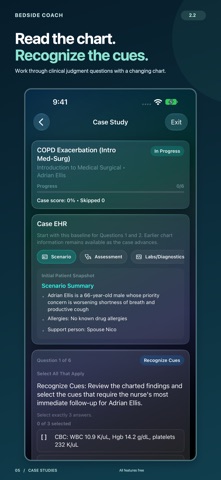

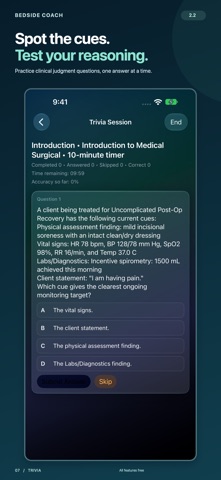

Description by Brandon Dominguez Written by the developer, not by AppBrain. Click to read.
Bedside Coach helps nursing students, educators, and simulation teams practice patient care, clinical judgment, and communication. All features are free, including the full case library, study activities, and custom case creation.
WORK THROUGH PATIENT SCENARIOS
Monitor simulated vital signs, review patient records, assessments, orders, and medication information, and practice your next steps. Connect what you see in the chart to the decisions you make at the bedside.
PRACTICE THE CONVERSATION
Rehearse therapeutic communication, including de-escalation, grief, and difficult conversations. Practice simulated telehealth visits with voice or typed responses and optional communication challenges. Choose Notes, Teaching Material, or Transcript in the companion workspace. Keep private notes, drafts, and sharing state while changing panes or available space; sharing starts only when you choose it. Review feedback with excerpts from your responses.
PRACTICE IV PUMP DECISIONS
Practice simulated programming, stop and resume controls, and alarm response. Within a patient case, compare the explicitly linked order and committed pump settings while distinguishing simulated delivery from charted entries. Missing links and order changes stay visible; comparison does not verify medication or document administration.
MAKE A STUDY PLAN
Tell Study Buddy what you want to work on and build a guided session. Explore all Trivia modes and follow a patient through six clinical judgment steps in Case Studies, without a daily Case Studies quota.
BUILD AND SHARE TEACHING CASES
Create custom cases, import supported cases from ChartSlate, and share instructor or student case files. Create a separate QR-locked copy to distribute before class, then share its matching unlock QR or encoded text when you are ready to release it. Imported cases stay available after unlocking.
TEACH, OBSERVE, AND ASSESS
Use Skills & Competency Assessment for standalone checkoffs and proctored scenarios. Apply faculty rubrics, record observations and prompting, review explicit scores, and preserve signed assessments when creating a reassessment. Save and share local PDF reports. On iPhone and iPad, Debrief Coaching links findings to saved transcript evidence when available, with explicit replay of retained audio and recovery controls for interrupted analysis.
PRACTICE ACROSS APPLE DEVICES
Use the Apple Watch companion to provide cues to simulated participants and receive case-specific learner alerts. On Apple Vision Pro, arrange spatial monitoring, patient records, and simulated infusion controls around your practice workspace.
PRIVATE, ON-DEVICE PRACTICE
Supported simulation conversations, speech processing, and coaching run on device. The developer does not receive your cases, recordings, transcripts, or reports. You choose what to export or share; selected external services may have their own network and account requirements. Use fictional or properly deidentified information only.
Apple Intelligence features require compatible hardware, Apple Intelligence enabled, and an available on-device model. Availability varies by language and region. iPhone requires iOS 27 or later; iPad requires iPadOS 27 or later; Apple Vision Pro requires visionOS 27 or later. Apple Watch cues and learner alerts require a compatible connected iPhone and watchOS 26 or later.
Existing subscribers: free feature access does not cancel an existing subscription or renewal. Review your Apple Account subscriptions through Profile > Existing Subscription Support.
For education and simulation only. Not intended for diagnosis, treatment, or real-patient clinical decisions. AI feedback is formative and requires educator review.
Privacy Policy: https://www.bedsidecoach.app/privacy
Terms of Use: https://www.apple.com/legal/internet-services/itunes/dev/stdeula/
Safety and technology
Found in the app by AppBrain- Price
- Free
- App size
- 663.6 MB
- Content rating
- Everyone
Technologies used by Bedside Coach
Releases
Updates seen on the App Store- Version
- 2.2
- Launched
- February 2026
No changelog data
Alternatives
Similar apps and more from Brandon DominguezAlternatives to Bedside Coach






Rankings
App Store top chartsApp Store Rankings for Bedside Coach
About the app and developer
About Bedside Coach
Bedside Coach is an education app developed by Brandon Dominguez.
What is the rating of Bedside Coach?
Bedside Coach is rated 5.00 out of 5 stars, based on 6 ratings.
Is Bedside Coach free?
Bedside Coach is free. The app size is 663.64 MB. The latest version available is 2.2. The last update was on October 17, 2026.
What are the requirements for Bedside Coach?
The app has a content rating of Everyone. The app has been available on the App Store since February 2026.
Developer information for Brandon Dominguez
Address:
Frequently asked questions about Bedside Coach
Is Bedside Coach free?
Yes. Bedside Coach is free on the App Store.
Is Bedside Coach still available?
Yes. Bedside Coach is on the App Store, and the last update we saw was on October 17, 2026.
How large is Bedside Coach?
Bedside Coach is 663.64 MB.
Is Bedside Coach suitable for children?
App Store rates the content of Bedside Coach as suitable for everyone.
How do people rate Bedside Coach?
Bedside Coach scores 5.00 out of 5 stars, from 6 ratings on the App Store.
Who made Bedside Coach?
Bedside Coach was developed by Brandon Dominguez. It is listed in the education category on the App Store.
What are the best alternatives to Bedside Coach?
People looking at Bedside Coach also look at these education apps: Medibytes, West Coast University, Delightex Edu, Elsevier Secure Browser, vSim for Nursing.